Value Add Re-Telling .01

I work as an engineer for a Value-Add-Reseller for many different products. In the acronym world that we are so well acquainted with, this is just referred to as a VAR. What does a VAR do? The idea behind a VAR is that we do what product specific vendors cannot. We are able to work across the product specificity of the solutions out there, and combine solutions sets from different vendors that directly speak to customer needs. This means that I may talk on-premises on one day, and cloud on the next. I may speak to VMware, and also Cisco, in the same meeting. The goal at the end of the day is for the customer to be able to access and utilize what they need for their environment. Some people don’t really like VAR’s as they are not as in-depth as product specific vendors, but some really do appreciate the fact that we can combine technologies for a customer to grow their capabilities. Now, with this in mind, the goal of this blog is not about what a VAR is, but instead, what your career/job/position would look like working in a VAR.

For me, one day I am accelerating sales teams, building the next technology elevation, and the next traveling and helping customers figure out problems. When looking at making a move into the VAR, or Vendor space (especially if you are coming from a customer perspective) it can be quite jarring. Lets walk through a couple things that may help soften the landing.

First, if you are an engineer, you no longer matter in the upkeep of the company. You’re now a small part of the overall growth of the company. You may have a number attributed to your area or technology group that you have to meet, so instead of “keeping the lights on” your goal is to “Sell, Sell, Sell.” Now you are no longer single-threaded to maintain, monitor, and scale, but to dynamically change your technology to the needs of the customer and help them realize that solutions for their growth. This can be jarring, because you no longer have management over you telling you what you need to do, or micromanaging you. That being said, you will have mangers telling you to “sell” or to “create” or something along those lines, but they wont have a direct end goal that they point you to. In many cases your managers may lean on you for direction and perspective. I see this more as an operator moving into a “developer” space. You may not write code, or deal with the same frameworks, but you are basically trying to create a practice and a structure that will lead the company to continual growth.

Second, your ability to know the product does not matter as much as your ability to communicate it. This is rough on engineers, because we are so regularly busy trying to show how smart we are. “Hey I did this really cool thing with these three other products!” or “Hey I got the thing tweaked and now the database will run faster!” doesn’t generate any cheers or excitement anymore because no one really cares. Customer want a product, and they want what the product provides. If that is a faster database then they will purchase it off the customers “faster database” criteria. Understanding the criteria of the customer, and the abilities of the product your selling, creates a gap. That gap, is what you need to bridge in your communications. No one cares about the fact that you have 20x certifications, or know how to connect multi-cloud. What they care about is your ability to solve their problems. This is where the ability to communicate is key. I’ll try to dig more into this on a second blog.

Third, understanding execution is critical. Great, you know your product, you know how to communicate it, and the customer buys it… Now what. Its a hilarious statement in sales that “speed kills” but when you get the customer to sign on the line, they need to be on-boarded with the product as fast as the customer will allow. That means your ability to on-board them fast and in a proper manner counts. I’m not saying that you rush things to get a sale and miss the questions you should be asking as your communicating with the customer, I’m saying that if you have done your due diligence then you should know what needs to be done and you should be able to get it done in a timely manner. Its at this point the sales part drops off as they move on to the next customer and the group on the other side of the fence steps in, which is normally Professional Services or Managed Service Provider(MSP).

The idea behind most of these three statements, is understanding your product, communicating appropriately how your product solves problems for your customer, and then solving their problem in a quick and orderly fashion. This leads to the overarching group schema of where you will end up in a VAR or Vendor product company. Sales, Architect, Professional Services(PS), and MSP are places where you may end up, and each group focuses on different aspects from the above mentioned steps. Sales must know how to bring in an architect to scope and scale, and those two must be able to communicate how these will fix problems, and be implemented for PS/MSP. If any part misses the other, then extra calls will be needed and time will be lost.

So, what are these rantings. Well, first, know what you know. Know how to talk about it from a high level down. Second, know how to speak about it. If you have never spoken above your manager level, you may not understand how businesses are ran, and how they only care about making money. I remember showing a technology solution that would change the companies patching process from 3 hours to 1 minute, and the full C-suite didn’t care at all, as it didn’t add money to their bottom line, and 3 hours to patch was status quo and wasn’t a problem to them. Finally, execute. You got every piece in place, now make it happen. This is pretty close to chess. If you have all the piece in place everything just falls into a process until the final end is realized. I’m going to try to build on these in the upcoming weeks. I miss blogging and maybe this is a good topic to cover.

On and On (2022 Goal Post)

There is a sad statement I’ve heard. In this life, there is no goal, no final black and white checkered flag. No hope of things ever stopping. In fact each year things only get slower, your body gets slower to heal, and it has pain easier.

and yet….

In spite of all this we move on. We keep moving forward. We keep pushing. We keep Learning. We keep growing. It doesn’t matter what pain brings us, because pain is inevitable.

“Life is pain highness, and anyone telling you differently is selling something.”

The Princess Bride

It doesn’t matter that its hard, because difficulties are again, just a part of life. We work, we continue, we endure.. In the last year, and in this year, and the on to the next.

The amount of things I was hoping to accomplish in 2021 was a lot. Tons of certification goals, more requirements for work. Also trying to exercise and work through my own growth with strength, and cardio. This year I tried so hard to run, and learn how to run better that I ever have. I went from running 5k 3x a week, to running 5k 3x a week, and adding a 30-40 minute workout each day. This equated to about 2 hours of working out each day. It felt great. I know its hard to believe, but I really did feel like I was doing some amazing things during that time. I was working my job well in-between workouts, but also the workouts were hard and pushed me to learn more about myself. In a bad way too. Because after a month of 2 hour workouts weekdays, I found I had a huge pain in the back of my left foot. When I had it checked out they announced that I had overworked my Achilles tendon and I had to put my left foot in a boot. Now at the end of the year, They are finally saying I can start running again, working out again.

2022, looks like a pretty awesome year right now. I plan to write more, help more, blog, podcast, and grow.

I do these blogs each year as a mile-marker for myself, and also, to help encourage others to create their own goals for the year. Blogging allows me to track what I have done and what I plan to do and track them. This turns these ideas into plans, and goals. Some I’ll hit, and some I wont.

THE Motivational Quote to Make Your Screenwriting Dreams Come True -  ScreenCraft

2021 Goals checked off looks like this:

  • Obtain Associate level certification in GCP and Azure
  • Training in SaltStack
  • Obtain Professional Level Certification AWS
  • HashiCorp – Associate in Consul and Vault, with professional in Vault.
  • Create a Demo Application and start digging into full stack dev. (This is a stretch goal)
  • Kubernetes
  • Obtain CKAD
  • Write a Kubernetes application
  • Tanzu!!
  • OpenShift!!
  • K8s all the things!
  • Gain Knowledge of sales
  • Understand and prioritize sales opportunities
  • Learn dealing with clients as opposed to customers
  • Manage to be a big factor in meeting or exceeding the sales quota.
  • Workout at least 3 times in a week
  • Soft Skills (people skills) – Learn the Non-Tech
  • Lose weight

In terms of certifications I did obtain the GCP ACE, Oracle Associate, but Azure only foundations, this is something I need to work on. Its hilarious that the cloud that I work in the most I’m actually certified the least. Its funny how that works. I also didn’t get a professional level cert for AWS. Next year that changes.

This year the majority of work that I did was in sales, learning the craft of my job, and what is my place to help the people around me. This is what pulled a ton of time, and for good I think. I learned how to navigate multiple areas. Now that I know these things, I believe to be more prepared for success in 2022. I think these things are more needed between years as they add more skills, yet dont immediately grant a reward like a certification, or fixing something, or building something. However, Its worth mentioning that spending time within your job to find out how they make money, then injecting yourself into that process, is always a good use of time.

One thing of note is how I was pulled off personal Goals to perform tasks needed for work. For instance I went after a certification that required VCP-NV, and VCP-DV, so I got both of those, I also achieved my VCAP-CMA. I’ve done a lot of certifications with VMware this year, and I find that pretty crazy as I keep pushing myself into other areas. No offense to VMware, I just don’t see a lot of growth opportunities where I lack certifications right now. Maybe I’ll get my VCIX at some point, but its not needed for work at all, so not a ton of drive to do it.

I really wanted to dive into full-stack Dev, and know how to prep an application and run it wherever I wanted. However, my job didn’t want me to go that direction, and I found myself re-learning some things that I’ve lost touch with. Not a bad thing at all, but each year we measure how much we want to do our personal goals, vs our work goals, and we endeavor to do our best balancing the two.

I did learn a ton of SaltStack and its been a staple for understanding self-healing structures, configuration management, and day 0 compliance. Its only one tool of many, but its been a great learning experience and has been very helpful to customers to see demonstrations on it.

In 2022 these are my Goals.

  • Professional Level Cert in Azure and AWS(Maybe Oracle)
  • Terraform Associate re-cert (maybe Professional as well)
  • Tanzu VCP, and badge.
  • Create trainings, blogs, and workshops

Much shorter list than last year, but considering professional certs can take 6 months, and I’m going for 2, it makes sense to spread it out and hope for the best. Both AWS, and Azure recommend the associate level as well before the professional certs I’m attempting so that will take additional time. Oracle is a wildcard. I didn’t expect to learn anything about Oracle this year until they opened up their training and certification for free. That’s been a great learning experience. Its always good to see how each cloud does different things, because one may be better than the other, and even though AWS tries to be all things to all customers, Azure, GCP, and Oracle do things better in their own ways.

I need to re-cert my Terraform associate. Considering this has been the top blog I have had on this platform I’ll probably re-post on how I past it again for others to see. Yes, I plan on still using Ned as my trainer on pluralsight but I want to get as far into IaC as possible so Pulumi may be in the cards at some point as well.

Tanzu changed their requirements for some of the certifications, so I will need to get those certs. I personally don’t see this as much of a challenge, but its definitely something I need to do by June, so I’m 100% sure I’ll get this done.

Finally, training, teaching, and sharing. This is going to be both for work and personal. I didn’t blog much this year on this platform, but for work, I wrote about 2 blogs a month. I need to adjust this so that this platform is still valid. So I’m going to start writing blogs that are more basic and helpful for quick things. I find that helps keep me being creative, even when I have to write “professionally” for work which can suck my creative juices dry. ITReality has really helped me maintain creativity, and set out content that I hope helps others. Vince has always done a really great job of keeping things on course, and though I tend to push things off course, he always rights the ship. With Richard Kenyon joining on as well, IT Reality will grow even bigger, and will have a lot of guests speaking on a variety of topics in 2022. Its going to be fun.

I hope for a prosperous and happy 2022 for everyone. I hope for light at the end of the Covid tunnel, and I hope for us all to see each other again. Till hope comes real, I’ll continue digging, working, and moving to get these goals rolling.

Cloud Field Day 12

I’m extremely excited be a part of Tech Field Day (TFD). For those that haven’t heard of this before, Tech Field day allows vendors to present their products and solutions to the public and they provide the platform to publicize the presentation. One key differentiator with TFD to other platforms, is they bring in delegates to perform the duties of audience during these presentations. These delegates come from different backgrounds, specialties, and cultures allowing a discussion with the presenters to help fill in the gaps the presentations may miss, or to double click on a specific area. I’ve been very fortunate in 2021 to be a part of this group. This will be my first in-person event, where I can discuss with the presenters what they are presenting and what could be expanded on.

Now this isn’t just a “hey look at me doing cool stuff” blog, or an announcement to stay tuned, (although definitely stay tuned if you want to see the presentations) but to say that the audience can take part of the presentation whether they are the delegates or not. As a delegate my position is to stand in your shoes, and to speak as I can for you, but its much easier when you engage with me! For example, I took place on a special Cisco presentation, and took questions that were given on Twitter, and asked them to the presenters. This grants the Twitter audience a place in the room.

Cloud Field Day 12 Schedule

  • Wednesday
    • 08:00 – 9:30 Prosimo Presentation
    • 10:30 – 12:30 Juniper Networks Presentation
  • Thursday
    • 08:00 – 10:00 Ondat Presentation
    • 11:00 – 12:30 Red Hat OpenShift Presentation
    • 13:30 – 15:30 MemVerge Presentation
  • Friday
    • 08:00 – 10:00 Veeam Software Presentation
    • 11:00 – 12:30 Yotascale Presentation

If you’re interested to take part in the audience participation, please hit up one of the delegates, like myself, on twitter and we’ll try to voice your question to the presentation. For the link to the presentations, look here.

iPad Learning

Taking a break from k8s on pi as I’m thinking through next steps, or even if there are next steps. Currently with the rPi series you can basically do whatever you want. I mean, I setup and ran both parts of kNative, so there really isn’t much of a limit.

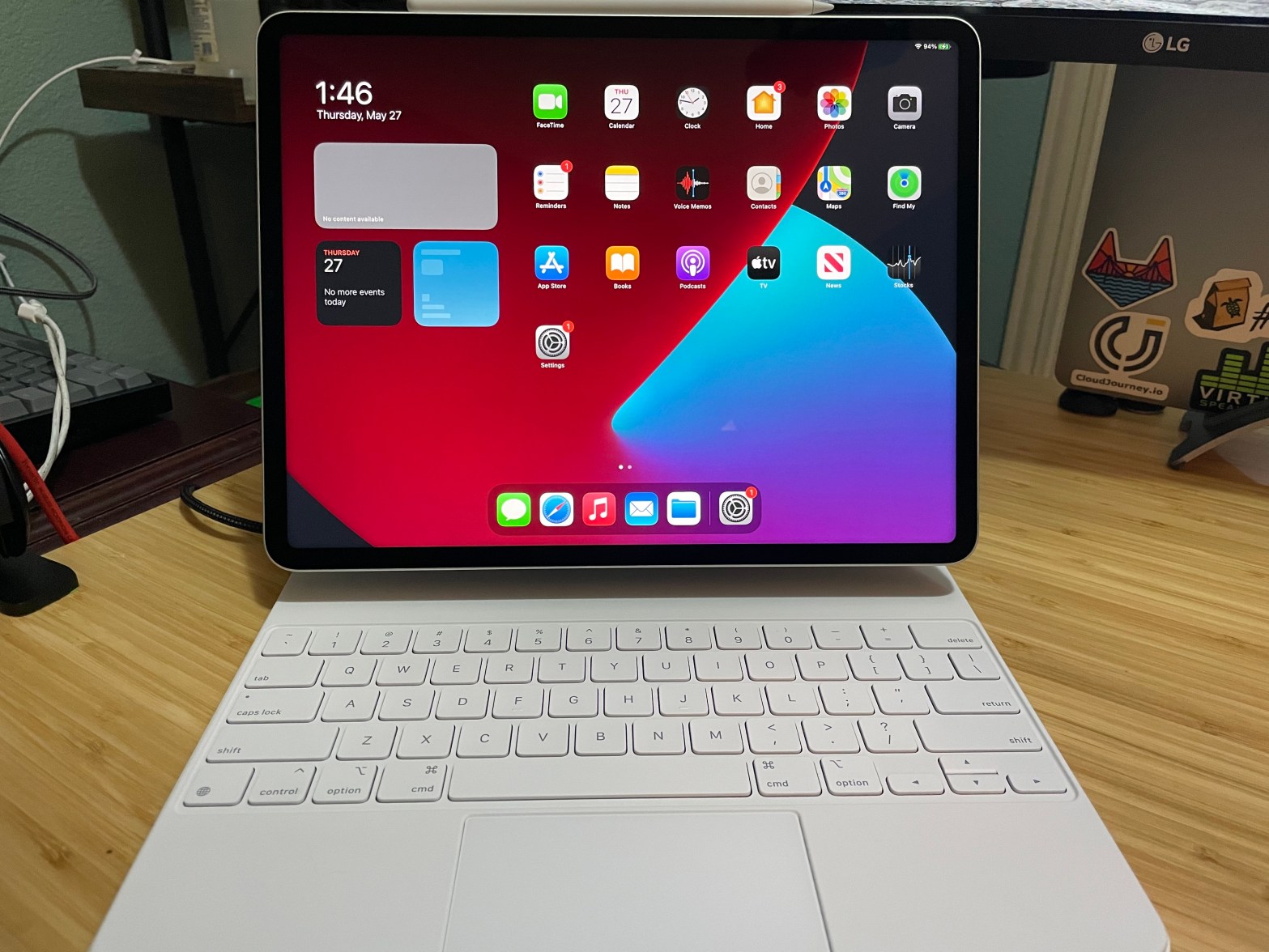
Let’s look at a different use case for rPi. An accessory for iPad that will enable coding. I fly for work a fair amount, and wanted a smaller solution to learn code while flying. I wanted to enable this a couple of different ways. First, I wanted to enable vsCode on the rPi. I didn’t think this would be an issue as code-server has been out for a while, and I haven’t seen a lot of trouble getting it running. Second, having the binaries for the code languages I’m running. I know code-server would allow the terminal to run, but would it also let me run code files, as well? Third, and finally, GIT. Yup, I want the trio. Code IDE, Code Binaries, and Code Repository, and well, I got it. It may be silly to go through the steps in order to just grant yourself the ability to do things that a MacBook Air can do as well as other things, but I really l Ike the mobility of the iPad and want to push it as far as possible.

USB rPI Connection

Not much to add here, an awesome blog with steps for this has already been written here: https://www.hardill.me.uk/wordpress/2019/11/02/pi4-usb-c-gadget/ – Ben Hardill

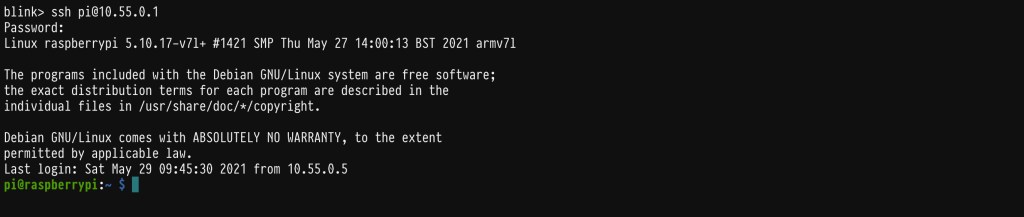
Just follow those steps and you will be able to connect to the pi through the USB port and power it. It DOES take a LOT of power from the iPad, but you should be able to perform this while on a flight. This will let you SSH into the pi without local WiFi, or networking. The rPi will be on the 10.55.0.1 IP address if you go through these steps to the letter.

One thing of note. You can still use the wlan on the rPI to connect to WiFi if you need external networking. Just ssh to the 10.55.0.1 and then run the regular “raspi-config” to enable and setup the WiFi connection. Or you could install raspAP for a GUI interface to scan and connect to WiFi SSID’s.

Code-Server

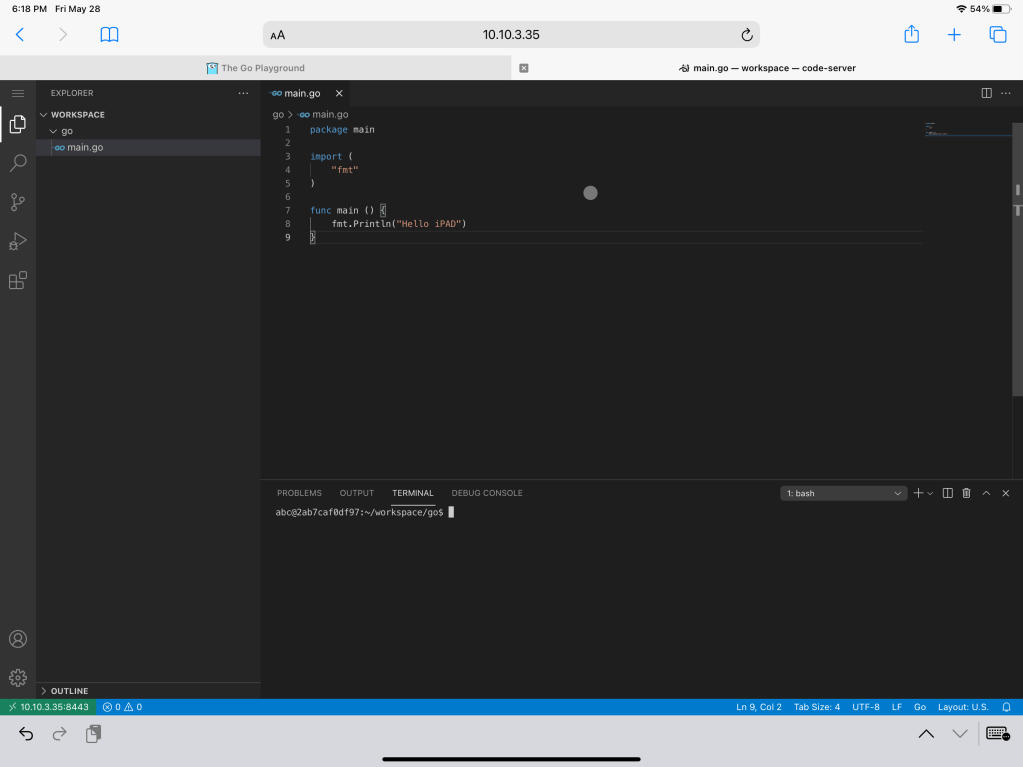
Now, this was a bit of a challenge but nothing too hard. Code-Server has some issues with architectures outside of its scope. I could try to compile or change some things to run it on raspberryOS, but instead I opted for a different solution, Docker. There is a docker registry here that will let you run this docker image locally on the pi. So installing docker first via “sudo apt install docker.io” installs Docker, then run the docker image commands will enable it. It’s worth mentioning if you run the basic commands, the docker image will run on boot, so you can unplug, and plug in the rPi without fear of losing the image. It also maintains the storage of your code which is pretty crucial. One other thing is Code-Server doesn’t have ALL the extensions that a normal vsCode affords, but it has most of them. I was able to enable all of the extensions I normally use, so I don’t see this as an issue, but just something to be keep in mind.

Hello darkness my old friend… Oh yeah, dark mode is available too…

Code Binaries

This part isn’t difficult, but I got spun around on it for some reason. By now you should be able to access the code-server within the usb interface using 10.55.0.1:8443 and using the default password. This then, allows you to access the terminal within the container so you can install the binaries locally(if your not too familiar with Docker exec commands). With this you can run your “apt-get install” commands for golang, python2/3, java, and whatever. Now you have the ability to create files in your IDE and format/lint/intellisense your files to make it easier to write, and be able to run them within the terminal.

GIT

This part was super easy, because GIT was already built into the docker container. So all you really need to do is connect with your Git repo via SSH or HTTP, and get to coding. This comes with the basic push/pull/fetch, just remember you should be connected to the WiFi on the pi in order to commit/push your changes.

Thoughts

Really this is just to get awareness out there about the different things that you can do with Pi’s. I saw this and immediately knew it was something I was going to do. It was really a fun weekend project, and I’ll be using this to learn GO with Todd McLeod’s Udemy course. You may have other reasons to do something like this. Heck maybe you see this and thing, “WWDC is 2 weeks away, I bet vsCode will be available” and if it is, then I’ll be crazy happy. But till then, this was a fun side project. If you want, give it a try.

Learning K8s on Pi – Check that Node

So at this point we have a single node kubernetes cluster that can publish load-balanced IPs for applications. Which is totally cool, except now we’re faced with a new problem. We need to figure out if the cluster is actually compliant and worth using. This is where the problem of custom built kubernetes becomes more a problem with automation, in terms of how you build your cluster, and standardization. We need to ensure that each cluster built is compliant with CNCF(The big k8s people in the sky) and repeatable so our Devs can have a production cluster and dev cluster that is a mirror standard of each other.

This is where cluster scanners/audit programs are extremely usable to ensure that what we are running is good for applicaitons as well as CNCF. This blog I plan to look at Sonobuoy, and Octant

Sonobuoy

Installing the product is interesting because up to this point we’ve ran everything on the raspberry pi. Now its time to treat that pi “cluster” as an actual remote cluster that can be connected to. That calls for you to install kubectl on your actual machine. This can be done different ways. The easiest for most, is to install Docker Desktop on your machine. This will install the kubectl command as well as docker, and also give you the ability to run kubernetes locally(if your interested). For now lets just focus on the kubectl installation and how we can connect to the pi cluster.

Every installation of kubernetes stores a config for the default admin to connect to it. This is stored in “/etc/kubernetes/admin.conf” on the main k8s node. Pulling this information locally can be as easy as copying this information into “~/.kube/config”, so doing this on your laptop/desktop would be the same process. Basically, you will have a “.kube/config” file either in your C:\ drive or in your /home drive for your user(“/home/user/.kube”)(“/Users/username/.kube” for Mac). All you will need to do is copy the admin.conf from the pi cluster into your local drive. I wouldn’t do this in production as your basically pulling the root account into your machine. In a production environment creating users and tokens/certificates is your go to process, but I really don’t want to dig into that quite yet.

Once you’ve copied the /etc/kubernetes/admin.conf into your local .kube folder you should be able to run a simple, “kubectl get nodes” and see your pi server node come up.

Once you have this working you can run different applications against the cluster.

I use a Mac which means I have Homebrew and a happy life. BUT HOMEBREW DOESN’T DOWNLOAD SONOBUOY… c’mon homebrew. So I have to download the file, unzip, and move it to my PATH like a peasant.

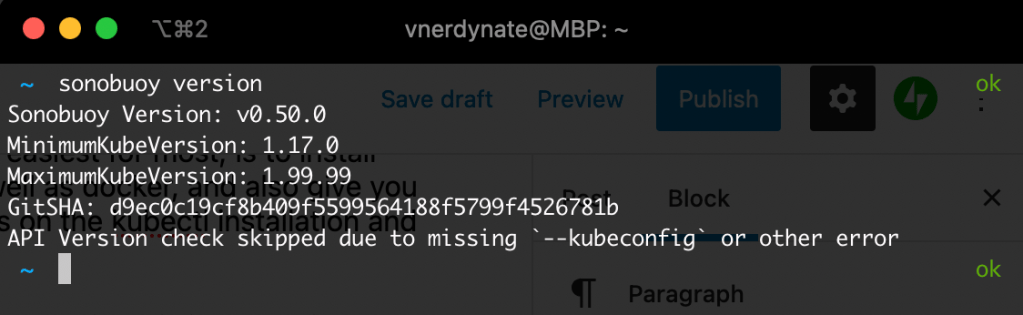
Once you have this working, you can run your sonobuoy version to verify its good:

Now you can check the overall status of the cluster by running “sonobuoy run –wait” to run a longer regular scan, or you can run “sonobuoy run –mode quick” to do a faster scan. I’m impatient…

So when this runs you can see a number of resources that are spun up in the cluster to verify they can be. You would see errors, or warnings when it cant do what it needs to do. If you dont know what these resources are, then maybe another blog on what each of these are will help. but you can run a “kubectl get …” for whatever resource it deployed.

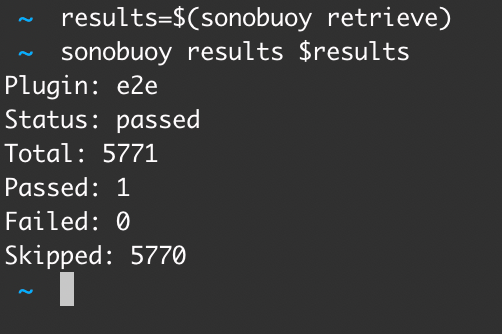
Ok so stuff was built and verified, so lets check those results. You will run two commands, one to find the tarball file which has the results, export it, and then pull that file and and look at the results,

results=$(sonobuoy retrieve)” pulls the tarball in, and “sonobuoy results $results” pulls the actual results to the screen so you can see how things went. You can run “sonobuoy run --wait” for a longer more in depth scan, that would probably be better for production clusters, but for now this is good for our little Pi. To clean up run “sonobuoy delete --wait” to remove the everything sonobuoy created. For more informatioon on Sonobuoy and all the things it can do, checkout the documentation at https://sonobuoy.io/docs

Octant

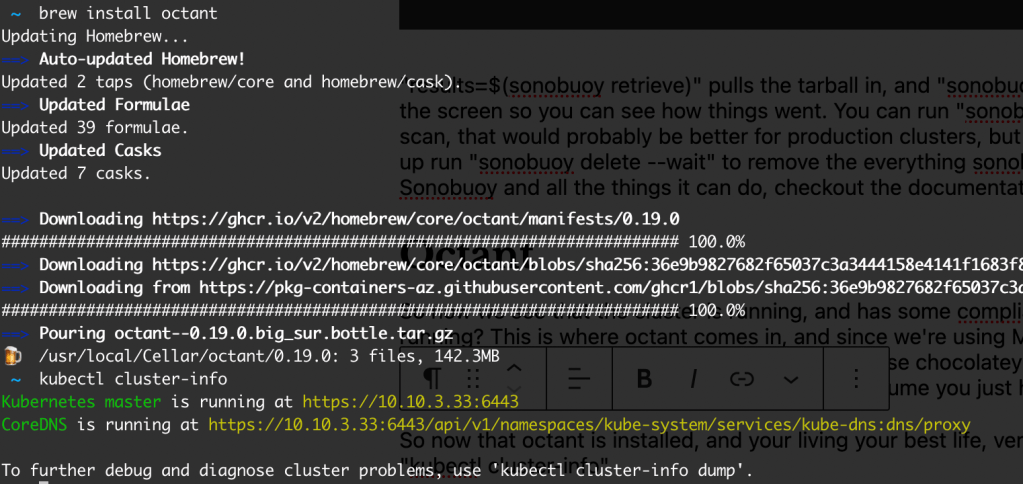
So now we see that the cluster is running, and has some compliances that are good. What about what is running? This is where octant comes in, and since we’re using Mac, its simple “Brew install octant” for those using windows and hating life everyday, you can use chocolatey to install using “choco install octant“. If your running windows and not using chocolatey, I’ll assume you just hate yourself.

So now that octant is installed, and your living your best life, verify your connection to the cluster by running “kubectl cluster-info

how life is meant to be

Next simply run “octant” to start up the gui interface locally.

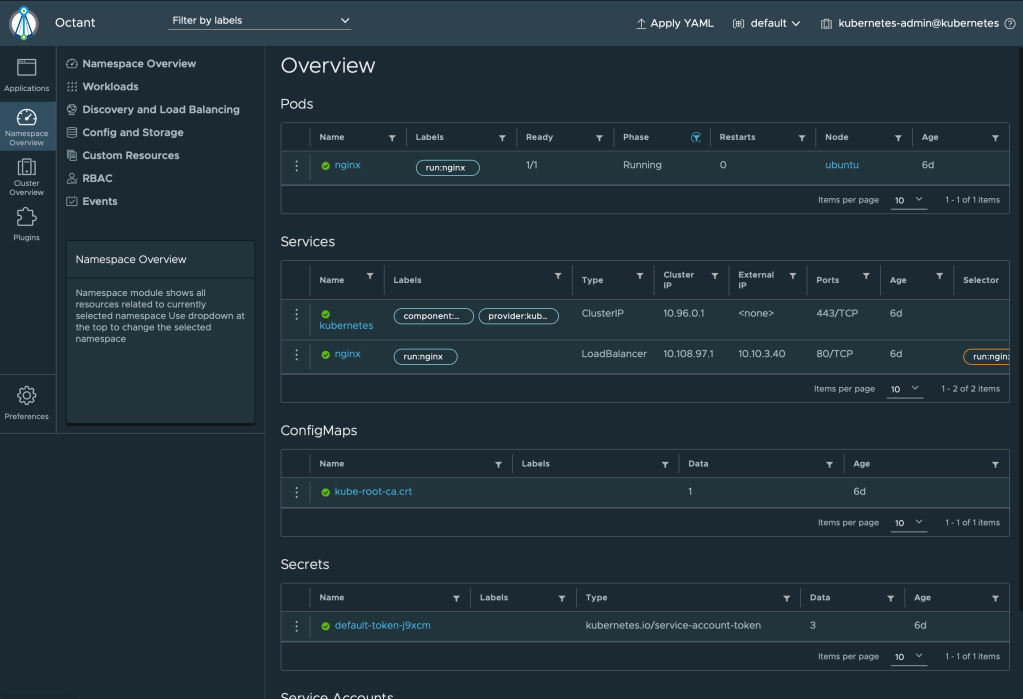
Not only does this create the dashboard, but it starts it for you as well! In my opinion this is pretty awesome for VI Admins that are not quite there with the kubectl commands yet. Here is a quick video of some stuff you can do in octant:

Octant demo
Taken from the octant website: https://github.com/vmware-tanzu/octant

Pretty cool stuff too play around with on one single kubernetes cluster RUNNING ON A SINGLE RASPBERRY PI! True Octant isn’t really running ON the cluster, but it does run some checks within the environment. This can also be done using the kubernetes dashboard found here: https://kubernetes.io/docs/tasks/access-application-cluster/web-ui-dashboard/ but you may run into some KUBECONFIG, or TOKEN errors, so that will be a different blog where we create a God User(to see the process), and then verify the users creds for logging into other areas and doing things. That may be one or two blogs down the pipe. Helm is next. Cause I love package managers.

Learning K8s on Pi – Metal LB

If you have built a managed kubernetes cluster in any one of the public clouds(AWS, GCP, Azure, or even Digital Ocean) you have probably fallen in love with the ability to deploy a load balancer easily for your application to a public IP. This is a critical component(at least in my opinion) to utilizing kubernetes in an enterprise environment. Sure you could use a daemon set that ensures its built on each node, and then use a service mesh and then load balance that with an external LB, but who has the time and people. Its so much easier to just set our “type” of service to “LoadBalancer” and be off and running. In the public cloud this deploys a number of services normally including a public IP to expose the application to the public. Since we’re just using a basic raspberry pi, we’re going to be using MetalLB to do this for us, and expose a range of IP’s that are available on our local network.

How does this work?(Taken Directly from MetalLB website)

Address allocation

in a cloud-enabled Kubernetes cluster, you request a load-balancer, and your cloud platform assigns an IP address to you. In a bare metal cluster, MetalLB is responsible for that allocation.

MetalLB cannot create IP addresses out of thin air, so you do have to give it pools of IP addresses that it can use. MetalLB will take care of assigning and unassigning individual addresses as services come and go, but it will only ever hand out IPs that are part of its configured pools.

How you get IP address pools for MetalLB depends on your environment. If you’re running a bare metal cluster in a colocation facility, your hosting provider probably offers IP addresses for lease. In that case, you would lease, say, a /26 of IP space (64 addresses), and provide that range to MetalLB for cluster services.

Alternatively, your cluster might be purely private, providing services to a nearby LAN but not exposed to the internet. In that case, you could pick a range of IPs from one of the private address spaces (so-called RFC1918 addresses), and assign those to MetalLB. Such addresses are free, and work fine as long as you’re only providing cluster services to your LAN.

Or, you could do both! MetalLB lets you define as many address pools as you want, and doesn’t care what “kind” of addresses you give it.

External announcement

Once MetalLB has assigned an external IP address to a service, it needs to make the network beyond the cluster aware that the IP “lives” in the cluster. MetalLB uses standard routing protocols to achieve this: ARP, NDP, or BGP.

Lets get MetalLB up and get going!

So MetalLB is very simple to get going. You start by deploying the needed security policies, daemonsets, and deployment, for the solution to be started, then you set a configMap to set the needed private ip range for it to utilize. First you run the command to build:

kubectl apply -f https://raw.githubusercontent.com/metallb/metallb/v0.9.6/manifests/namespace.yaml
kubectl apply -f https://raw.githubusercontent.com/metallb/metallb/v0.9.6/manifests/metallb.yaml
#On First Install Only
kubectl create secret generic -n metallb-system memberlist --from-literal=secretkey="$(openssl rand -base64 128)"

The initial apply creates the namespace, then the 2nd deploys the needed manifest(security policies, Daemonset,Deployment), and the third creates a secret for the solution. The ConfigMap needs to be created before applied. Here is what it looks like:

apiVersion: v1
kind: ConfigMap
metadata:
namespace: metallb-system
name: config
data:
config: |
address-pools:
- name: default
protocol: layer2
addresses:
- **INSERT IP ADDRESS RANGE HERE**

At **INSERT IP ADDRESS RANGE HERE** you would insert the range you would like your load balancers to use. For instance: 192.168.10.25-192.168.10.50 would give you 25 load balancer ip addresses. I save this as “metallb.yaml” and then apply it with “Kubectl apply -f metallb.yaml” (the -f stands for “file”)

Now lets test this out, cause whats the use in having fun tools is boring until you actually use it.

First lets run our favorite container, NGINX! Run the following to build a basic container:

kubectl run nginx --image=nginx

You can use “kubectl get pods --watch” to verify the pod gets to running. Once it shows “Running” under status, you can expose that pod to an IP address not connected to the Node using the LoadBalancer parameter. Expose your pod with the following:

kubectl expose pod nginx --port=80 --type=LoadBalancer

This exposes the pod with a load balancer port. You can see the information with kubectl describe svc -o yaml which will output the information for this service in yaml form. This is handy if you ever want to build multiple layers in your kubernetes manifest (For instance building an app pod with a LoadBalancer on creation).

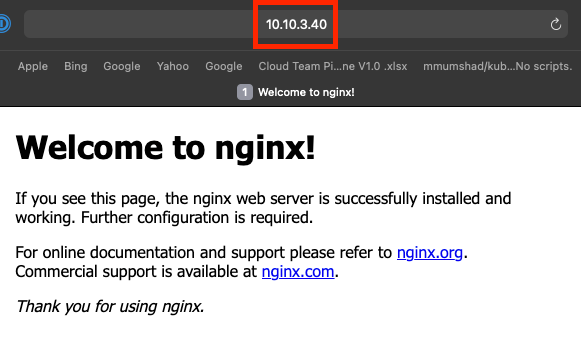
Verify your app is now exposed on that ip address. For this just open a web browser and go to the LoadBalancer ip on the External-IP :

There you go! MetalLB exposing your applications publicly through yaml files, into an IP space. Pretty cool right?

Learning K8s on PI – CRI-O

Docker is by far the de-facto runtime for kubernetes, at least in my opinion. The ability to build on the same machine that your are deploying is quite handy for learning. However, at some point you will start thinking, “I want to play with other run-times, whats out there to try?” Run-times aren’t huge differentiators until they absolutely ARE! Myself, I haven’t found a use case where one is better than the other, so this is focusing on learning and growing.

Now everything you just did in “Learning K8s on PI – Kubeadm” is exactly the same steps, as kubeadm, kubelet, and kubectl still need to be deployed in the same fashion with the same networking configs. These steps just replace the Docker installation within the kubernetes cluster. In fact, I’m going to verify these steps then kick this off to make sure that everything runs in the proper format.

In fact, I think I should add a script to this that allows you to set the hostname, version, OS, of the machine then you run it and everything just works. May make everyone’s life a lot easier, and make it much faster to get these brambles up and running. But I digress…

CRI-O

CRI-O is an awesome container alternative to docker. In fact, a couple stories in the news are saying that docker may not be the continued runtime for kubernetes and may be phased out! OH NO! This is the fun side of kubernetes and the CNCF, is there are always things changing and new things being added.

Couple things to be aware of before you try to install CRI-O. You need to set your version for your OS via an environmental variable: You can find the list here. You can see I’m using ubuntu20.04, and set CRI-O as a static version(list here ), to ensure that your running a proper version. I’ve had a couple tests with setting the cri-o version as an environmental variable, and it never worked so I’d suggest you do it statically(see below). Also be sure to update your OS before running these steps.

After those are set, run the following(each line is a step)…

sudo su


NAME=Ubuntu
VERSION_ID=20.04

. /etc/os-release

sudo sh -c "echo 'deb http://download.opensuse.org/repositories/devel:/kubic:/libcontainers:/stable/x${NAME}_${VERSION_ID}/ /' > /etc/apt/sources.list.d/devel:kubic:libcontainers:stable.list"

wget -nv https://download.opensuse.org/repositories/devel:kubic:libcontainers:stable/x${NAME}_${VERSION_ID}/Release.key -O- | sudo apt-key add -

The next two commands have the static version of the OS and of CRI-O, So set these to the appropriate versions. If your having issues then I’d suggest running these as set and you should be able to get it going.

sudo sh -c "echo 'deb http://download.opensuse.org/repositories/devel:/kubic:/libcontainers:/stable:/cri-o:/1.18/xUbuntu_20.04/ /' > /etc/apt/sources.list.d/devel:kubic:libcontainers:stable:cri-o:1.18.list"

wget -nv https://download.opensuse.org/repositories/devel:kubic:libcontainers:stable:cri-o:1.18/xUbuntu_20.04/Release.key -O- | sudo apt-key add -

apt-get update
apt install -y cri-o cri-o-runc


systemctl enable crio.service
systemctl start crio.service


cat <<EOF > init.yaml
apiVersion: kubelet.config.k8s.io/v1beta1
kind: KubeletConfiguration
cgroupDriver: systemd
---
apiVersion: kubeadm.k8s.io/v1beta2
kind: ClusterConfiguration
networking:
podSubnet: "192.168.0.0/16"
EOF

You have to do a couple cgroup settings with raspberry pi, so let’s do those quickly:

sudo nano /boot/firmware/cmdline.txt

At the end of the file add the following line: (NOTE: It should all be one line), and then enable the following settings

cgroup_enable=cpuset cgroup_memory=1 cgroup_enable=memory

cat <<EOF | sudo tee /etc/modules-load.d/k8s.conf
br_netfilter
EOF
cat <<EOF | sudo tee /etc/sysctl.d/k8s.conf
net.bridge.bridge-nf-call-ip6tables = 1
net.bridge.bridge-nf-call-iptables = 1
EOF
sudo sysctl --system

echo 1 > /proc/sys/net/ipv4/ip_forward

iptables -I INPUT -j ACCEPT

The Kube stuff

Now, you can follow kubernetes.io/docs for setting up a cluster with kubeadm. I’ll walk it through:

  • sudo apt-get install -y apt-transport-https ca-certificates curl
  • sudo curl -fsSLo /usr/share/keyrings/kubernetes-archive-keyring.gpg https://packages.cloud.google.com/apt/doc/apt-key.gpg
  • echo "deb [signed-by=/usr/share/keyrings/kubernetes-archive-keyring.gpg] https://apt.kubernetes.io/ kubernetes-xenial main" | sudo tee /etc/apt/sources.list.d/kubernetes.list
  • sudo apt-get update (Updates repos with new google target)
  • sudo apt-get install -y kubelet kubeadm kubectl (does the bizness)
  • sudo apt-mark hold kubelet kubeadm kubectl (Keeps "apt upgrade" from touching these unless we want to do it ourselves"

REBOOT NOW!! Seriously reboot to ensure everything we’ve done take effect.

Ok, now if everything WORKED, then this next part will work… *fingers crossed*

kubeadm init --config init.yaml

now you can install the CNI, which I would suggest to use Weave:

kubectl apply -f "https://cloud.weave.works/k8s/net?k8s-version=$(kubectl version | base64 | tr -d '\n')"

After you install CRI-O you can go ahead and install all the other steps found in https://nerdynate.life/2021/03/14/learning-k8s-on-pi-kubeadm/ to enable the single host or multiple, and also to enable the CNI.

This took a long time to figure out for something that’s really small changes. The CRI or Container Runtime Interface is very much a random thing to go over as many people don’t really play with this stuff. CRI-O is everything you need in a runtime with nothing you don’t. So if you’re comparing it to docker, then it could give you some resources back, especially on something as lightweight as a Raspberry Pi.

I seriously hope this helps you learn about CRI-O and kubeadm. Its a fun solution to grow from and learn. I hope you have fun with this, and hit me up if you need help or have issues.

Learning K8s on PI – kubeadm

Each time I am talking to other operational mindset people about Kubernetes, I run into roadblocks in communication. After a lot of thinking, I started to imagine how I can help bridge the technical gap between operations and kubernetes. I decided to start a blog series on how to get started using one simple item; a raspberry pi. With this item, I’ll show how to create a single node kubernetes master that will allow pods to be deployed directly on it, and we’ll start building additional layers on the k8s platform, and I’ll also show how to build this as a cluster. I truly hope this is helpful to some or many, and can help you grow out of this into the kubernetes space. There really isn’t much outside of this stuff in the Enterprise space. Kubernetes really is just kubernetes wherever it is (public cloud etc.), some providers just abstract layers so that you can’t see parts of it. That’s pretty much it. With all that out of the way, lets get into the BOM.

As I am aware that there are MANY other blogs out there about how to do this, I’m just going to split this up into easy chunks that I *HOPE* help some. Here are other blogs that are better for pi’s:
https://ubuntu.com/tutorials/how-to-kubernetes-cluster-on-raspberry-pi#1-overview
https://alexellisuk.medium.com/walk-through-install-kubernetes-to-your-raspberry-pi-in-15-minutes-84a8492dc95a

I used Alex’s the first time I did this and definitely would recommend it, as I’m just notating things from myself doing this with kubeadm… We’re going to stretch as far as we can with kubeadm, but I predict that at some point I will be doing another blog where I’ve gone k3s and used Alex’s blog to do it.

For your BOM to get started you need the following:

  1. Raspberry Pi – I’m using a pi4 8GB, but I think you can get by with a 4GB. Since we’re using ubuntu it probably needs the additional horsepower.
  2. Power cable – Verify it’s a legit pi powercable, don’t scrimp on it.
  3. Video cable – microHDMI
  4. SD card for the OS – Micro, because things are small
  5. Another machine to flash the SD card – using etcher, or raspberrypi imager(below)

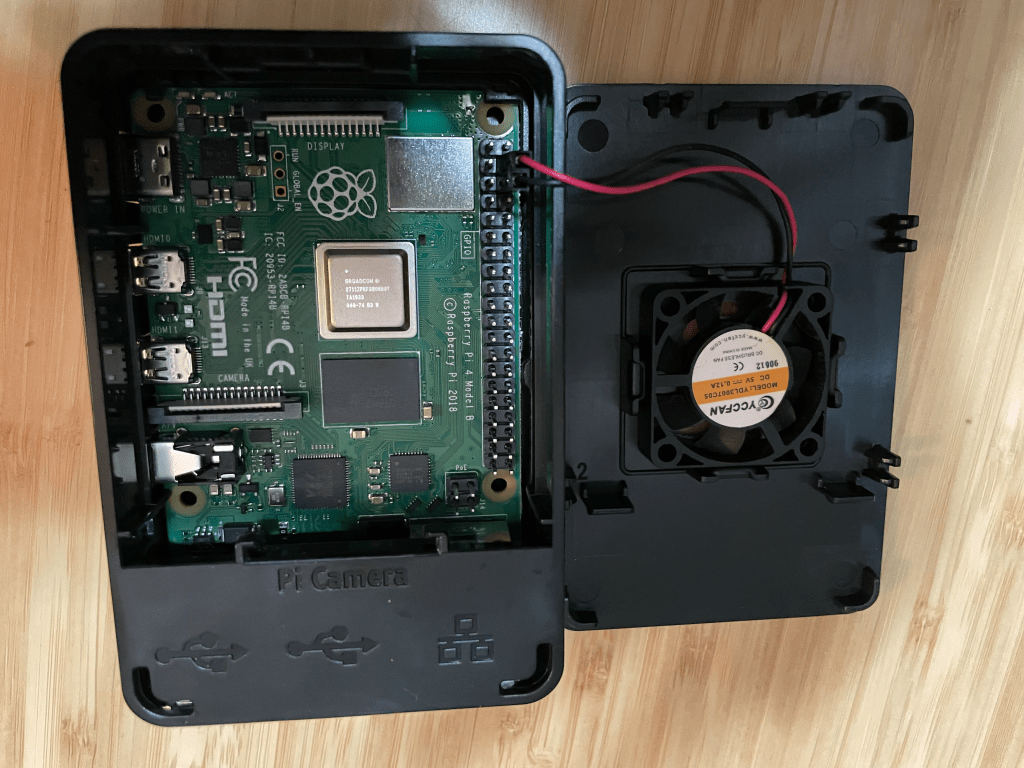
First things first: you need to setup your pie in its case (if you have one). I’ve been using CanaKit for a long time so I’ll be using their kit for this which includes a fan (if you have a fan picture to help find the jumpers to plug up into it.

Now, to flash your SD card with ubuntu using the raspberry pi imager found here: https://www.raspberrypi.org/software/ . With this running, you can install ubuntux64 server LTS edition. We don’t want the desktop and want to try to keep things as ‘lite’ as possible.

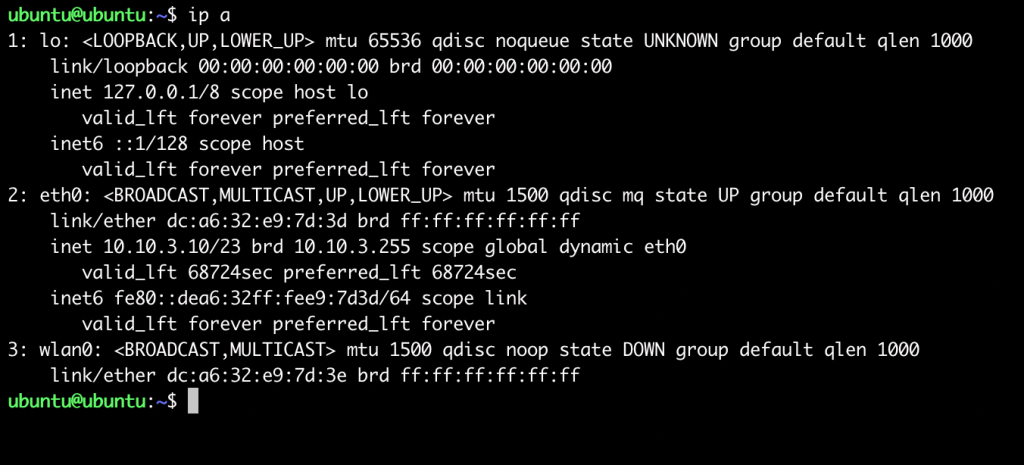
Once you have the machine up and running with the SD card, you need to pull the ip address. You will need to login to the machine using username “ubuntu” with password “ubuntu”. It’ll ask you to change the password, so do that. I normally just change it to “raspberry” or something easy, as I treat these machines as ephemeral boxes and flash SD cards quite often. Now run “ip a” This will give you the interfaces including the ip address, like so:

After this, you should be able to SSH into your raspberry pi with the ip address using the username “ubuntu”, and the password you set. SSH will help you perform these tasks as copy/pasting can help a lot.

This is a good point to change the hostname of the machine, especially if you’re going to cluster the machine to others as names must be unique. These steps are simply:

sudo hostnamectl set-hostname newNameHere
sudo nano /etc/hosts

change “ubuntu” to a unique name, and then reboot.

Next, I just run my regular updates,

sudo apt update
sudo apt upgrade

Next open up the firewall, and set some network configs:

iptables -I INPUT -j ACCEPT

cat <<EOF | sudo tee /etc/modules-load.d/k8s.conf
br_netfilter
EOF
cat <<EOF | sudo tee /etc/sysctl.d/k8s.conf
net.bridge.bridge-nf-call-ip6tables = 1
net.bridge.bridge-nf-call-iptables = 1
EOF
sudo sysctl --system

The “sudo sysctl –system” should update the settings, if it doesn’t, run the lines until the 2nd “EOF”, then run the sudo command independently:

Using Docker

This walkthrough will be using Docker, but I’m going to do a different one with Cri-O later once I have those steps written up.

sudo apt install -y docker.io

Once installed, enable docker:

systemctl enable docker.service

You have to do a couple cgroup settings with raspberry pi, so let’s do those quickly:

cgroup="$(head -n1 /boot/firmware/cmdline.txt) cgroup_enable=cpuset cgroup_enable=memory cgroup_memory=1 swapaccount=1"

echo $cgroup | sudo tee /boot/firmware/cmdline.txt

The Kube stuff

Now, you can follow kubernetes.io/docs for setting up a cluster with kubeadm. I’ll walk it through:

  • sudo apt-get install -y apt-transport-https ca-certificates curl
  • sudo curl -fsSLo /usr/share/keyrings/kubernetes-archive-keyring.gpg https://packages.cloud.google.com/apt/doc/apt-key.gpg
  • echo "deb [signed-by=/usr/share/keyrings/kubernetes-archive-keyring.gpg] https://apt.kubernetes.io/ kubernetes-xenial main" | sudo tee /etc/apt/sources.list.d/kubernetes.list
  • sudo apt-get update (Updates repos with new google target)
  • sudo apt-get install -y kubelet kubeadm kubectl (does the bizness)
  • sudo apt-mark hold kubelet kubeadm kubectl (Keeps "apt upgrade" from touching these unless we want to do it ourselves"

REBOOT NOW!! Seriously reboot to ensure everything we’ve done take effect.

Ok, now if everything WORKED, then this next part will work… *fingers crossed*

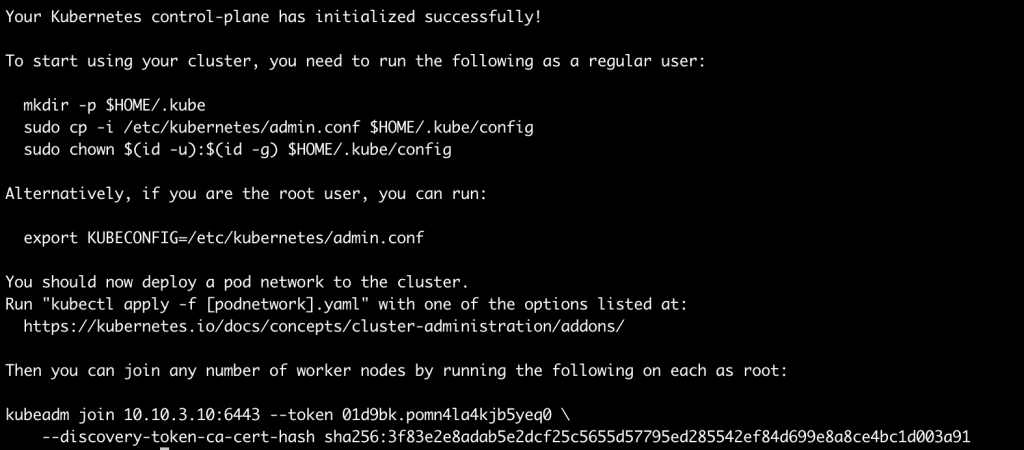
sudo kubeadm init --pod-network-cidr=192.168.0.0/16

HUZZAH! Now, let’s dissect this information…

1st line is the line of joy that your control-plan is initialized.

“To start using your cluster,” – These lines move the config into a non-root user (such as ubuntu on this pi), the “export” command is for root.

Move admin.conf to local directory:
mkdir -p $HOME/.kube
sudo cp -i /etc/kubernetes/admin.conf $HOME/.kube/config
sudo chown $(id -u):$(id -g) $HOME/.kube/config

Finally:

kubeadm join 10.10.3.10:6443 --token <TOKENSTUFF> \
--discovery-token-ca-cert-hash sha<WHATEVERYOURSMAYBE>

This is the command to join a different pi to this control-plane to create a CLUSTER! Basically, follow this document up until the reboot, then run the above command to join a different pi to this pi instead of the “kubeadm init”.

NOW, because I want this to be the cheapest I can make it, let’s make this node a single node kubernetes box. Run the following to remove the taint from the master node, and take note of the dash at the end, as that REMOVES the taint. I’m using ‘–all’ so you can copy/paste. Don’t run this in a cluster, (OR do! – I’m not your boss, and pis are for learning!)

kubectl taint nodes --all node-role.kubernetes.io/master:NoSchedule-

Now, you have a non-ready cluster! WOOHOO! Time to select a CNI(Container Network Interface) but this time, lets just use Weave: Run the following!

kubectl apply -f "https://cloud.weave.works/k8s/net?k8s-version=$(kubectl version | base64 | tr -d '\n')"

NOW RUN “Kubectl get nodes”, AND SEE THE GLORY!

So, this has been a fun pi day blog for me, and I hope this helps you. Yes, you can write a bash script for this, and there may be one or two things in there that are not completely necessary. Pis are very low on resources, and though I’m using an 8GB module, it’s still limited. Still this is just a start to actually use it, Its like we just deployed ESXI and vcenter, and now we can deploy actual workloads.

I’m going to continue this as a series, so the next one will be using Cri-O instead of Docker, and then I’ll probably be running additional things from there as I can. I chose Kubeadm for this blog, because I’ve used this at work as well as at home, and it’s also how the CKA has you build a cluster. If you take that exam you can use this information to help you perform those tasks(up to a point). As always, please feel free to reach out to me on twitter if I missed something or something didn’t work for you. I’ll edit and update as needed.

HAPPY PI DAY!

Twenty-Twenty-One-daheck?

About two years ago, I started writing out my plans for the next year. Everything from personal goals, professional development goals, and everything in-between. It’s been my mile marker each year in terms of progress and career growth. I began this process because I was quite tired of only working through customer break-fix issues and wanted to gain knowledge of new products, solutions, and architecture. Also, because I’m lazy, I do this because if I don’t push myself, then nothing will move the marker, and if I don’t set a marker, then I don’t know what has moved.

THE Motivational Quote to Make Your Screenwriting Dreams Come True -  ScreenCraft
A dream written down with a date becomes a GOAL. A goal broken down into steps becomes a PLAN. A plan backed by ACTION makes your dreams come true.”

This is the quote that started it all. Basically, my goal of “Stop Sucking” just really didn’t lend results from month to month, and year to year. Well, 2020 is almost done, and it’s time to focus on the next year, and the next goals. 2020 has been an “interesting” year for everyone, but I’ve been very blessed to be where I am, doing what I’m doing. Let’s look at the performance review for 2020 #CovidYear and what progressed in the year.

Check Off List GIFs | Tenor

The Shut-In Year

2020 has been a banner year; keeping me on my toes was changing jobs right at the end of 2019 (day before new years eve). This was not the initial plan when I wrote the goals for 2020 so it was a bit of a swap from my expected goals, then in March the shutdown started, and holy cow how everything changed. Looking at the year, the goal difficulty should have gone from hard to way easy. Here are the goals I had in 2019:

  1. Learn and be operational with vRealize Automation 8
  2. Learn and be operational with vRealize Operations 8
  3. Create an Ansible solution, and utilize playbooks for configuration management after deployments in vRA 7.6
  4. Kubernetes Solutions
    1. Create Endpoint solutions, and make a PKS solution
    2. Go through the “Learning Kubernetes the hard way”, on Git
    3. Create a Kubernetes cluster in rasberry pis, and figure out how to create and deploy images to it
    4. Create AKS, GKE, and EKS for kuberenetes solutions in the public cloud
  5. Learn Terraform for Private cloud, and Public cloud in AWS, Azure, and GCP
  6. Learn Pulumi for the Private cloud, and Public cloud in AWS, Azure, and GCP
  7. Obtain my VCP in CMA
  8. Obtain my AWS Architect Certificate
  9. Target weight at the end of 2020, is 170.

Looks like a lot of stuff, right? To me this felt like a boatload of extra work while keeping customers operational as well. As for all vRA related goals, you can check that right off. From setting it up in 8.2, to getting my VCP in Cloud Management, to even using Terraform in vRA, it has been a lot of stuff. Even at the end of this year, I got to create a blueprint for “no-touch” deployment of SaltStack Enterprise and then SaltStack deployed the whole application stack (Blog link will go here when live, – Expected 1/7). One thing about vRA, I’ve just stopped working with 7.x. I’ve put in my time with it, and now that I’m working in a different position, I’m focusing on the current market solutions. Not knocking 7.x, it’s just not my focus.

RevdKathy's Scrapbook

Moving to Kubernetes; getting my CKA and the Cloud Native Master specialist badge from VMware was a great learning experience. Even spent the time to write blogs on how I passed. I spent a lot of time working on my pi cluster, which I’ve talked about it several times on ItRealityUS. It was a great way to learn kubeadm k8s and getting things up and running. I’ve even used MetalLB on the pi cluster, so it’s really awesome how the cluster can help prep for the CKA. One thing I’ll add, is, KIND clusters are extremely helpful for this now. If you can run KIND, then you will get most, if not all, the functionality and be able to learn how things work in a k8s cluster. I also managed to get my Terraform Associate certification. I then wrote a blog about this (which ended up being the most clicked blog). I’ve used Terraform for a while, and I’m a big believer in the solution. Finally, I got my AWS associate certification, including the Cloud Practitioner… now Lets look at the list and check off what I did.

  1. Learn and be operational with vRealize Automation 8
  2. Learn and be operational with vRealize Operations 8
  3. Create an Ansible solution, and utilize playbooks for configuration management after deployments in vRA 7.6
  4. Kubernetes Solutions
    1. Create Endpoint solutions, and make a PKS solution
    2. Go through the “Learning Kubernetes the hard way”, on Git
    3. Create a Kubernetes cluster in rasberry pis, and figure out how to create and deploy images to it
    4. Create AKS, GKE, and EKS for kuberenetes solutions in the public cloud
  5. Learn Terraform for Private cloud, and Public cloud in AWS, Azure, and GCP
  6. Learn Pulumi for the Private cloud, and Public cloud in AWS, Azure, and GCP
  7. Obtain my VCP in CMA
  8. Obtain my AWS Architect Certificate
  9. Target weight at the end of 2020, is 170.

My target weight at the end of 2020 was definitely not 170. I hadn’t gained weight, but I definitely lost muscle. So I need to get back into working out. Especially burning the fat. If I don’t get to the gym in 2021, I’ll take a loss of weight as a win.

Pulumi and vROPS got the short straw in 2020. I had a couple things take its place, for that I’m actually quite happy. Pulumi is an amazing product and something I’ll look forward to when I get the chance, but for now very glad to have something still out there to dig into in this space.

Twenty-Twenty-One

A good friend of mine, who single-handedly changed my life, told me to focus this year on sales and cloud. Sales, because I’ve been told several times that my skill set is extremely technical and I’m incredibly skilled for technical positions, but I have no skills in how to deal with sales and quotas. Well, that’s something I plan on changing this year. This year there is a quota for my team to meet, and I plan on being a part of that. A big part. As for the clouds, I have my AWS certification, but I am not sure if AWS Professional is in the cards. I’ll toss it in the list as its pushing the bar, but there are three main public clouds. With all this in mind here are my goals for 2021.

  1. Obtain Associate level certification in GCP and Azure
  2. Training in SaltStack
  3. Obtain Professional Level Certification AWS
  4. HashiCorp – Associate in Consul and Vault, with professional in Vault.
  5. Create a Demo Application and start digging into full stack dev. (This is a stretch goal)
  6. Kubernetes
    1. Obtain CKAD
    2. Write a Kubernetes application
    3. Tanzu!!
    4. OpenShift!!
    5. K8s all the things!
  7. Gain Knowledge of sales
    1. Understand and prioritize sales opportunities
    2. Learn dealing with clients as opposed to customers
    3. Manage to be a big factor in meeting or exceeding the sales quota.
  8. Personal Goals
    1. Workout at least 3 times in a week
    2. Soft Skills (people skills) – Learn the Non-Tech
    3. Lose weight
It's time to Git Gud Scrub gag gift for your gamer friends who are noobs at  your favourite video games :P #gaming #memes #pcmasterrace … | Memes, Git,  Geek culture

Looking at it on paper, it seems a like a lot. With Covid we really have no clue what 2021 will hold. Currently, I expect nothing to change. I expect that I’ll be able to get these things completed or mostly completed within the year. The stretch goal will probably be a continual goal. I really want to dig into development, and really get into DevRel and Advocacy for developers. In my last customer job, I really enjoyed working with developers and operations to bring them together. I like trying help developers and operations understand why each one needs the other, and more importantly, the tools that can help that relationship.

Moving from customers to clients, or, from Tech to Marketing/Sales, is a big change for me. Thankfully it’s one that many people have talked about on podcasts/blogs. I plan on doing a lot of research in the next year on this topic. I’ll start by digging into NerdJourney podcast as they have a couple episodes on it, and I’m sure we will explore this with the ITRealityUS podcast.

What Would You Say You Do Here GIFs | Tenor

In terms of tech, I really want to dig into the cloud certifications right off, and then do HashiCorp certifications as I write an application using Vault and Consul in k8s. I really want this application to be portable to multiple clouds and create a reference architecture that can really grow my job and myself personally.

Not sure what code to dig into for writing an app. I only have so many hours in the day but really need to dig into this as much as possible. Thinking Python, and Go will be my framework(probably not the right word there). Then may dig into some other application langges, such as React.

Soft skills are also growing, as I need to learn how to talk to clients and people I work with, to really learn from others and change my mindset from the technical to the marketable.

Communication GIFs - Get the best GIF on GIPHY

Something I think will be rather difficult for me, but something necessary. I plan on going through three books to help this. “Gap selling”, “7 Habits of Highly Effective People” and “Atomic Habits” are the books I’m going to go through (Thanks Audible). These are basic self-help books for anyone, but its about time I start working on this part of myself. I’ve always been a homebody and an introvert to an extent. So I need to work on those issues and start learning how to work with people more than just getting things done in a vacuum. I think a lot of people are in that place in the IT world. We all think about the code/infrastructure/architecture before the people, and I need to figure that piece out.

Create, Re-Create, Repeat

Working in Tech has been categorized as “Create, Re-Create, Repeat”. Specializing in a product is only good for a certain amount of time, but eventually you need to re-create yourself, and you skillset, which can be rather rough.

Rebirth GIFs - Get the best GIF on GIPHY

When I found my footing in automation, I was pushed into it. I really didn’t have any marketable skill other than the ability to follow a runbook or pick up the phone. Automation fell into my lap and I jumped on the opportunity. This time, I’m trying to figure out myself the best next step, which is something I’ve never done before. Normally its pushed on me by a different source/person. Now if I fail, I’ll have no one to blame but myself… and twitter… 2021, will be a rough year for me. I’m going to get down, I’m going to get beat up, and I’m going to fail daily. But each failure, each doubt, each bruise, and pain help me get stronger, better, faster. Its like my gym trainer told me when I worked out, “If its not hard, and not hurting, then you’re not growing. Dig deep and keep going.”

Drake Lets Go GIF - Find & Share on GIPHY

VMworld 2020 Networking and Security – Early Blogger Access

As a vRealize user I’ve always been extremely interested in Network Insight. The ability to map traffic from one point to the next is well worth the time investment. Especially in an environment that is new, or one that you do not fully understand. I’ve been in both situations myself. The roughest is when you have been in a place for a while and they still do not know the mapping from an application to the external connection, or to its database. This is a great feature of vRealize Network Insight. Lets look at the announcements we’ve heard.

Security

First, lets understand that most companies footprint has grown, and by growing you have increased the weakness for security gaps. Those gaps can allow infiltrators into your environment. Once in they start trying to either elevate rights or move in your network. This is the East to West traffic that is now the battleground of your environment. By using something like micro-segmentation in NSXT you can keep apps that have been infected from infecting other apps. East-West Traffic is now the security battleground.

With the announcement of VMware TAU(Threat Analysis Unit) you can now leverage machine learning to look for bad traffic within your firewalls. This capability is able to scan up to 20 TBPs which is industry leading. The capability starts with your NSXT appliance, and leverages NSX Intelligence to use this ML/AI to find bad operators in your environment.

NSXT already has great capabilities for IDS/IPS since 3.0 and with these new additions to allow advanced threat prevention to your environment you can engage and be prepared for the battle.

Traffic (VRNI)

Lets go back to that idea of tracking things from the network. vRealize Network Insight(VRNI) has amazing capability to track what is happening on your network and mapping it in front of you. Now add to it the ability to state what you want to communicate to each other, and then it tells you how to set the proper ACLs, firewalls, etc. VRNI 6.0 does just that. This is a new feature known as Assurance and Verification. This will look at what you want to communicate to each other, and take the understanding of the network to state how it can be achieved.

One more thing to add to this functionality is the ability for the information to port into vRealize Operations so users can see what is needed, and what is happening. Very great addition.

Edge Network Intelligence

Finally with all the possible malware that can hit your network. Lets take this, and apply it to our edge devices? This is where Edge Network Intelligence comes in.

The ability to see the devices within your network and see the issues that are happening and the major problems that need to be addressed. This can look inside the lan, outside the WAN or in the application itself.

Its all great stuff on this side of the fence. The problem is we still have hands to get on to these solutions and truly see how they interact with each other and verify what they can do. Its a challenge for sure, but the execution of these announcements could truly make a huge leap for customer capabilities to deal with malware, and verify their traffic runs as designed.