vSphere 7.0 – A New direction

The announcement of Project Pacific last year at VMworld came to the surprise of engineers around the world. Project Pacific, in a nutshell, is the deployment of Kubernetes within vSphere and the solution to deploy Kubernetes clusters on vSphere hypervisor. From the customer perspective, there were so many unanswered questions. I was allowed to take part in an early access on both beta and a blogger access webinar on vSphere 7 and other releases. We tried to ask as many questions as we could, but so many more remained. With the new cloud solutions all around us, the different cloud spaces, and modern K8 clusters, and from the infrastructure that is built, to the applications running on that infrastructure, the direction of business has changed. Obviously, in our ever changing and fast-pace business space this makes sense, as ‘the application’ is what makes the money. For a long time, vSphere has been focusing on the operations and enterprise architect engineers, which has allowed us to use our beloved solution to bring applications and VMs to manage resources. With the release of vSphere 7, our beloved hypervisor is getting not into the OS kernel deployment solution, but into pure application management, operation, and deployment. For today, lets just  look at the vSphere 7 updates and look at how they bolster vSphere for both the engineer, and operator.

vCenter Server Profiles

vCenter Server Profiles is a desired state file that holds the configuration for your hosts. This includes authentication, management network, etc. that can be exported and then imported to servers and then set universally. This can also be done to multiple vCenters, allowing the same settings across DR zones or different co-locations. A surprise of this solution is that it’s API based, so, you are pulling the configuration of the host and then importing it through the API. Now, some may rejoice at this solution, but others, may hold back their rejoicing as APIs can be difficult to navigate, but fear not! The big V has added an API explorer to help you navigate around and configure your GET, SET, POST, PUT etc. The Server Profile will allow you to set your network solution, but be advised that NIC1 will always be utilized as vCenter HA.

vCenter Upgrades

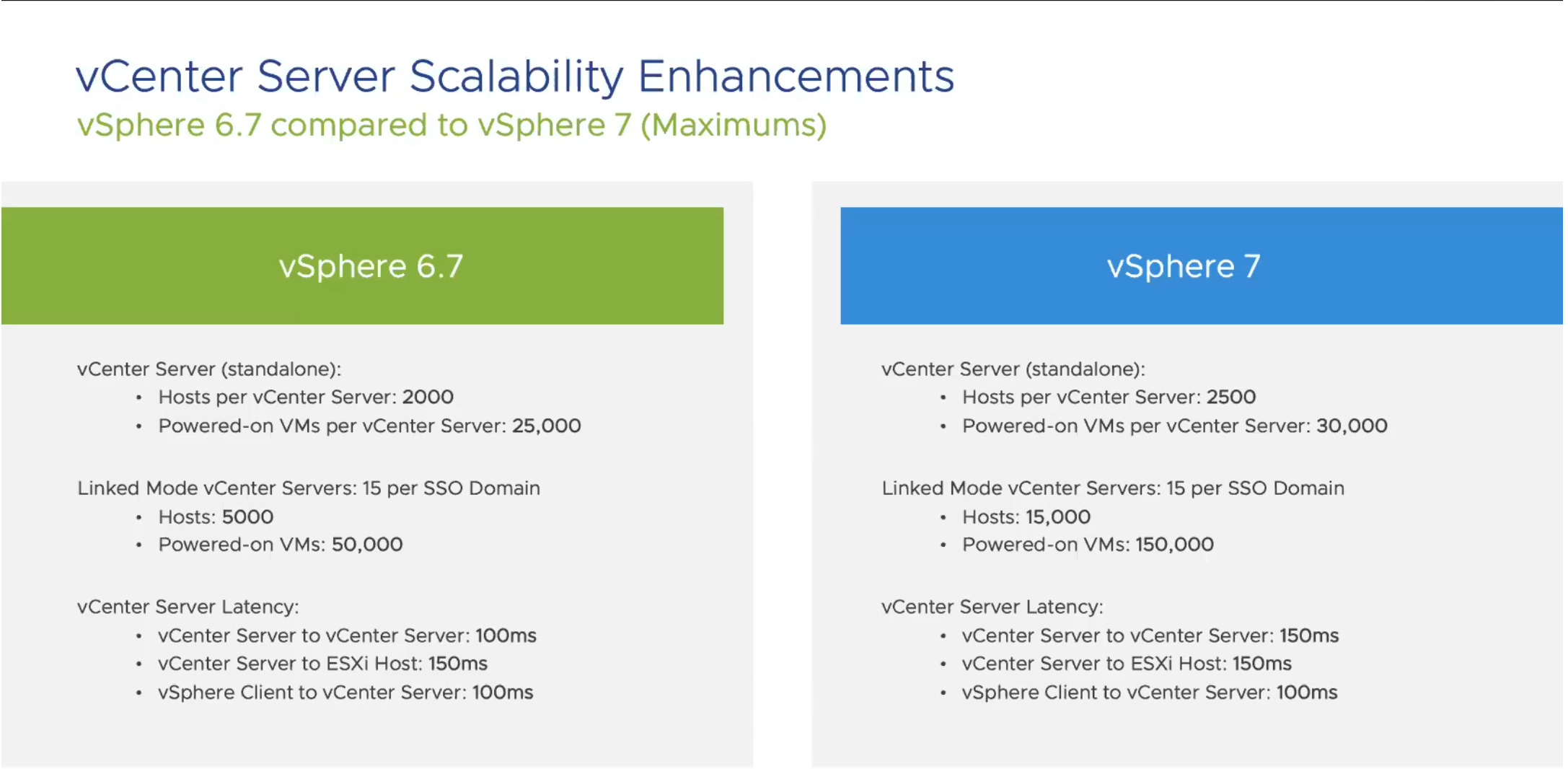
For vCenter, they also ‘beefed up’ the allowed resources you can connect to your solution, allowing your environment to grow even larger. Here is a quick snip of the increases.
Screen Shot 2020-02-29 at 10.47.43 AM

Content Library

As a vRealize guy, templates have been critical to my whole life. Being able to deploy golden versions of templates is a huge part of the solution. Content library, to me, has always been a frustrating solution, because it has never really been useful to me. However, Content Library has some amazing new features including versioning. The Content Library will allow a check-in and check-out solutions to pull those templates out and update, or adjust them. After adjustment, if it fails and you have crashed your template, you can revert it! If you are like me, and know the pain of having to create a new template every time a patch screws up sysprep, or, if you have ever had to make an adjustment and needed to revert and the snap isn’t there, this safety net is a really nice feature.

Updating

With the new release of vSphere 7, updating is getting easier and more automatic. While we all love VMware Update Manager, and the solutions that it brings, I’m sure we can all agree it would be better if it removed the process of creating baselines, but still gave us the ability to manage what patches are deployed. These are the issues they seem to be working on, and we’re getting a better patching solution, for both vCenter and ESXI.

The vCenter Upgrade Manager will address the patches that are available for upgrading vCenter as well as the environment. This includes the solutions that are installed including the vRealize Suite, and the compatible versions for those solutions. This allows engineers to see the gotchas that they may experience after the upgrade, before clicking the button. The manager also allows modifying the solutions that are deployed, which lets engineers add solutions if they are not automatically seen, and setting the versions so they can be run against the vCenter upgrade delta.

For ESXI, VUM is no longer, and has been replaced with Lifecycle Manager. We all love the solution of VMware Upgrade Manager allowing us to add devices and drivers, but the goal of Lifecycle Manager is to bring that solution automatically, This allows those users who use partner products, currently HPE and DELL, to be able to view ESXI patches, as well as drivers and firmware for the hardware. Once again, the goal here is “Desired State” keeping all hosts in the same settings across your environment. Lifecycle Manager allows the driver and firmware updates set in the recommended settings to verify that they are safe to run before installation. Once again, this solution is available via both API and a GUI allowing those API engineers the solution of pulling and pushing code to set the variables, and push the solution.

Workload Utilization – DRS

Previously, DRS had been focused on a cluster based metric, verifying the solution across each ESXI host. Now, DRS is focused around the workloads running on the cluster. This gives an increased polling rate at 5 minutes to check the solution and populate a DRS Score. This score will run on each host, and if a better score is on a different host, the solution will consider migration, and if it is better to keep the workload on the host that it is currently on, DRS will decided to keep it there. The DRS Score score brings in CPU-ready time, Memory swap, Cache behavior, etc., meaning this takes into account both compute and storage. Screen Shot 2020-02-29 at 11.12.10 AM
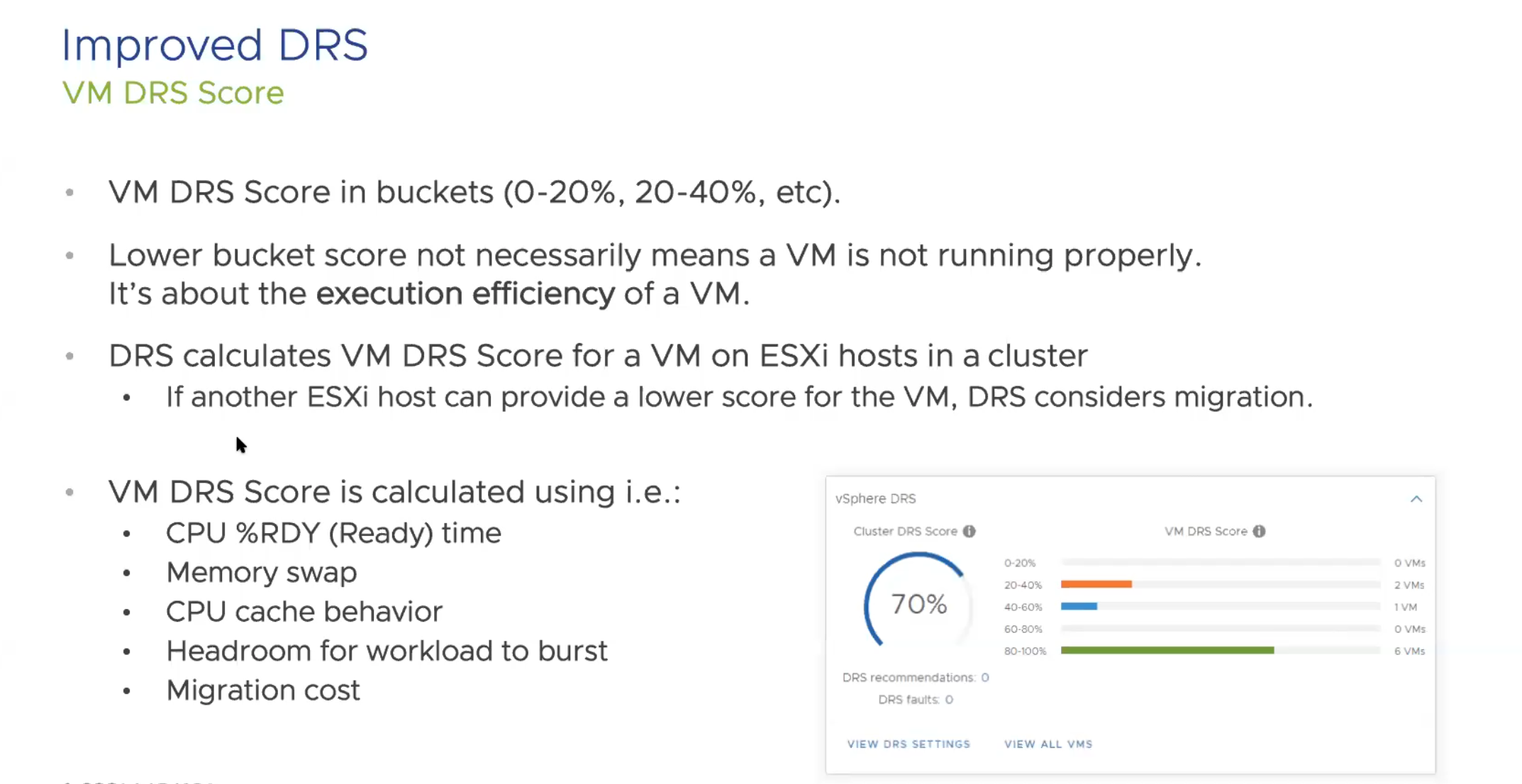
DRS also will take into account specific hardware accelerator solutions such as vGPU solution on the VMs that are running.

In the DRS improvements, VMware also took a look at VMotion and have made adjustments to help VMotion work on large or monster size VMs. For these large machines (like SAP HANA, or Oracle) VMotion will now lower the stun time and migration. They worked really hard to create or refactor a solution to help with these larger VMs and have found a process that works better. Along with this refactor comes better memory migration for VMotions, and the stun time reduction will help all VMotions, but the most noticeable change is on the bigger VMs. Additionally, with these configs, EVC now has new versions of CPU to set on your EVC settings.

For the ESXI hardware component, they include a watchdog timer to catch OS failures, and reboot upon failure, also, a Precision Time Protocol or PTP to help financial apps or features, which keeps that time setting down to milliseconds. This is only available in hardware components within 7.0 but great features to help those that 3 A.M. calls about machines that failed on patch update reboots, or time being outside the needed parameters for sales, financials, etc.

Security

Now, let’s look at changes in Certificate management. If anyone has replaced certificates in the PSC, you know that replacing multiple certificates and having the number of certs is kinda crazy in vCenter. Screen Shot 2020-02-29 at 11.30.38 AM
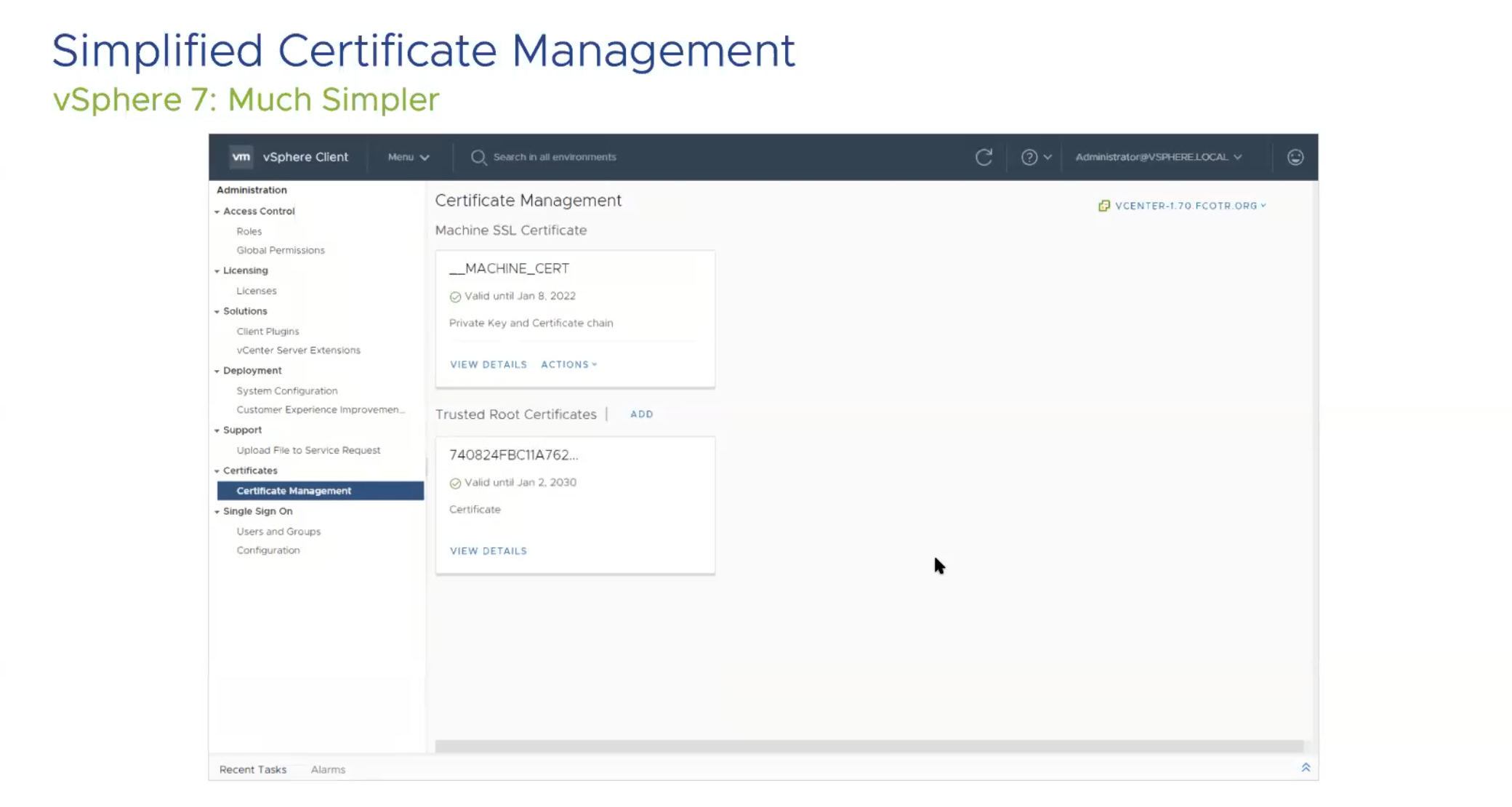
This picture was very much a relief to me personally, as there were about 6 (8 total) more certificates in 6.7 and in 7.0 there are only 2.

vSphere Trust Authority is being introduced as a new feature for vSphere. It introduces attestation for key management if needed. It also makes it easy to implement the principle of least privileged, allowing users only the needed access instead of more. vSphere Trust Authority also requires a vCenter cluster of 3 hosts outside of the “Workload” vCenter to maintain this, and it can also encrypt Workload vCenter Server instances.

Identity federation in 7.0 will let single federation of ADFS allow authentication into your environment. This also has Multi-factor Authentication available, allowing a huge feature to be available to those wanting to bring in a more trusted and secure authentication process to log into your environment.Screen Shot 2020-02-29 at 11.43.05 AM
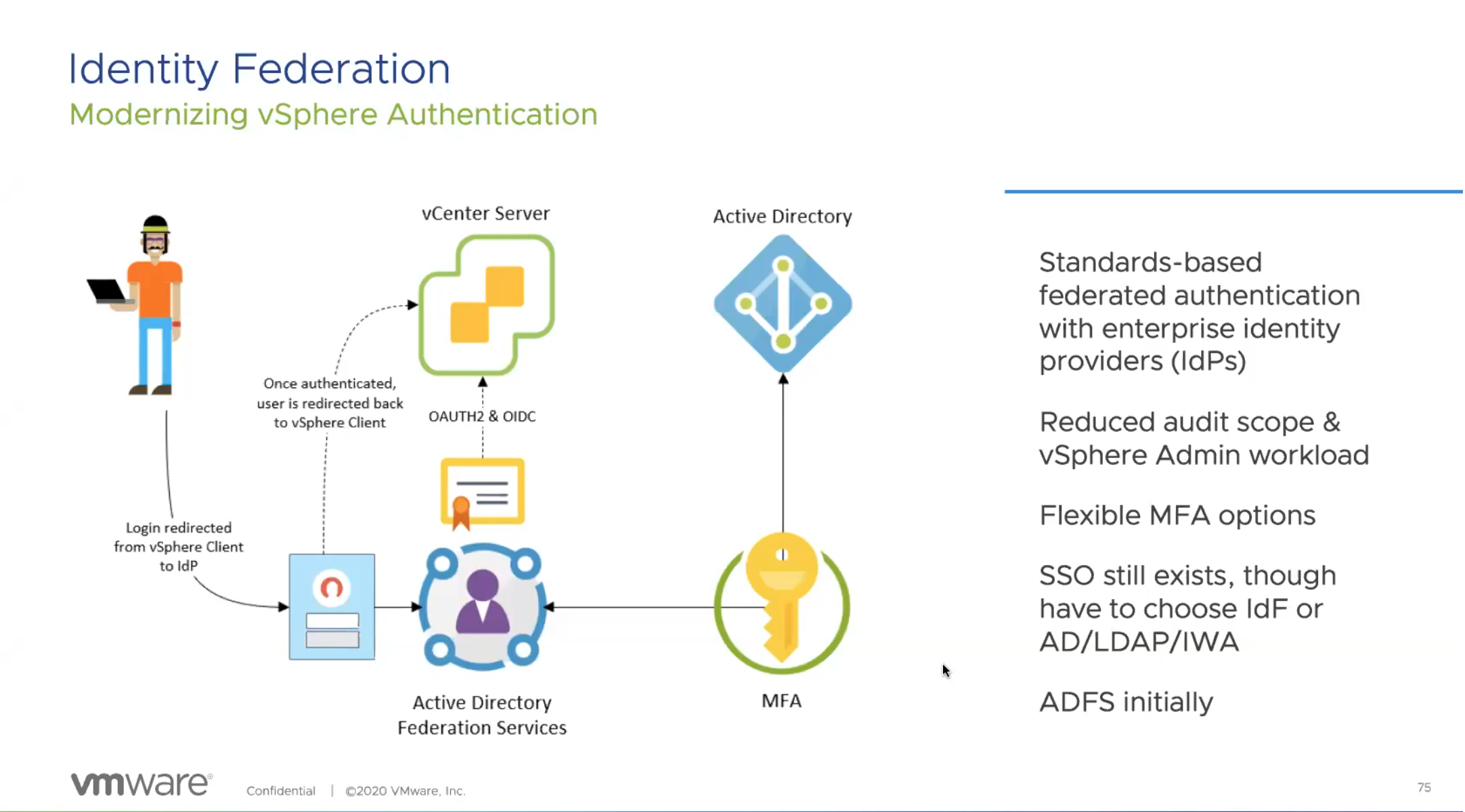
This is available only for vCenter, but eventually they will bring in other solutions into the federated solutions. This does bring federation into Kubernetes namespaces as they are built into vCenter.

Conclusion

vSphere 7.0 is not just an iterative upgrade for VMware. This is a full solution upgrade for engineers that brings in many solutions that we were looking at third parties to provide. Now, we have the ability to find these solutions directly in vSphere. Your homelab will run easier with these solutions, and your enterprise 20,000 VM solution will run better. I’ve been in the vSphere Beta for the past 2 months, and I’ve loved the solutions this has brought. I’ve only scratch the surface in my homelab (and in this blog), but there are hundreds more updates that are in vSphere that will make being a VI admins job easier. I hope this helps fill in the gaps in where vSphere is headed on March 10th. I look forward, as I’m sure you all do, to utilizing these functions and working with the new solutions.

Weekend vCenter Error Fixing

So in the Homelab life each weekend is normally the “Fix it” time. If I can get time outside of the weekend I’ll try to get to it, because my OCD just drives me nuts seeing that red. Usually though it falls on the weekend.

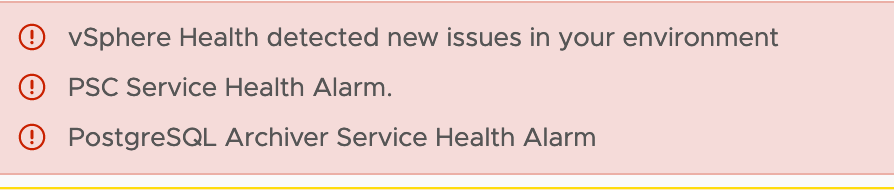
This weekend the errors I looked at are the following:Screen Shot 2020-01-02 at 2.40.44 PM

PostgresSQL Archiver error

So for this I did some research in VMTN and also a lot of other blogs etc. The key points were what I found in the vCenter Log here:

In /var/log/vmware/vpostgres/pg_archiver.log-[n].stderr, you see error similar to:

2018-05-22T10:27:36.133Z ERROR  pg_archiver could not receive data from WAL stream: server closed the connection unexpectedly
This probably means the server terminated abnormally
before or while processing the request.

So this KB  points to an HA or Timeout error, and I was seeing these errors, but the issue was the Watchdog service. After some more google-fu I came across Magander3’s Post Which all credit goes to for this fix. Basically here is what I did:

On each ESXI host in your cluster login via SSH and run the following command, “/etc/init.d/sfcbd-watchdog status” This should return “sfcbd is not running"

  • If this is the case try “/etc/init.d/sfcbd-watchdog start” just to see if that will help.
  • If it starts great! Run the start command on each ESXI host.
  • If not run “esxcli system wbem get” and you should get a fair amount of data, but your looking for  “Enabled:false”
  • If you see that run “esxcli system wbem set –enable trueThere are two “-” before enable. This should show “Enabled:true”
  • Run the previous “wbem get” command And you should see “Enabled:true” now.
  • Run your “/etc/init.d/sfcbd-watchdog status” again and it should show true.

After this ran on each ESXI host the error service started on vCenter and I could reset it.

PSC Service Health Alarm

This was a poser, and there are still a lot of different PSC errors in VMTN for 6.7u2. Well, I did a vCenter upgrade, some other house cleaning to see if it would clear this error, Then I found the following KB which basically tells you to sync the time across ESXI hosts and vCenter.

But the issue for me was how the sync was setup. I set everything to the same NTP server and the same time zone, but nothing worked. For some reason the PSC service just still would not work.

I fixed it by turning off NTP on the vCenter server and setting it to sync to the host. Once I set that up, BOOM it started.

Hope this helps someone, Sorry for the lack of pictures as I know those help. Have a good Monday!

Installing vRA8.0.1 Easy Installer

With the update to 8.0.1 and the features it brings (including possible upgrades from 7.6 to 8.0), I’m sure there are those searching for “how to perform this install?”, and “is it really “Easy”?”

Well the answer to the latter question is an emphatic YES. I’m just playing with the minimal installation, but, deploying one ISO with 3 OVAs is much easier than multiple OS deployments and service configurations on windows boxes. Even a minimal deployment in my lab took a couple days. This should be up and running within hours. Its pretty outstanding.

One of the major changes is that this is deployed as a Kubernetes cluster and run with the products as pods. This is actually really fantastic tech that betters our lives as users to the nth degree. I could relay to you all the horrors I’ve had deploying via 7.x in comparison, but I won’t. No one likes to read horror stories right??

Deploying Easy LCM Installer

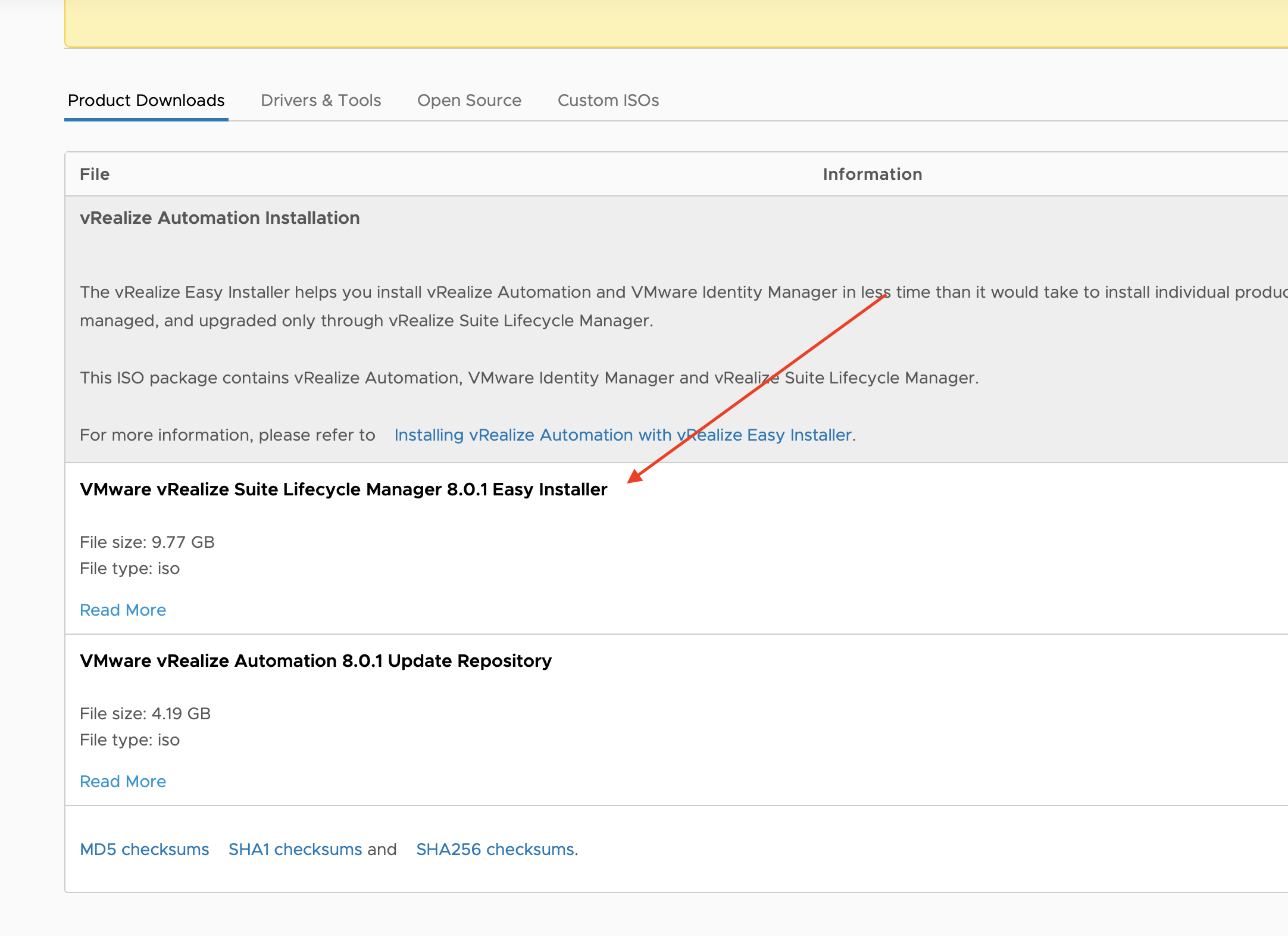
First things first; the installer your looking for is the “Easy” Installer from VMware.Screen Shot 2020-01-04 at 9.13.25 AM

While that is downloading you should go ahead and create DNS entries for the Identity Manager, Lifecycle Manager, and vRealize Appliance. These all need individual DNS as they are separate VMs.

If you have ever installed vCenter from the UI installer, this is very similar. When it has downloaded, mount the ISO, go into the “VRLCM-UI-installer” folder, and select the OS you are using (FYI, if your using a Mac you will deal with security issues, as the ISO may not show as: “installer” cannot be opened because it is from an unidentified developer.” my fix as this will happen through the whole installer on Catalina). Now, You have the installer running.

First step is the basic “I agree” and CEIP agreement.

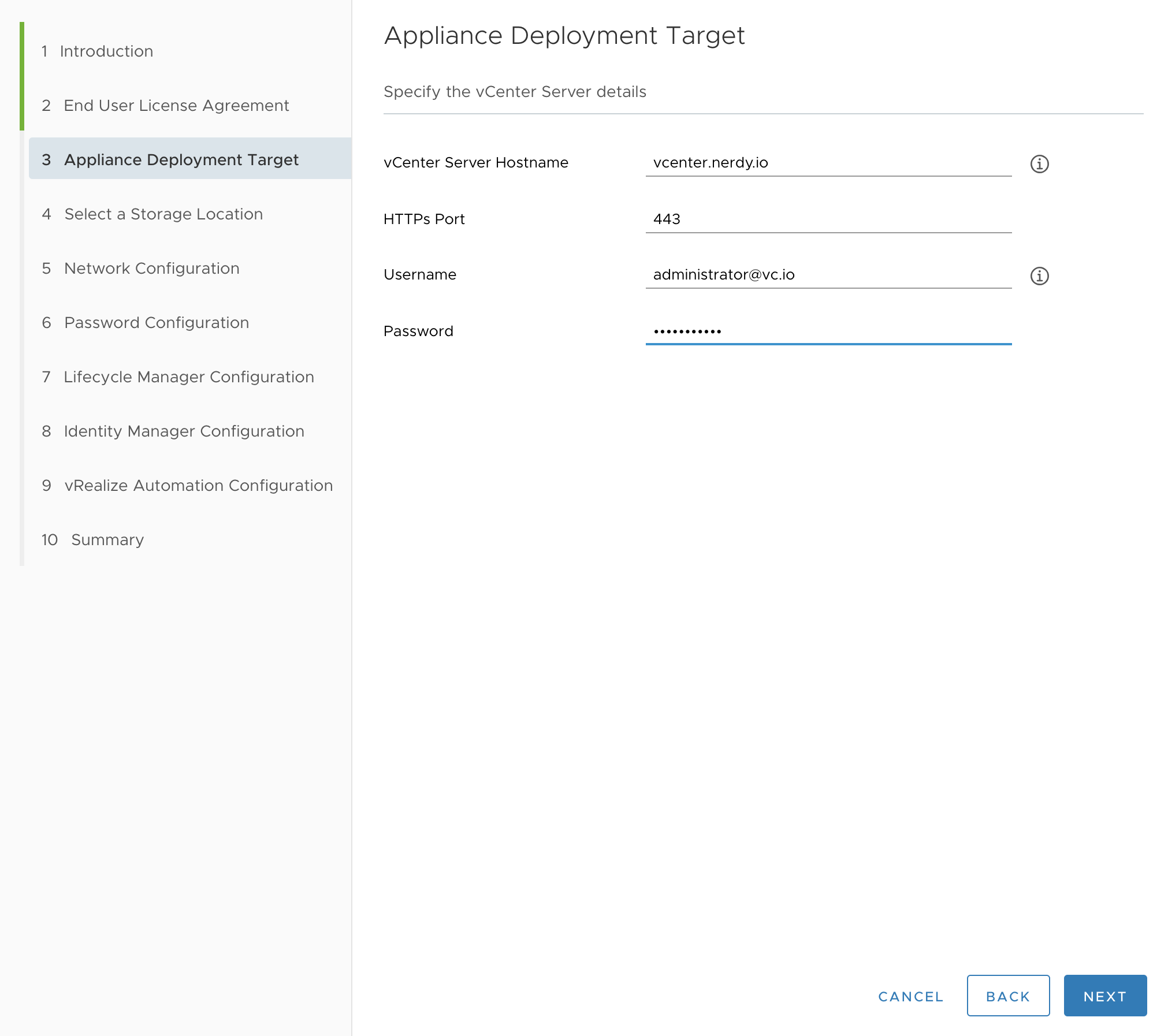
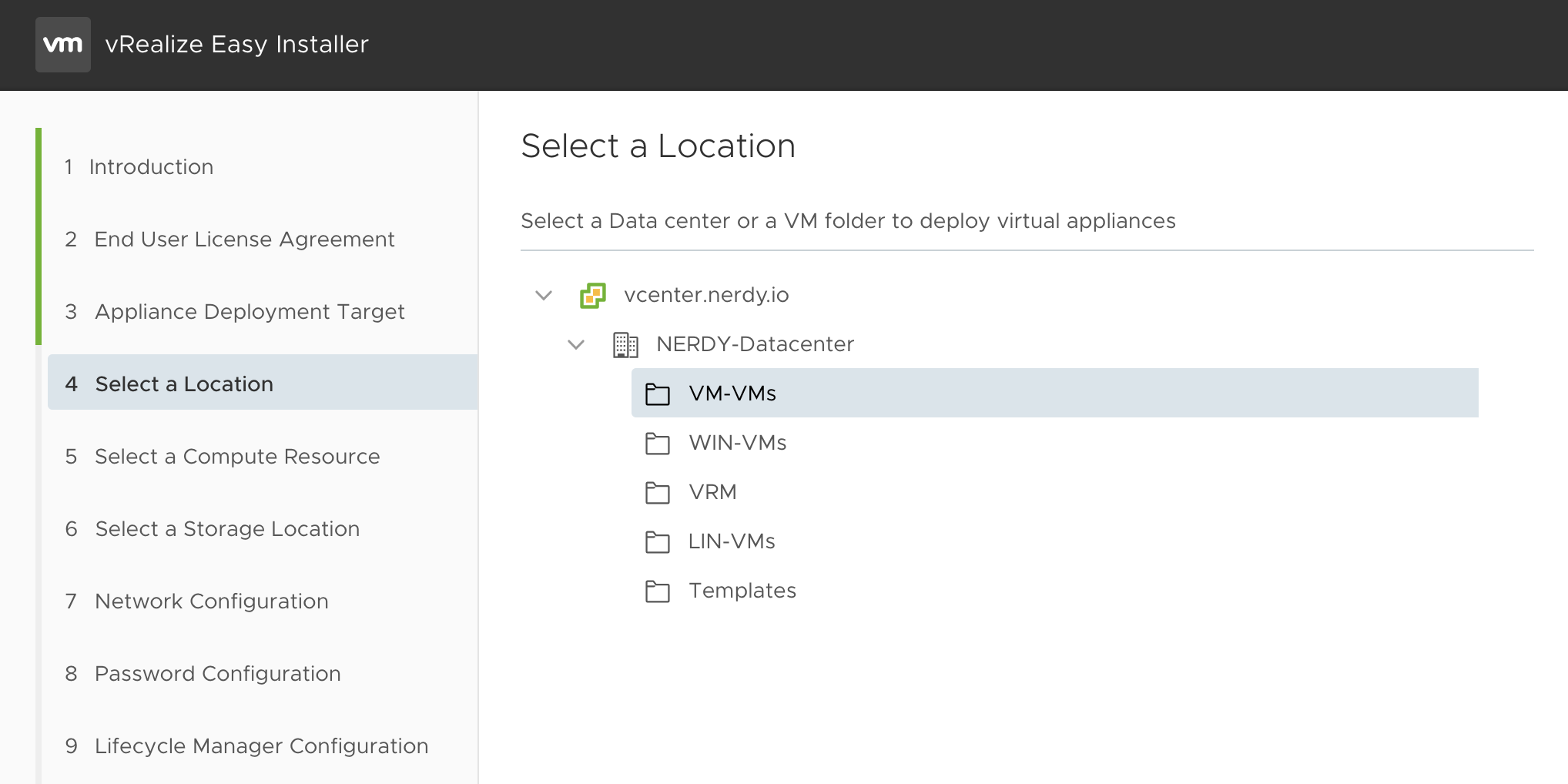
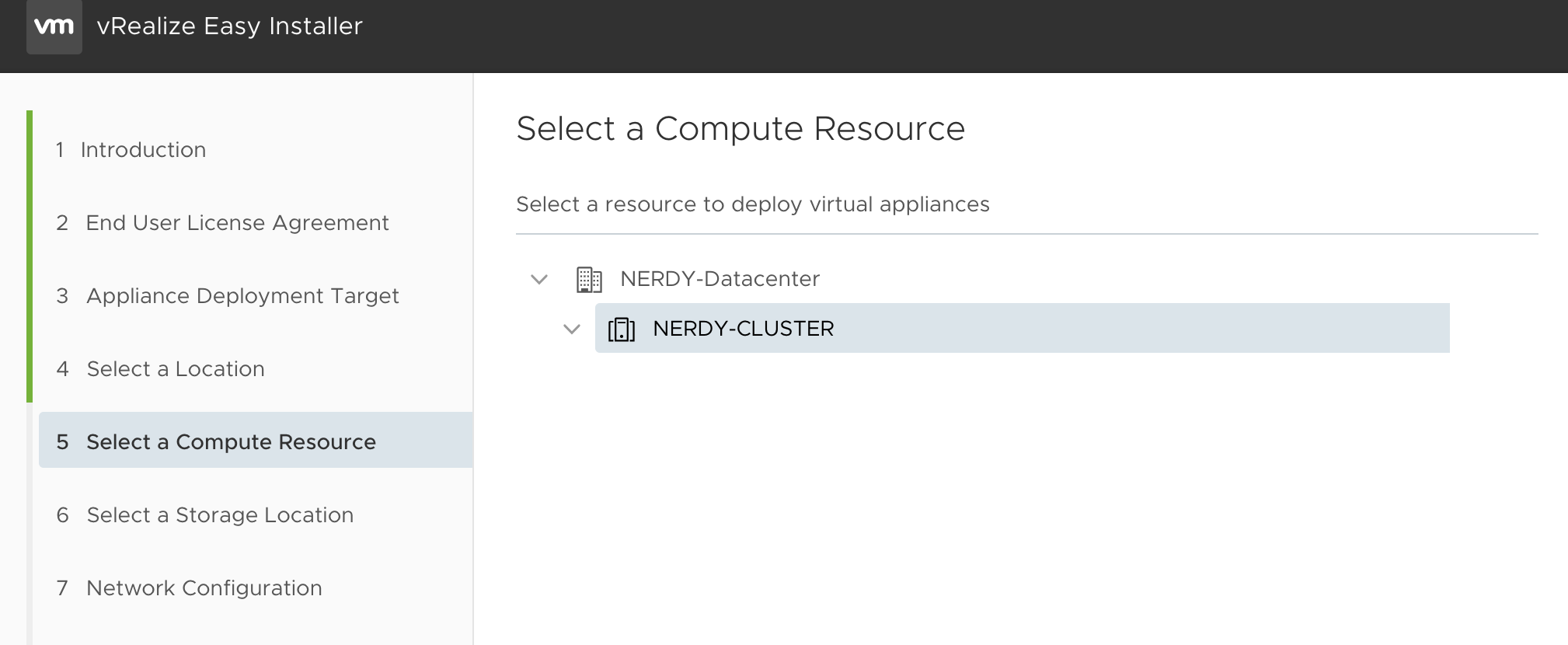
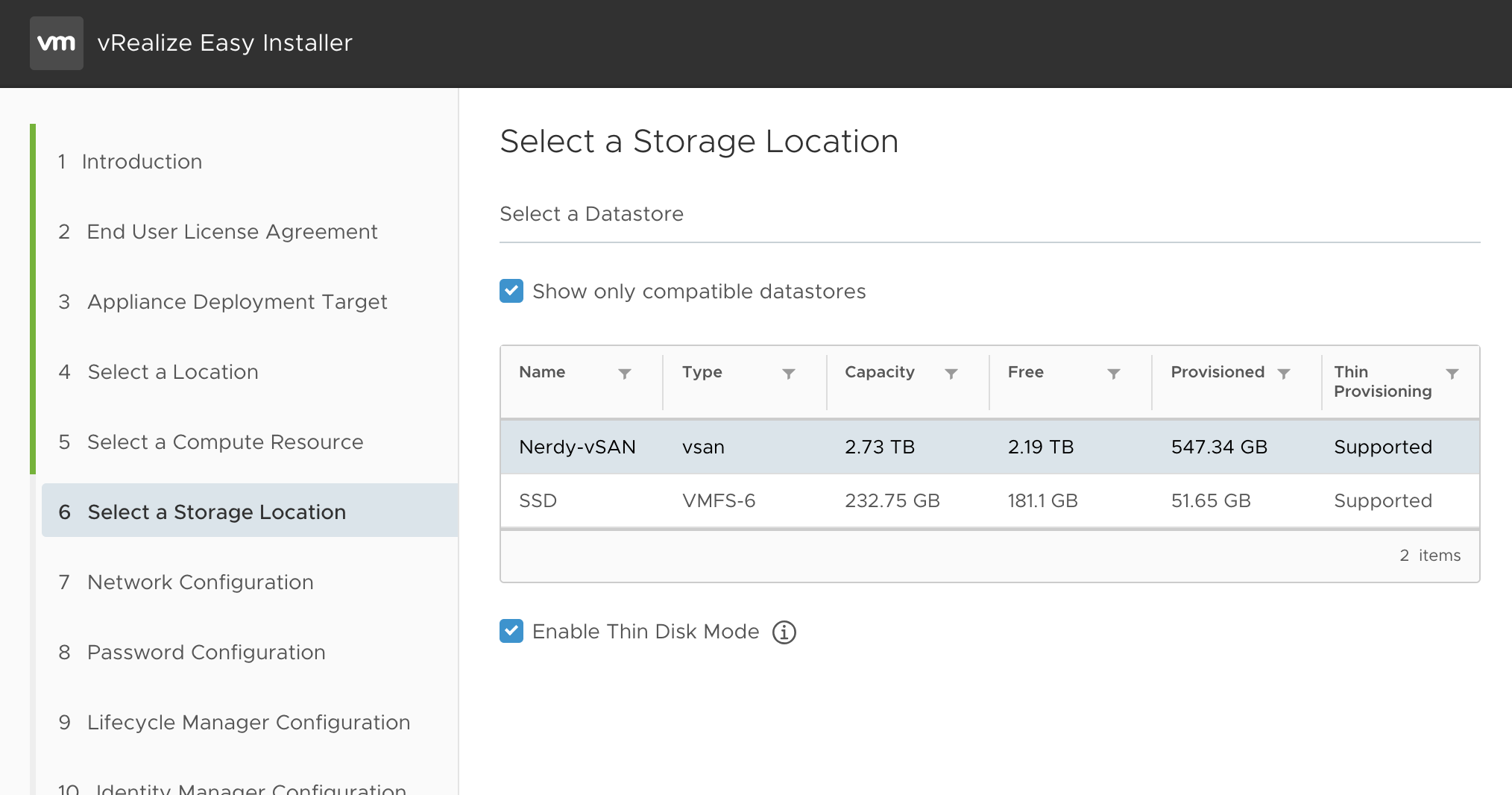
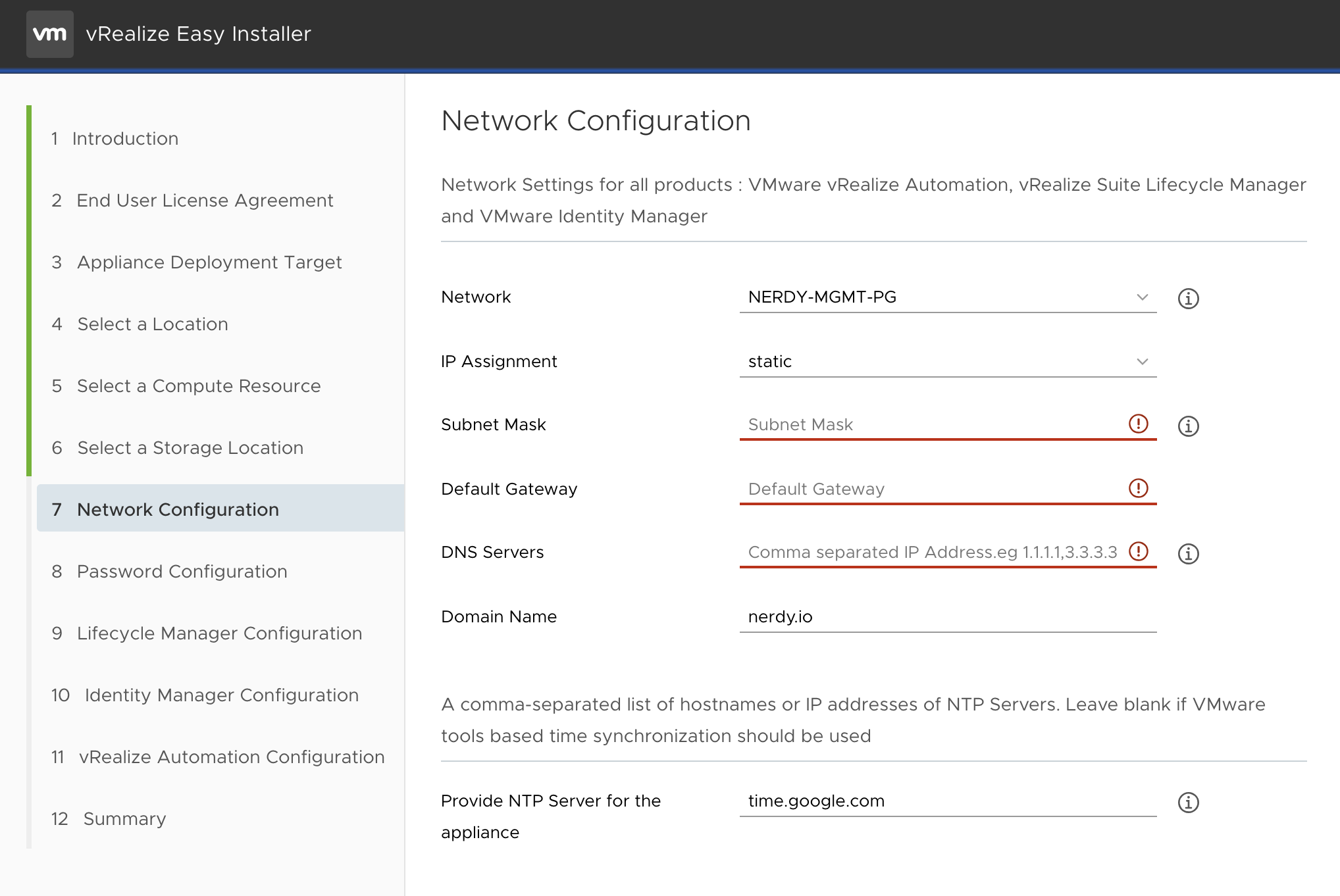
Second, is connecting it to your vCenter instance. This includes specifying the SAN, the network, and other configurations(PROTIP, Use an NTP for time sync)Screen Shot 2020-01-04 at 9.31.50 AMScreen Shot 2020-01-04 at 9.32.02 AMScreen Shot 2020-01-04 at 9.32.11 AMScreen Shot 2020-01-04 at 9.32.24 AM

Screen Shot 2020-01-04 at 9.33.06 AM
Obviously you would fill in what’s red, For some reason I just didn’t want to have that on the pic. Silly Nathan….

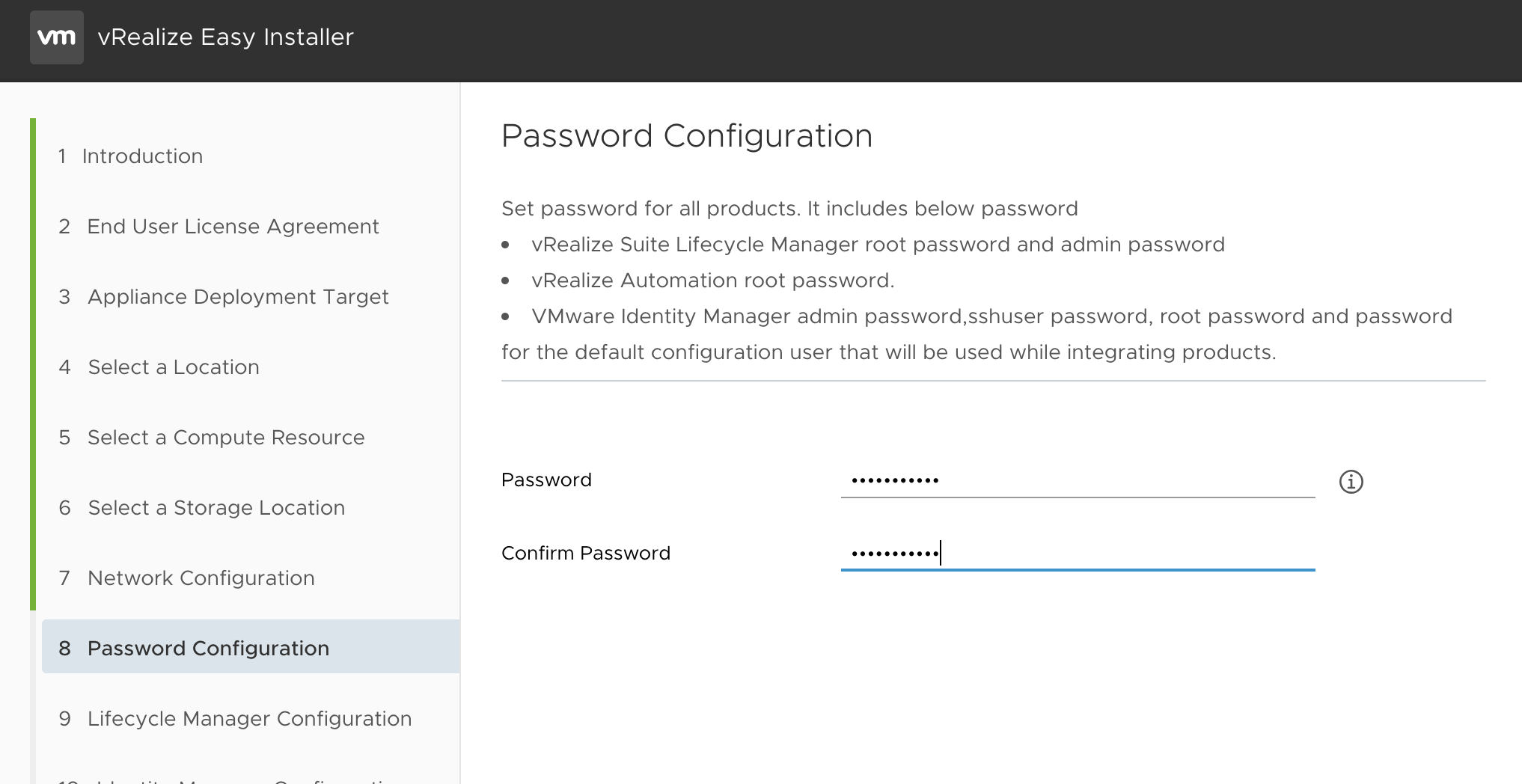
The Password page is the master password for everything your deploying. So make sure you know it, or have it.Screen Shot 2020-01-04 at 9.34.50 AM

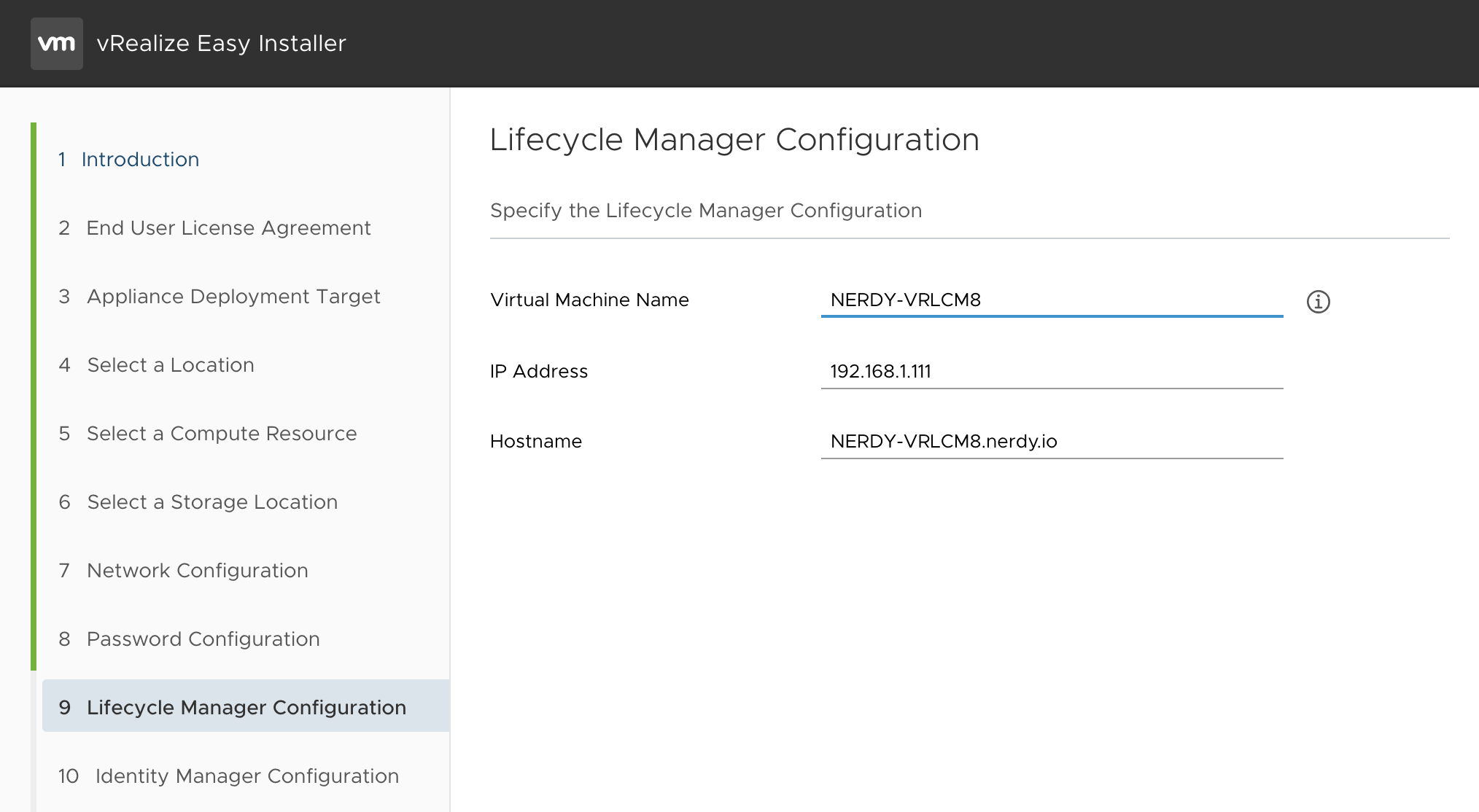
3rd is the LCM configuration:Screen Shot 2020-01-04 at 9.35.21 AM

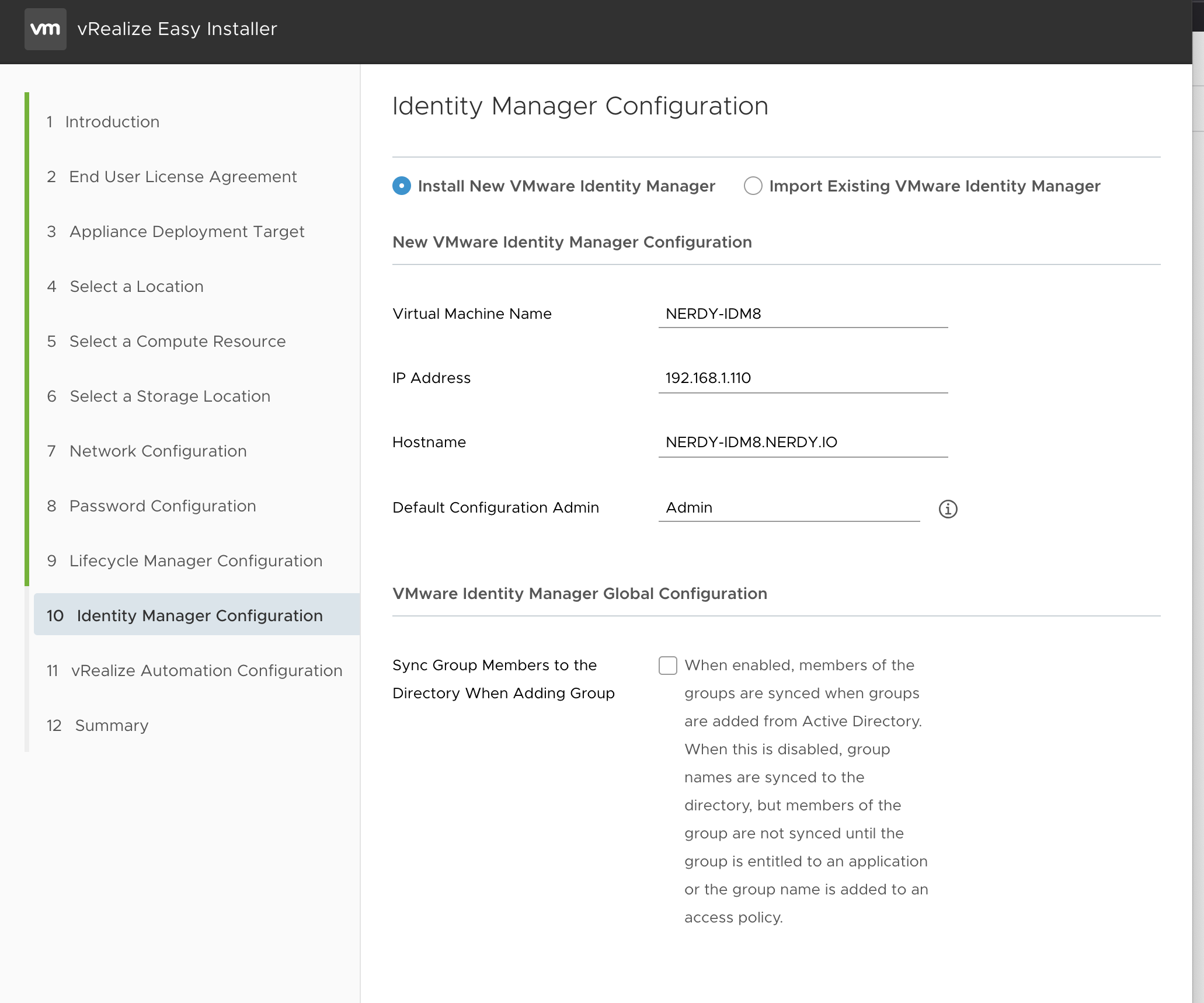
4th is the IDM configuration: Screen Shot 2020-01-04 at 9.35.32 AM

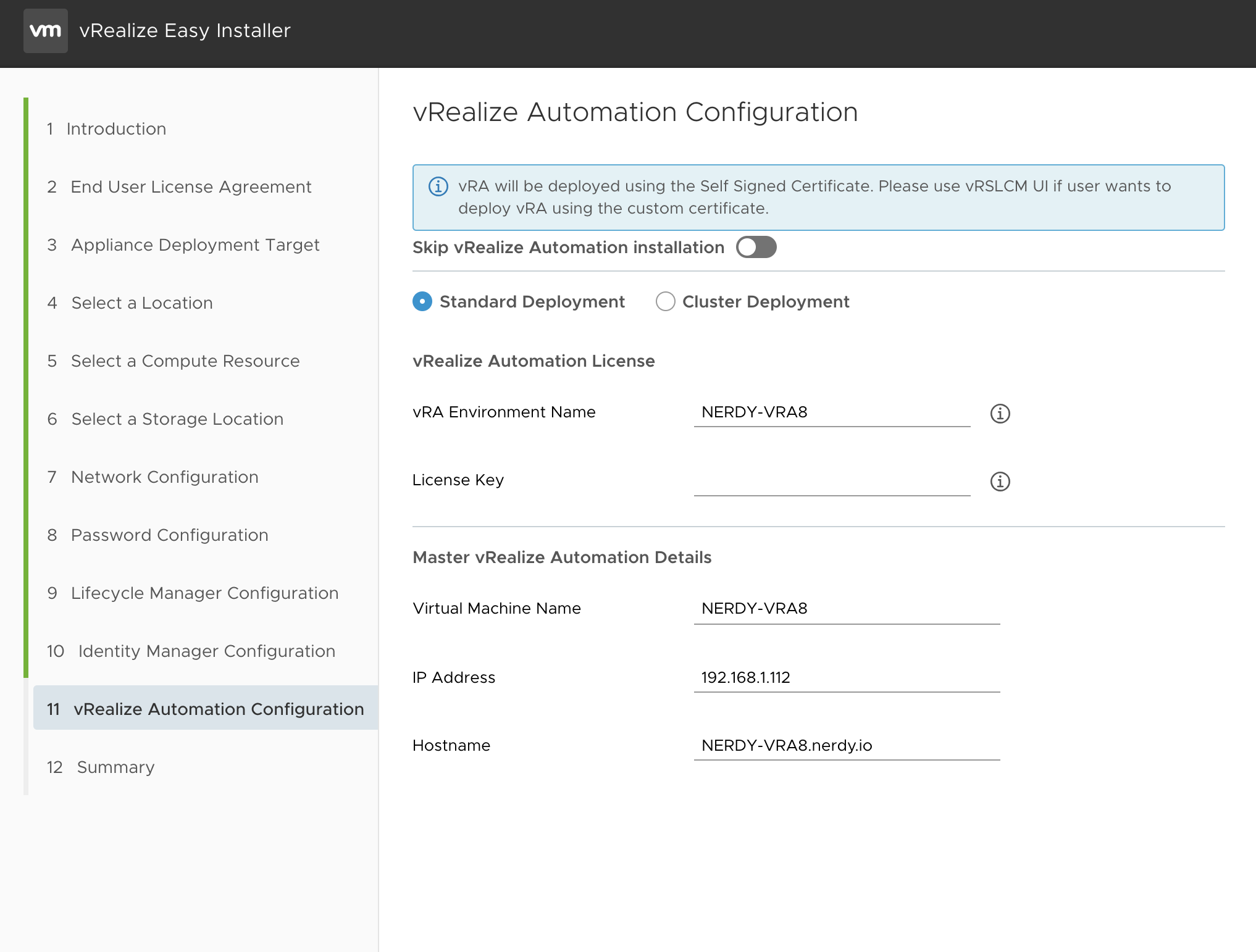
5th is the vRA configuration – Only thing new here is the Licensing key inputScreen Shot 2020-01-04 at 9.35.48 AM

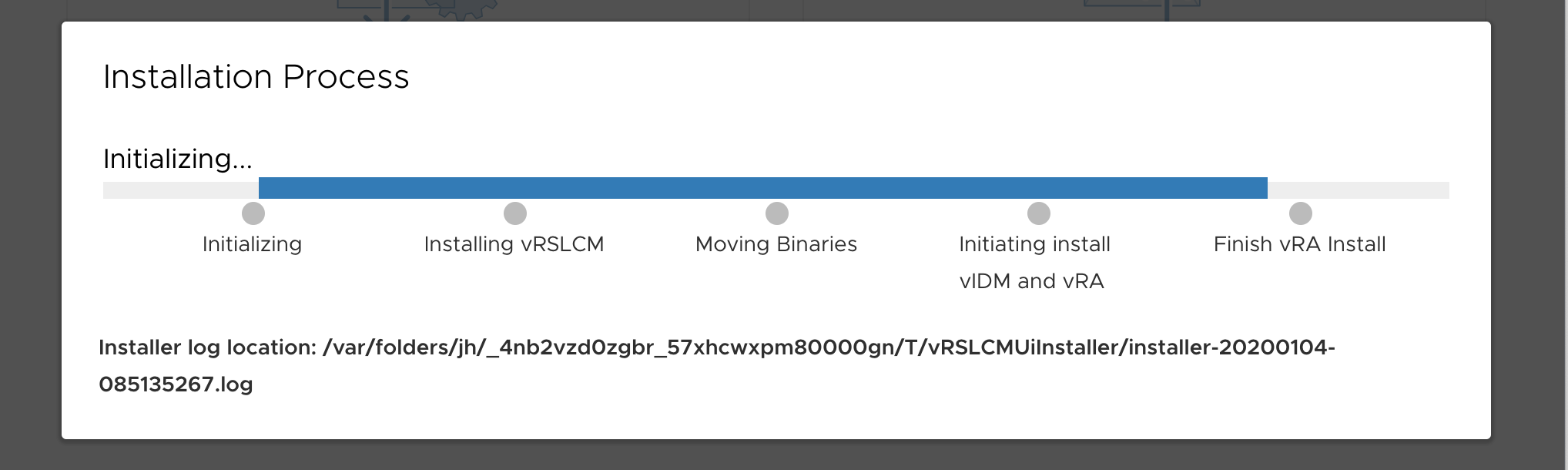
Now you wait….

Screen Shot 2020-01-04 at 9.22.14 AM

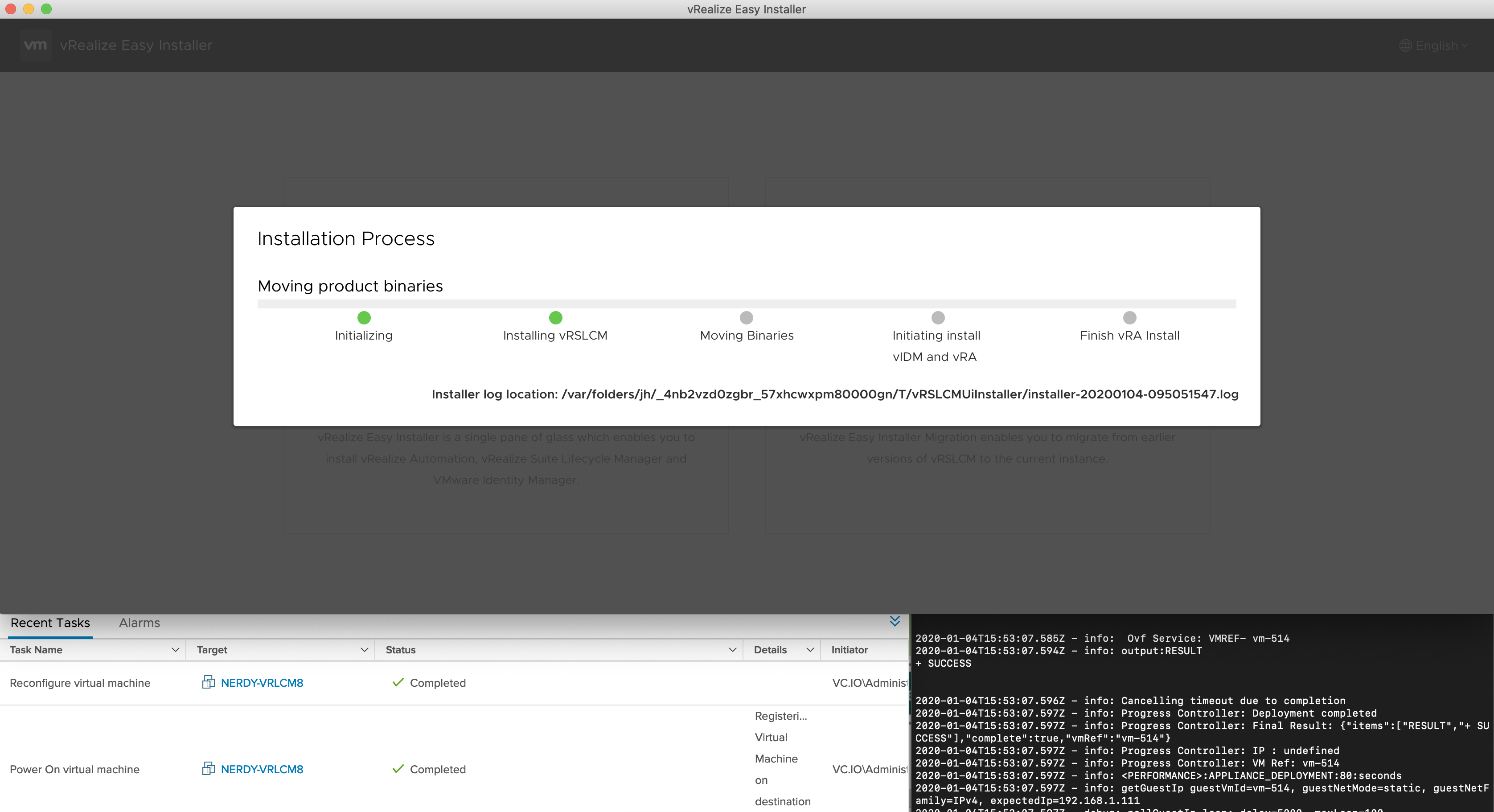
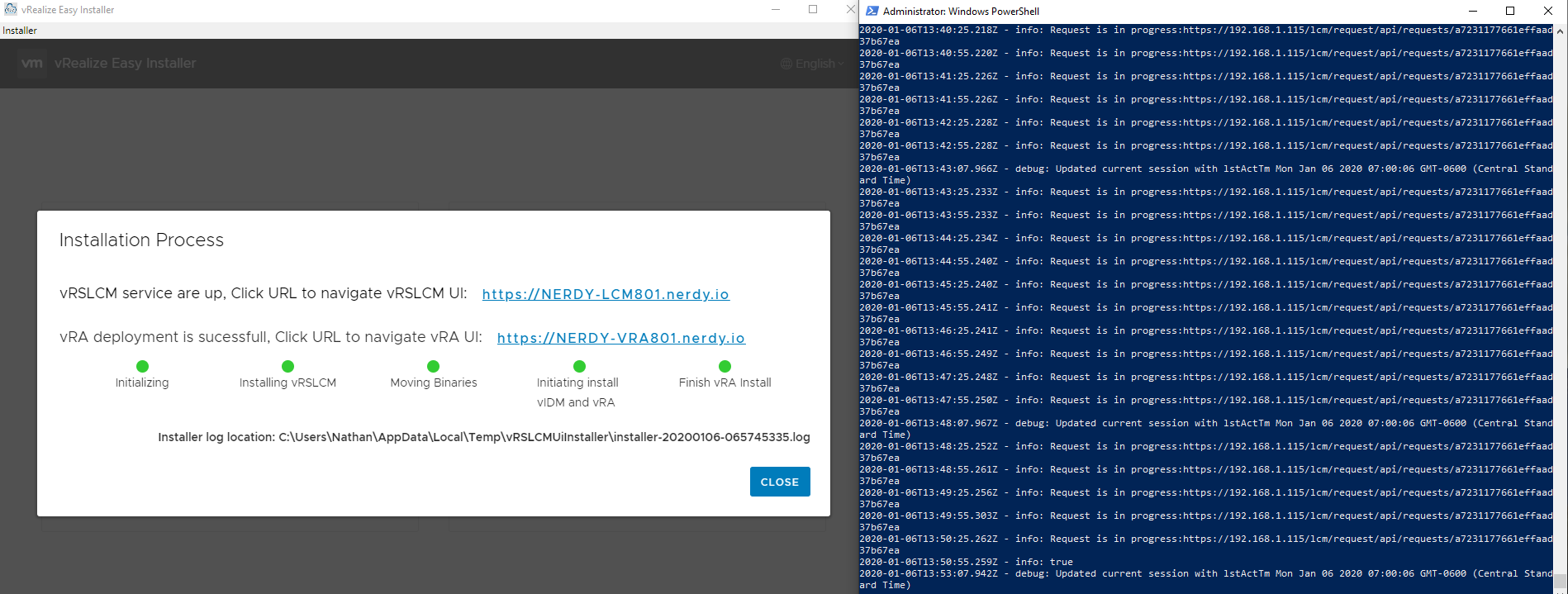
For those you can “tail -f” the log(“get-content *PATH* -wait” for Powershell) underneath to watch everything happening. If your like me it looks like this…Screen Shot 2020-01-04 at 9.55.07 AM

First command received at 7AM Final Completion at 7:57AM Less than an hour for full rollout once the inputs were all received.vra801

Those sharp eyed folks will realize a couple things. First the finish is on windows and i started on MAC. Catalina really screws the easy installer. Outside of the rights that I “Thought” I got around, it still holds something back on the installer. So I went to a windows machine.

Another issue is if you run the installer on the same DNS as a previous installation, it will cache things (on your workstation) and will fail on the post deployment checks. I got around this by changing my IP set for the three machines, and finally got my all green installer.

So, to sum up; easy installer can be great if you follow these three things:

  1. Dont use a catalina Mac. (I wouldn’t) If you do and you got it working, please tell me what you did to fix the rights, I’d like to fix my mac too.
  2. Dont re-use IPs from previous “Easy Installer” deployments(This is more a me thing, but heads up)
  3. Make sure your DNS is setup for IDM, VRA, and LCM and no collision.

Follow that and its pretty smooth sailing.

vRealize Automation 8.0 : First Impressions(The first 24 hours)

So its a little weird to give some thoughts on a product that hasn’t been out that long. The paint on vRA 8 hasn’t really dried on the GA announcement and I’ve only worked on it for over 24 hours. I thought this may be useful for those out there that are wondering if the upgrade from 7.6 to 8 was worth it (No migration). Maybe there are those out there wondering what it is, or what it does, or why these letters mean so much to some. Well I hope this helps, at least a little for some of those questions.

The “Easy” Installation

Oh there is a lot of talk about the Easy installer. Lots of people are discussing how its far superior to the deployment of minimal vRA 7.6 and how it even helps the larger installation. Well understand that with the “Easy” Deployment I was able to spin up an updated Lifecycle manager, IDM and vRA 8 within a couple of hours. BUT, the difference is within these “couple hours” the majority was just a loading bar.

The setup took 5 mins the first time I attempted to build the OS(HOLY COW). Yes, 5 mins. I timed it…

This failed because I put in a duplicate IP..(hangs head in shame) So I attempted again. This failed again… Why? DNS of course… So after setting up DNS and putting in proper IP address, it all installed like a charm. It was beautiful…

Comparison:

So for those looking at this and already attempted the “Easy” installation with vROPS or other appliances with Lifecycle manager, this is nothing new. But for those of us out there that remember the pain of building a SQL server, a “tools” server, and other IAAS components for vRA 7.6 you know that this deployment within hours, is amazing.

Oh and I didn’t have to mess with certs for a basic trial setup…. none…

Here is an HOL that will walk you through the setup:

HOL-2021-91-ISM – vRealize Automation 8

Moving around in vRA 8

This is alot of a learning curve and kinda the point of this blog.

vRA 8 is different… VERY different… If you’re familiar with CAS(Cloud Automation Services) you will be at home with vRA 8. The broker, assembly, Code stream, Orchestrator is all here. BUT, if you’re not familiar with CAS, and maybe(like me) you still use the legacy Orchestrator… This is all different, and different is good… real good.

Basically lets go over some basic navigation rules.

Service Broker = The vRealize Automation Service Broker is the simplified user interface that cloud administrators make available to users when the administrator’s teams do not need full access to developing and building and the blueprints or templates. From vRA 7.x its like the front end to the whole system much like 7.x has services and Catalog items. This will allow users to request things that we request with no access to Cloud Assembly needed.

Cloud Assembly = a multi-cloud, declarative blueprint orchestration and automation solution that enables infrastructure as code for expedited infrastructure consumption and application delivery. From vRA 7.x this is Reservations(kinda), blueprints, Xaas, and basically being a ENDPOINT agnostic automation tool.

Orchestrator (HTML 5 Only)= Simplify the automation of complex IT tasks with VMware vRealize Orchestrator, which integrates with vRealize Suite and vCloud Suite to further improve service delivery efficiency, operational management and IT agility.

Code Stream (Enterprise License)= is a continuous integration and continuous delivery (CICD) tool that you use to build pipelines that model the software release process in your DevOps lifecycle.

First 24 hours

Quickstart is a great intro to help reverse engineer how everything works from one part to the next. I really cant go into detail on how these work, but for those interested, there are many many posts on Cloud Automation Services to help fill in those gaps. After I spend more time with all the details and correlations there will be many more posts.

8.x is a great change for vRealize Automation. The idea of breaking a blueprint from an endpoint is genius. Playing around with “Cloud Machines” which are not glued to a specific cloud creates a great sandbox to build solutions that can be deployed to multiple clouds.

Lets say you build a 3 Tier web app that needs multiple machines. With this blueprint services you can run a build blueprint that can build this solution on your private cloud, but also on your public cloud as well. Or if you build it for AWS. it will also easily translate into Azure or GCP. This is the first Ah-ha moment of vRA 8.x and there are so many more to come.

Want to try it out? Go here to get a 30 day trial of vRealize Automation Cloud: https://cloud.vmware.com/vrealize-automation-cloud

Imposter Syndrome – My Experience + Sucking the Venom Out

So, something quite insane and personally significant happened this past week.

The week before had been a very difficult week in which I was up till 3 AM multiple nights working on things. At the same time I was dealing with the stress of selling our house and possibly being “homeless” because we didn’t know if timing would be on our side in terms of the move. The tipper was my wife. I’ll tell you one thing, nothing is worse than your wife being mad that you aren’t spending the time to be healthy, or time to take care of the family, because you’re up at 3 AM working. I love my wife. She is without a doubt the best thing that has ever happened to me, so know that putting her in this light is to paint a better picture of the issues that I’m working through.

My last post was on the Amanda Blevins talk at the VMUG Usercon in DFW. In it, one of the things that peaked my interest was when she talked about “Impostor Syndrome.” Either because I was distracted (or because I had 3 hours of sleep) I didn’t look into it or think about it anymore after that.  I do remember she talked about it as an issue in mental health, but I didn’t get what it was, or why/how it would impact my life.

Well the next week, a friend invited to take me to lunch. I had just screwed up and caused an outage for a product. There was a vendor in town, so I thought he wanted me to be part of a group. Over salads, we discussed how we both had been dealing with a lot of stress at home and at work, and how I felt as though I was not able to keep up as much as I wanted to, and many things were weighing on me. “You have impostor Syndrome!” my friend told me. “If you don’t know what it is, look it up.” It was the mention again of “Impostor syndrome” that stuck with me. I left lunch, and on a whim looked up impostor syndrome, and I have that thing to a T.

Impostor Syndrome

I’m pulling a lot of the next part of this blog from information from this: article

“I must not fail”

This thought is really easy for us to get into our head. I think for me failure is a constant, not something that happens now and again. Another engineer and I refer to our automation testing as “Incremental Assessments”. We both appreciate this as it helps us fail fast and learn what we missed. Once the testing shows good it’s then moved into a more production workload.

I always loved learning through trial and error, but lately that became difficult to the point of depressing. It morphed into “Every failure wasn’t learning, it was me failing.” This paired with the normal “Don’t screw up” voice that goes through everyone’s head during a normal workday became a crippling fear. For me this is the hardest to shake. I mean we all fear our own failure, even more, we fear that failure on a public stage where our peers, managers, and senior leadership are aware of said failure.

Remember this is an internal problem. Your own psyche is in a box of your brain, and it may have no bearing on actual reality. For me, people would tell me when I fail, “It doesn’t matter,” or “We know now something we didn’t before.” but it did matter; I still messed up and it rang in my head. How do we get out of our own heads? To combat this, we must listen, and believe. There are people out there that genuinely want you to succeed and grow. If you don’t know these people in your job, find them in your community. The vCommunity is great at this. We all fail, its part of our job. Accepting this and moving on is integral to our career. It may not help as much hearing things from outside of work, and I get that, but you need to hear it and believe it.

“I feel like a fake”

This is so true. I have stated several times I’m not a great automation engineer, I just find what other people have done and adjust to fit our environment. Its what I do best. If I had to start from scratch I’m not sure I’d get far. That’s my mental dialogue. It shows that this has been embedded in me for longer than even I’ve known.

The whole point here is not HOW I did the job, project, etc but that *I* DID it. Of course, others can use this to tear you down or make you feel little, just like any other kind of bullying. This negative feedback doesn’t mean you can’t do it, just that others might be able do it better. I don’t know who out there is the best of the best period, but understanding, and being honest with yourself, and your abilities and contributions is key here.

Remember YOU did the work that was necessary. YOU made the solution work. YOU took what was out there and made it fit the need of the company. Its not about HOW you did it, but that YOU did it, that’s what matters to combat that inner voice. When you feel like a ‘fake’, you feel like you don’t deserve what you have, but, remember you didn’t manipulate things to become that way, and it is not ‘just luck’. I’m blessed to be at a job that continually states they want me there, and are happy I am working there. A lot of people out there don’t have that, and I feel for them. This can be really hard when others don’t believe in you. Believe me, I’ve been there. If that’s you, reach out. Don’t let that negative inner voice win. It is not the truth.

“Success is no big deal”,“It’s all down to luck”

This comes from the previous point, Its about your inner voice downplaying the high points. Removing success as the goal is pretty horrid in my opinion. I know a guy or two that have done the bare minimum and found amazing success, and are they bad engineers? NO! They did exactly what the company needed and made things work for the company. What else were they suppose to do?

“It’s all down to luck”. This is something I’ve really never felt. I’ve always had a bigger issue with being a “fake” in my career. They seem to go hand in hand, but I’ve never felt that luck is what got me to where I am. I understand some may believe this. That somehow they stumbled upon things that “allowed” them to be successful. Unless that thing you stumbled on was a big sack of money, I doubt you stumbled on success. YOU got there.

End Notes

I am religious man. I believe there is more out there than what we see. If you’re not, that’s fine, believe what you need to be believe. BUT believe something, and it’s okay believe in yourself. In my college we discussed the “Worldview” of each person. This was basically created by asking the question, “how you see the world affects everything.” this naturally flows right into the question of “how do you see yourself?” Both are equally important when dealing with impostor Syndrome. Thinking through both can help you combat it.

I think that’s what this all boils down to. Belief. Amanda Blevins had an amazing talk on creating and using your brand, but the majority was based on knowing what keeps you happy and healthy in your career. Again, her mention of impostor syndrome initially put it on my ‘radar’. I summed up her talk as “Be Healthy, Be Happy” because it’s all about taking care of yourself. As Amanda put it, “It’s like the oxygen masks on an airplane, If you don’t put yours on first, you’re not going to be much help to those around you.”

You have to take care of yourself, and the first step is acknowledging you have a problem. I had to have a CIO scream it in my face (well not really scream, but he was loud and visibly worried). Don’t let it get to that point. I really want this to be something to create awareness. Life is more than work, eat, sleep, repeat. Work is more than success and failure. No one can live like that.

If you think you might have Impostor Syndrome, don’t wait, reach out immediately. It’s a warning sign of much worse things to come.

Here are some other points from the link above to help you mitigate the negative effects of Impostor Syndrome. Keep these in mind:

• Recognize impostor feelings when they emerge. Awareness is the first step to change, so ensure you track these thoughts: what they are, and when they emerge.

• Rewrite your mental programs. Instead of telling yourself they are going to find you out or that you don’t deserve success, remind yourself that it’s normal not to know everything and that you will find out more as you progress.

• Talk about your feelings. There may be others who feel like impostors too – it’s better to have an open dialogue rather than harbor negative thoughts alone

• Consider the context. Most people will have experience moments or occasions where they don’t feel 100% confident. There may be times when you feel out of your depth and self-doubt can be a normal reaction. If you catch yourself thinking that you are useless, re-frame it: “the fact that I feel useless right now does not mean that I really am.”

• Re-frame failure as a learning opportunity. Find out the lessons and use them constructively in future. This is a critical lesson for everyone.

• Be kind to yourself. Remember that you are entitled to make small mistakes occasionally and forgive yourself. Don’t forget to reward yourself for getting the big things right.

• Seek support. Everyone needs help: recognize that you can seek assistance and that you don’t have to do everything alone. This will give you a good reality check and help you talk things through.

• Visualize your success. Keep your eye on the outcome – completing the task or making the presentation, which will keep you focused and calm.

Cloning a Machine in Azure

The problem

Coming from my own vSphere engineering standpoint the public cloud makes things which I thought was easy difficult. After looking through some steps in order to basically “clone” a machine, I finally found a way to do this that is a bit easier though it does break some needed rules, and probably isn’t the safest process, but if your like me, it actually clones the machine

The process

To start out you need to snapshot the drive from a machine

  1. From the portal go to the Virtual Machine you want to snapshot, and click “Disks”
  2. From Disks click the OS disk for the machine
  3. Now at the top click, “Create Snapshot”
  4. Make sure to note the name and resource group as that’s the next steps. Click “Create”

Now that you have a snapshot you need to create a disk from that snapshot

  1. From the portal home you will click on the “See all” from the Azure Services
  2. From here go to “Disks”
  3. Click ” + Add”
  4. Select the Resource Group
  5. Input the name
  6. Click the “Source type”  and select “Snapshot”
  7. Select your snapshot
  8. For the drive make it the same size as the snapshot, and a “Standard HDD”
  9. Create whatever tags you need
  10. Create the drive

Now you should have the drive you need to create the machine.

  1. From the portal home you will click on the “See all” from the Azure Services
  2. From here go to “Disks”
  3. Select the Disk and near the top select “Create VM”
  4. From here on out create all the other needed options and create the VM. Dont change anything on the “Disk” field as its pulling the disk your deploying from.

Now the VM should build, and once done the drive is connected to the VM so it cannot be used again.

Log into the machine with your username/password from the origional machine(probably a good idea to change the password)

Enjoy!

DFW VMUG Usercon (my experience)

Usercon is an amazing event. Thanks to some of the leaders I was able to volunteer this year and be part of the team. This came with some discussion with the speakers, Talks with friends, hearing good speaker, and some good meetings with vendors in the solutions exchange. The great thing about usercon is that it comes accross as basically a min-VMworld (which it should!). Some of the sessions were almost identical to VMworld, in fact, our keynote was also a talk that was presented there. All of these things are what lead to some amazing talks with community, help with career development, and assist in basic IT needs. These are some of the many things that make this community so great.

The Keynote

https://twitter.com/vNerdyNate/status/1180126303187546114

Amanda Blevins did our keynote this year. it was focused on building your brand, but even more importantly building yourself as your brand. This was an interesting thought to me, as I had always thought that your brand is how people view you. However, I never truly gave time to think about what building that entailed. Yeah, sure, a Twitter handle and a blog helps, but digging in deep on the idea of “brand” reveals it as basically the perception of you.

Amanda’s talk was pretty eye opening, as I had spent my days busily fighting to prove that I was worth something at work, while at the same time, also selling my house. The endless hours of work tied up with the stress and fear of where am I going, what house will I be in etc. made her talk incredibly timely for my personal situation, and words I was ready to heed. One of the many take-aways I had was to create a sort of “budget” of your own needs and desires. We do this financially (I’ve been doing it daily since I’m buying a house), but we barely ever do this for our mental, spiritual, and physical well-being. To put it in short terms,

  • Sit down in a quiet room and center yourself (or meditate, pray, whatever to quiet the things around you in your life)
  • Now where do you want to go in your career?
  • How do you want to get to that point?
  • How do you want others to see you?
  • What makes you happy?  – This point is critical, as it drives us to achieve the other goals, but we also toss happiness aside for the others. So don’t forget this one
  • What makes you healthy?

I’m the sort of guy that goes all in at projects and issues. “You want my attention, well you got it bubba, Lets do this!!” tends to be my mindset. I’ll take the analogy of Captain Kirk – “leap before you look”. Its gotten me in trouble sometimes, but it is my nature to dive in to resolve issues. This made the idea that your “brand” is linked to your personal “budget” a new thought, but one I’ll be utilizing from now on. I’ll condense whole talk down to its most important take-aways for myself. #BeHappyBeHealthy

vCOMMUNITY!

I love these people. Some of the best and most wonderful folks to talk to are always around during a usercon. Al Rasheed was the one I was attached to the hip with, as he and I met on the Twitterverse and found him to be a very kindred spirit. We both believe fervently in this community, in the idea of practicing kindness, and the importance of giving back. It was great hanging out with him and talking to him about all the things that he was up to both professionally and personally. Great guy to know.


Paul Bryant is also one of my go-to guys to talk to. I’m sure most everyone knows Paul, hes commonly known as “The NSX Guy!” but one thing a lot of people don’t really know about, is that Paul is a solid, genuine guy who looks out for others, and is a great friend. Even on this day, Paul was pulled aside on an NSX issue and realized the problem and fixed it within minutes. Very impressive… TEACH ME SENPAI!

https://twitter.com/emcpebryant/status/1181703461840314373

I actually got to give back a little bit when talking to another person at the show about creating your brand, telling my experience, that was stumbling through setting up a blog, twitter, and then going through a whole ton of stuff where I basically vomited information on devops, kubernetes, containers, etc. Sometimes I guess just having a soundboard helps.

Other people shout outs to this awesome community are to @indylindy22 @KCDAUTOMATE (We will talk about vRA someday!), I got to talk to them at the dinner before the usercon, but not hang out at the event. These two got a vLadies panel together to go over women in the field. I don’t remember the title, which I hate myself for not writing down, but these are two people to know, as they are genuine people, know their stuff, and wonderful to talk to.

https://twitter.com/CaitVmug/status/1180195450621763584

Basically, if you can go to a usercon or VMUG get involved and go. These are amazing people with great skills who would love to help you improve, grown, and enjoy life together. Come be part of the party.

https://twitter.com/wmichel/status/1179899777066110978

vRealize Operations 7.5 Application Monitoring

Application Monitoring

These days there are a lot of different application monitoring solutions. I know cause I’m in the middle of looking through them for a good fit. The hardest thing for an IT operations engineer is having to be woken up at 3AM to fix a “Server Down” situation. However, it’s even more detrimental to for a company to have a customer or a critical application to be down and no one be alerted.
I always think about the old adage, “If a tree falls in the woods but no one hears it does it actually fall?” Well of course it does. The difference is no one knows or cares about said tree. Well if that tree is a tier 1 app. You better know whats going on.

I decided to write this cause I had a really hard time figuring out how to get things setup in vROPS. Yes disk monitoring and other basic management packs are available for vROPS, but I wanted to be able to do more. HTTP get requests, IIS, SQL, ETC.

I know this will probably all change with vROPS 8.0 coming out, but for now this is what I wanted to roll out to test. The process may change or it may stay the same. Once I get my dirty hands on it, I’ll update this post as needed.

Couple of Pre-Requisites

  1. vRealize Operations deployed into your environment
  2. Licensing for the Enterprise edition of vROPS. You can do some OS monitoring with Advanced, but for application monitoring, you will need Enterprise

Application Remote Collector

Here is a video by John Dias on what you need to do to set this up, I’ll go through it step by step as well, so you have some steps on top of the video.

John Dias Video

  1. Log into vROPS
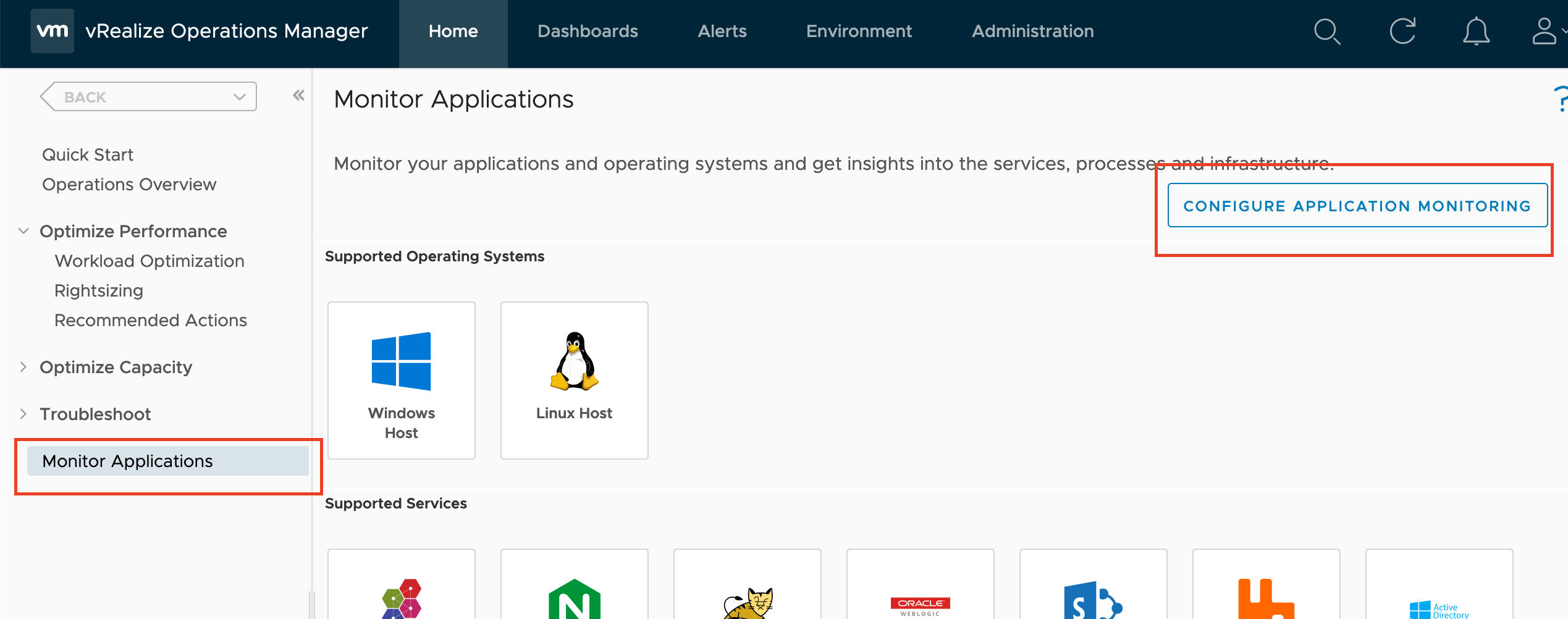
  2. On the dashboard go to “Monitor Applications” and then select “Configure Application Monitoring”Screen Shot 2019-09-06 at 6.43.03 AM
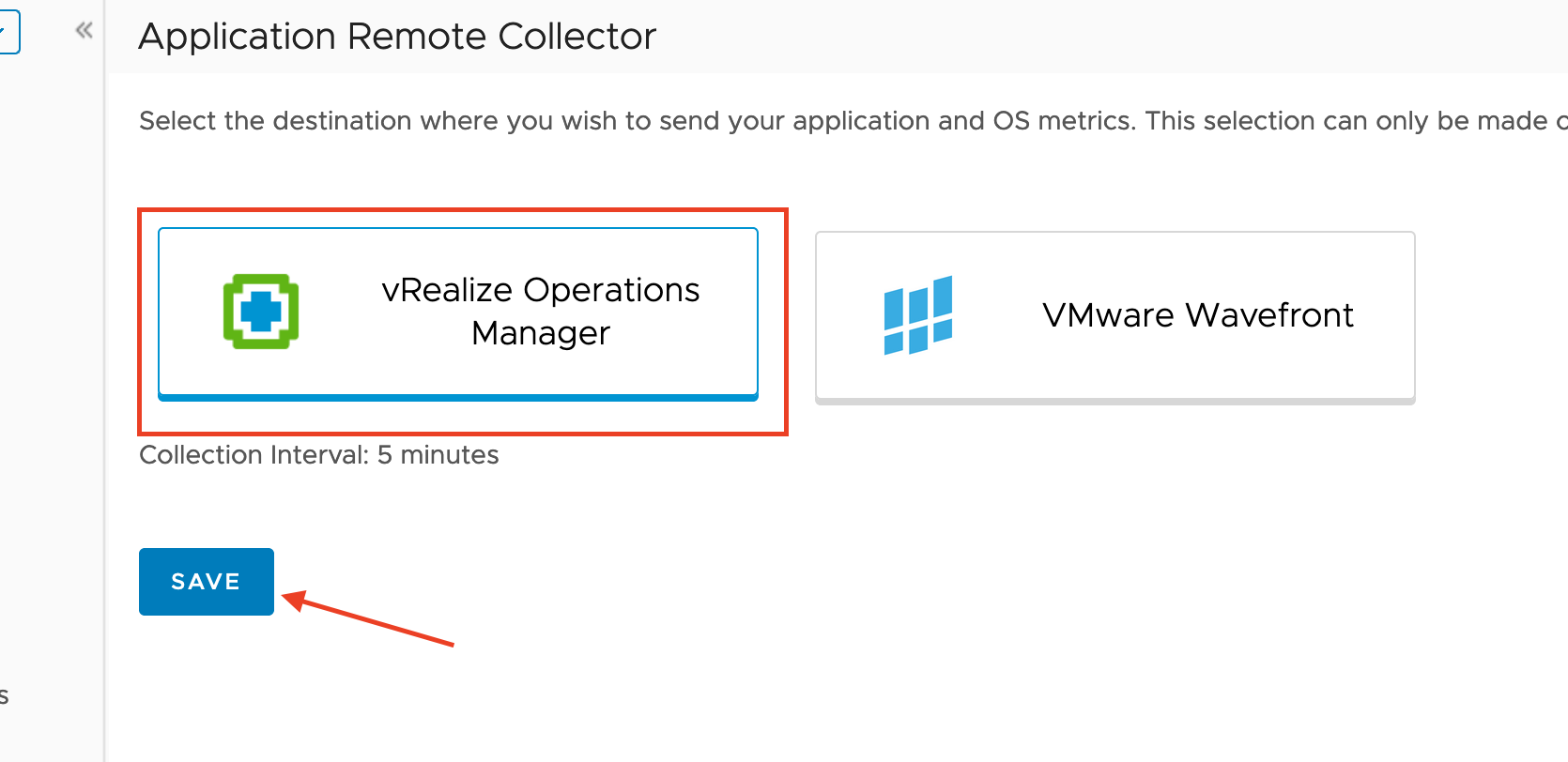
  3. Next you will Select what type of application Monitoring you will use. Either vROPS or Wavefront. For this we’ll use vRealize Operations, and Click “Save” NOTE: This is an irreversible choice. So plan ahead and make sure that you will be using this monitoring through vROPS only for the selection you pick.Screen Shot 2019-09-06 at 6.44.41 AM
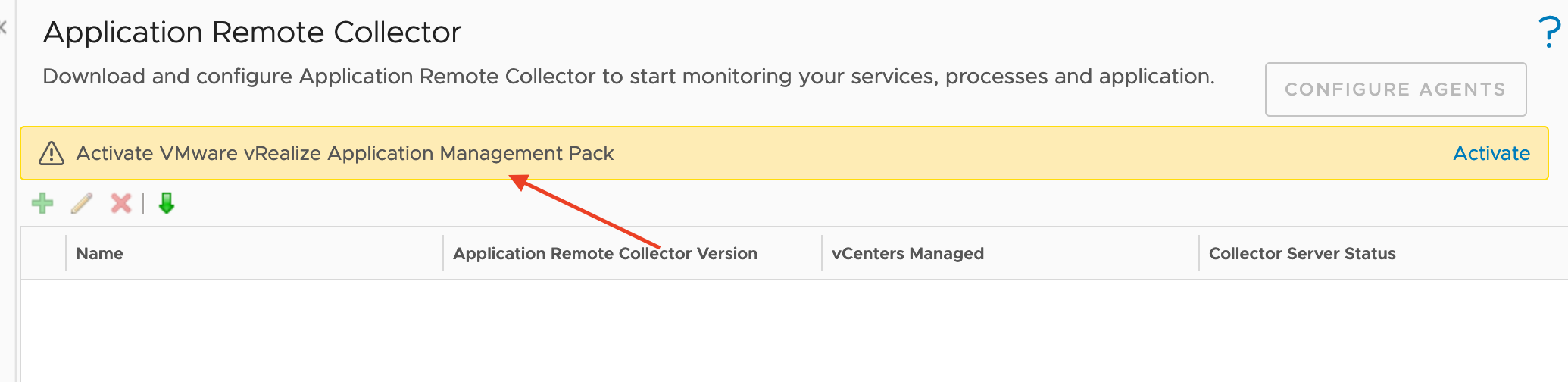
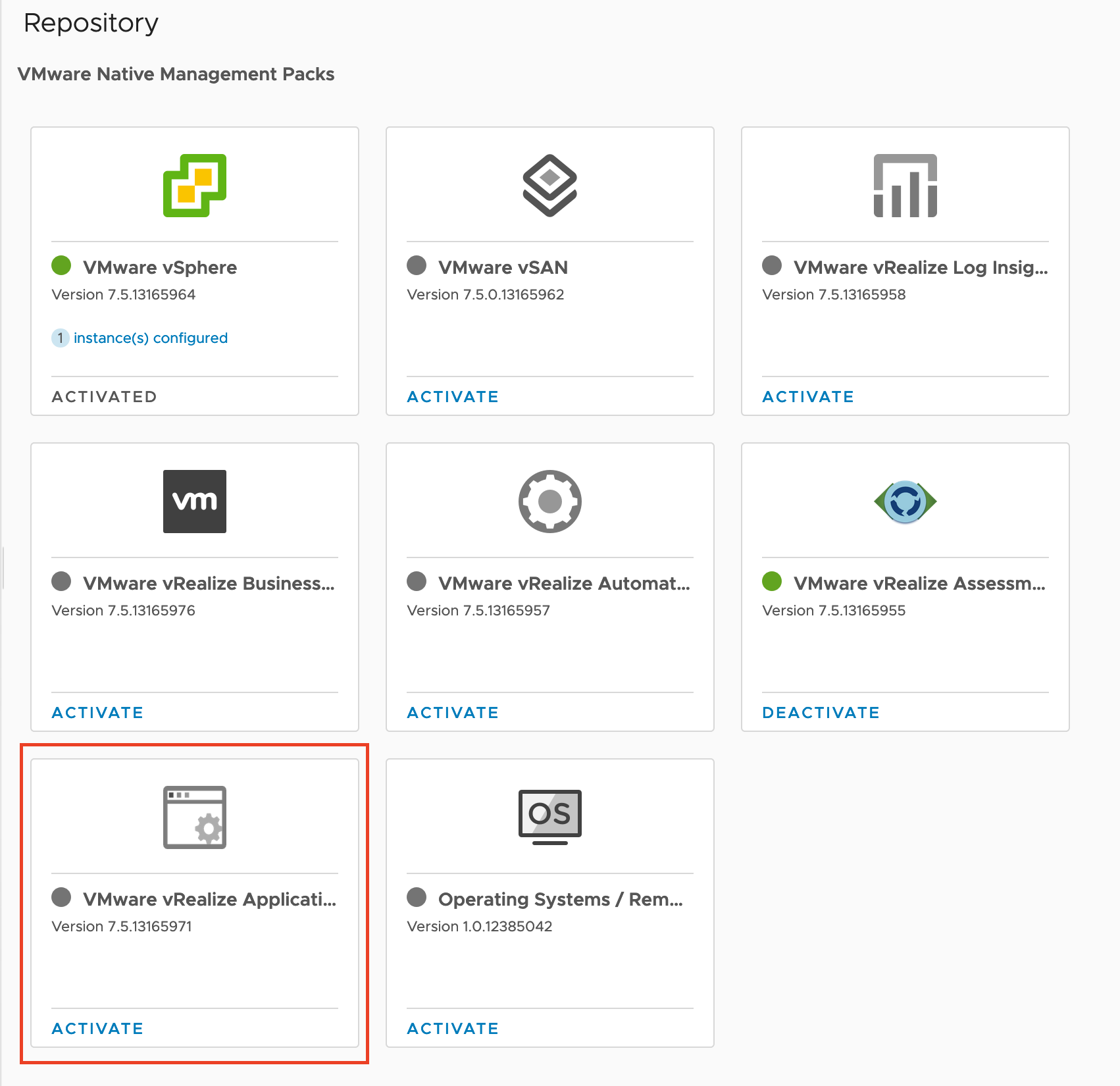
  4. This can take a while, but if you haven’t activate the vRealize Application Management Package in vROPS you will be notified to do so.Screen Shot 2019-09-06 at 6.45.41 AM
  5. Just click “Activate” and it will take you to the Administration Tab:Screen Shot 2019-09-06 at 6.46.28 AM
  6. Just click “Activate”, This will take some time depending on the size of your deployment.
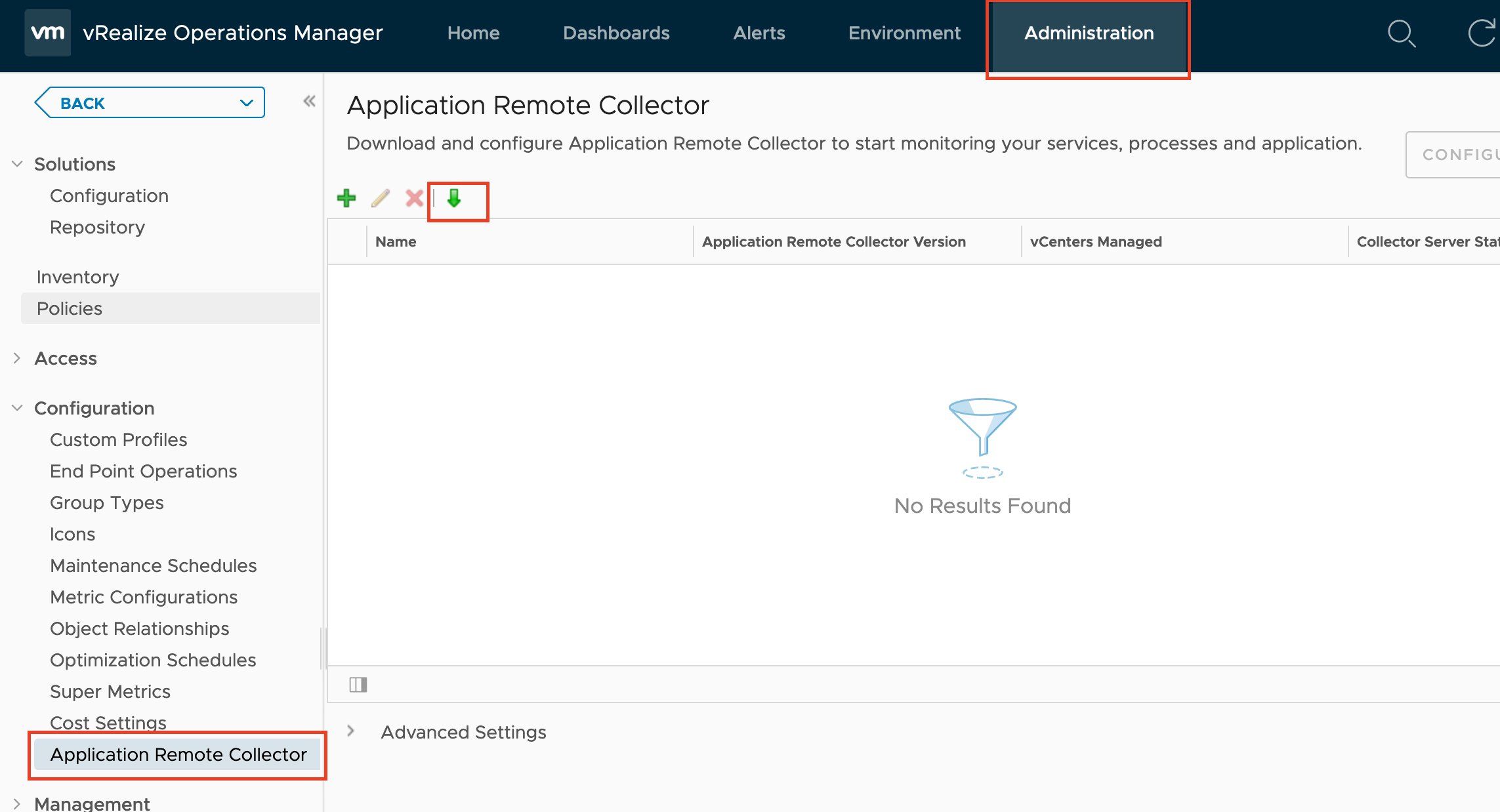
  7. Now that it’s activated, On the same tab(Administration) go to “Configuration”, and “Application Remote Collector”. Click the green download arrow to download the OVA of the Remote Collector. This will need to be deployed into your environment.Screen Shot 2019-09-06 at 7.05.19 AM
  8. Once the OVA is downloaded, deploy it to your environment. Probably good to neighbor your vRealize Operations deployment, so that you wont have to deal with those Networking guys. I wont go over the OVA deployment as it’s pretty standard. I will note, that you need to make SURE you remember the password you set.
  9. Power up your Remote collector appliance.
  10. Set a DNS record for the Remote Collector IP.
  11. Once the Collector is up. Open the console
  12. Login with username: root, Password: “vmware”
  13. Create a new password
  14. run: vi /etc/ntp.conf
  15. Add a new line at the bottom pointing to an NTP server – Line will look like: “server time.google.com”
  16. Run the following
    1. enable NTP
      1. systemctl start ntpd
      2. systemctl enable ntpd
    2. enable start ssh
      1. systemctl enable sshd
      2. systemctl start sshd
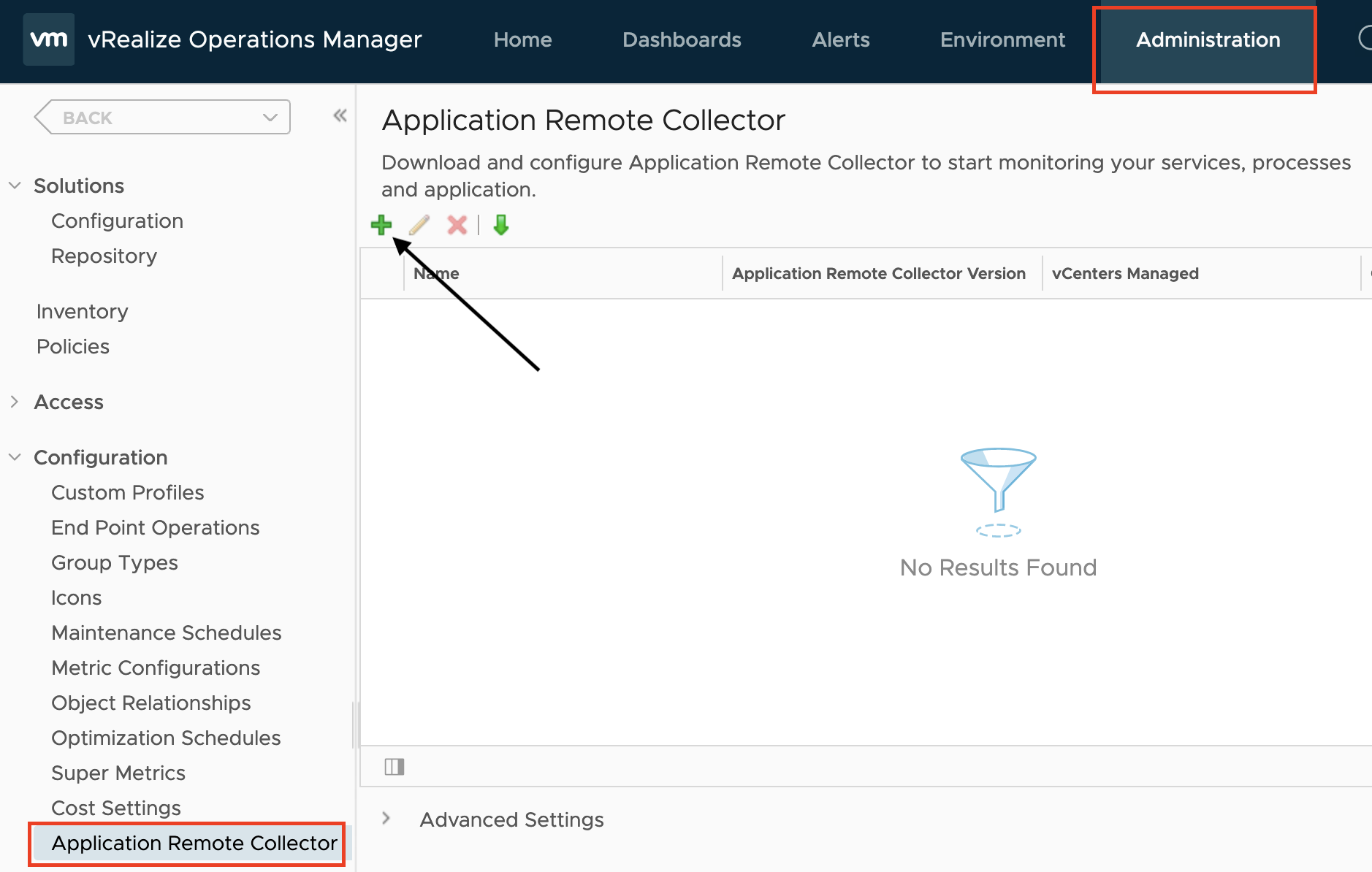
  17. Return to vROPS and go to the “Administration” tab under “Configuration -> Application Remote Collector” Click the green “+”Screen Shot 2019-09-08 at 6.39.10 AM
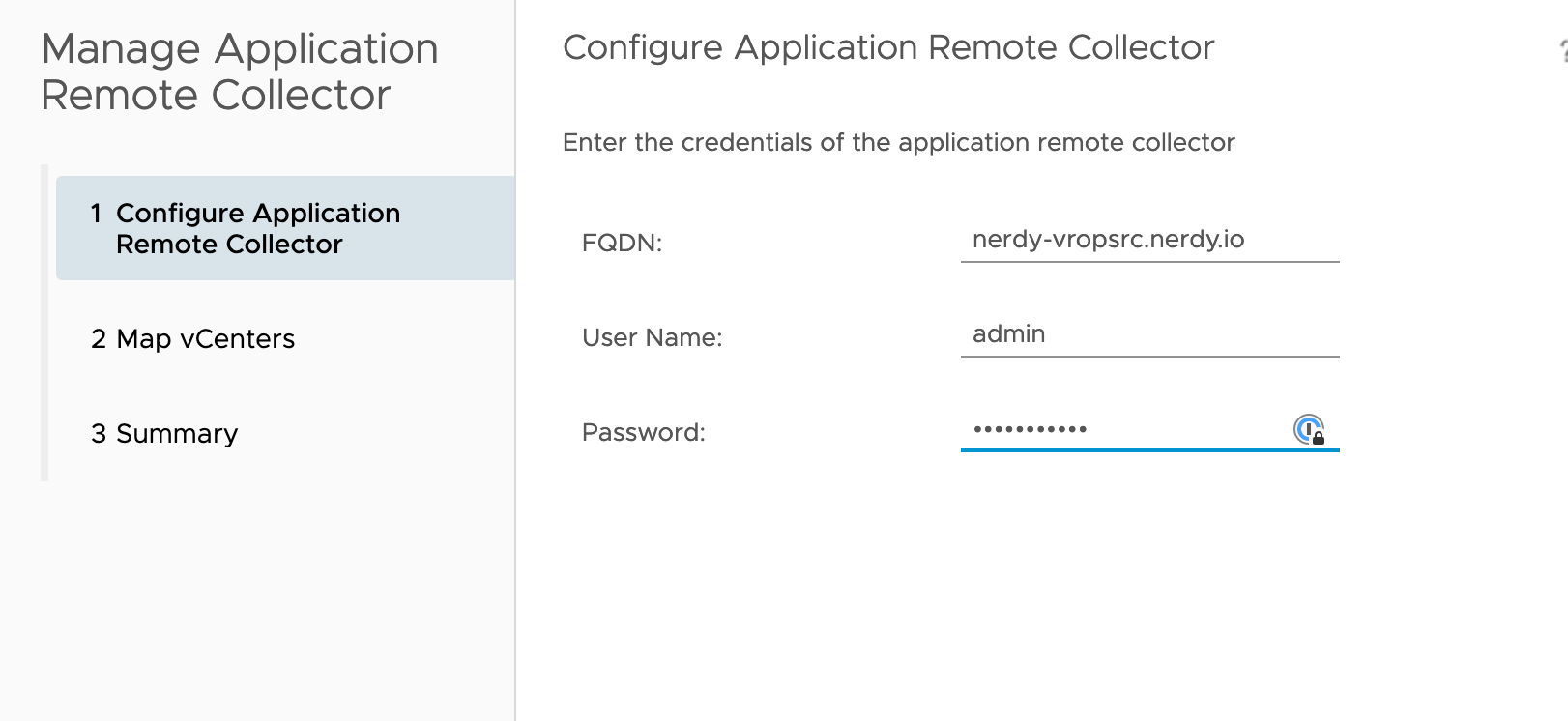
  18. Here is where DNS comes in. I’ve had some issues with getting vROPS to see the collector. On the top line input the FQDN of the collector(IP works as well for setup) input your Username and Password that you set when you created the appliance.Screen Shot 2019-09-08 at 6.56.38 AM
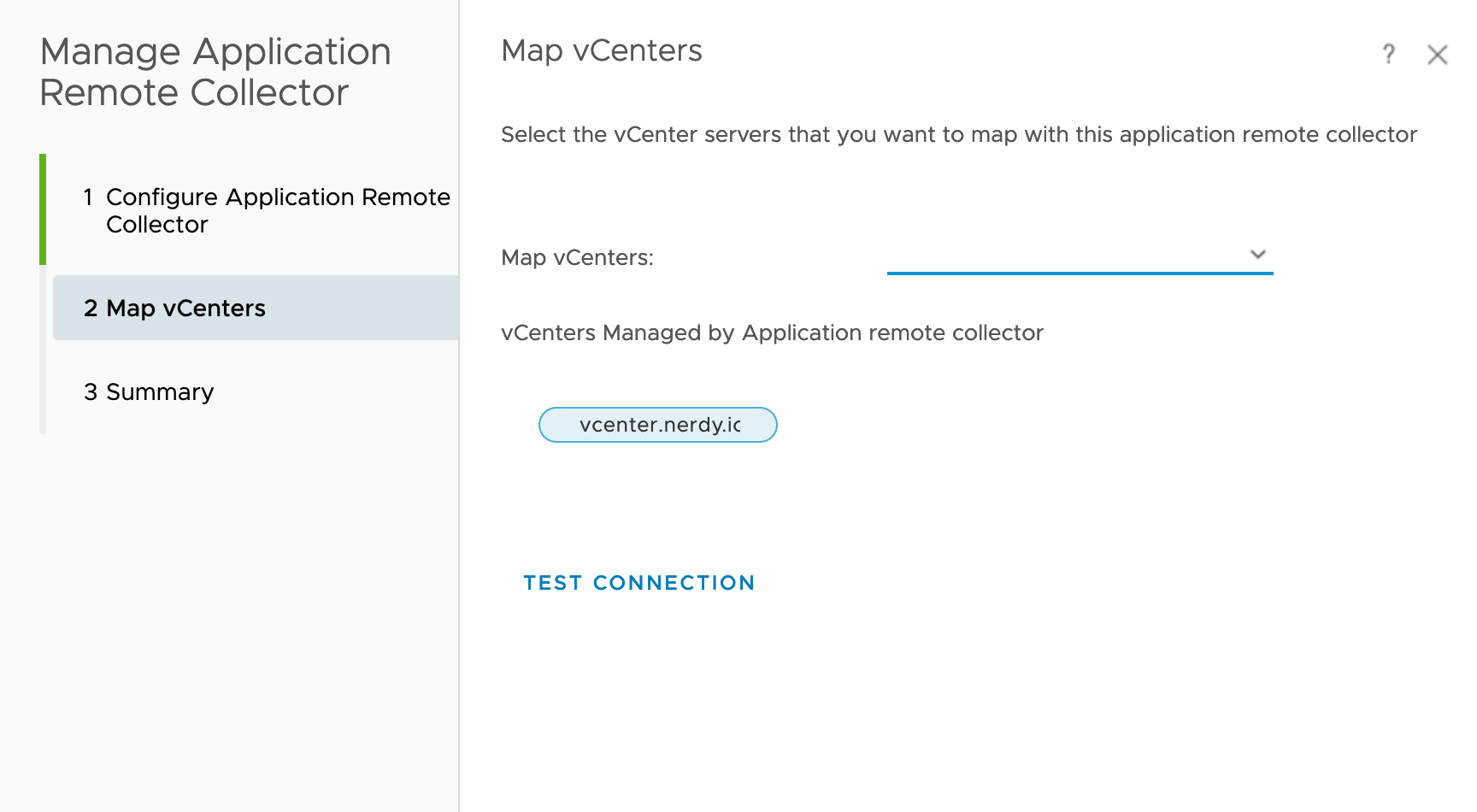
  19. Under “Map vCenters” Select the vCenter from the drop-down and run “Test Connection”.Screen Shot 2019-09-08 at 6.56.53 AM
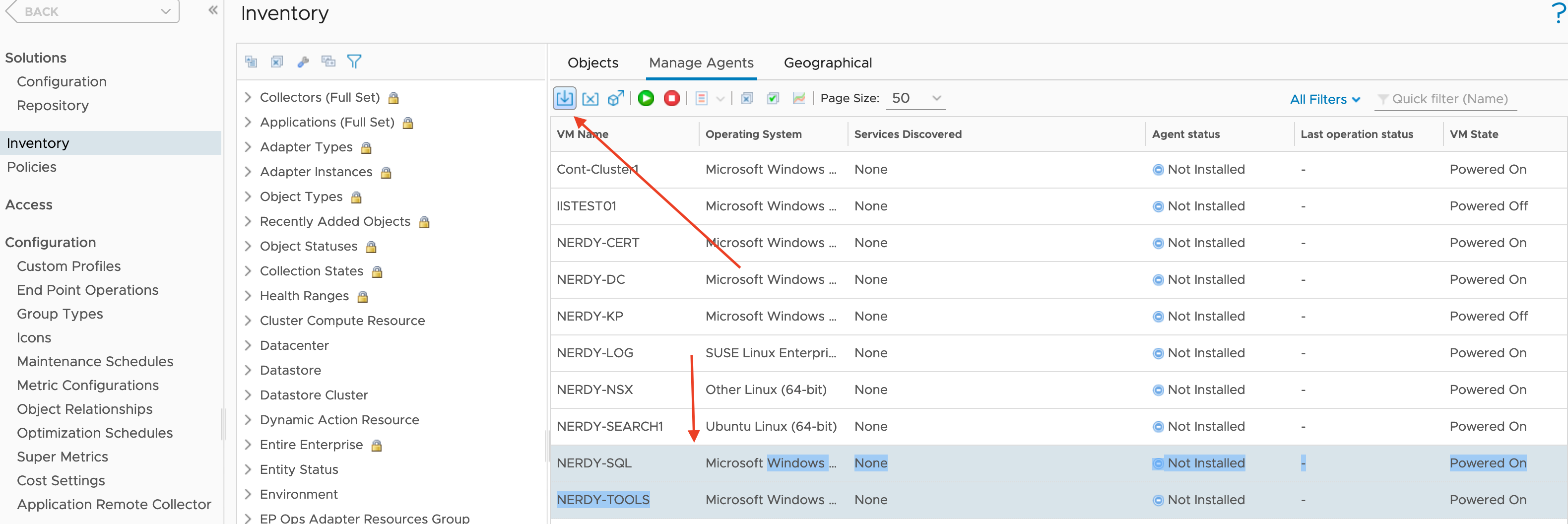
  20. Now after the Collector is loaded, click, “Configure Agents”. Select the VMs you want to install the agent on, and click the “Install” button (It’s the arrow pointing down). FunFact – You can use shift click to select multiple machines, and use the filter to allow a better selection.Screen Shot 2019-09-08 at 7.01.47 AM
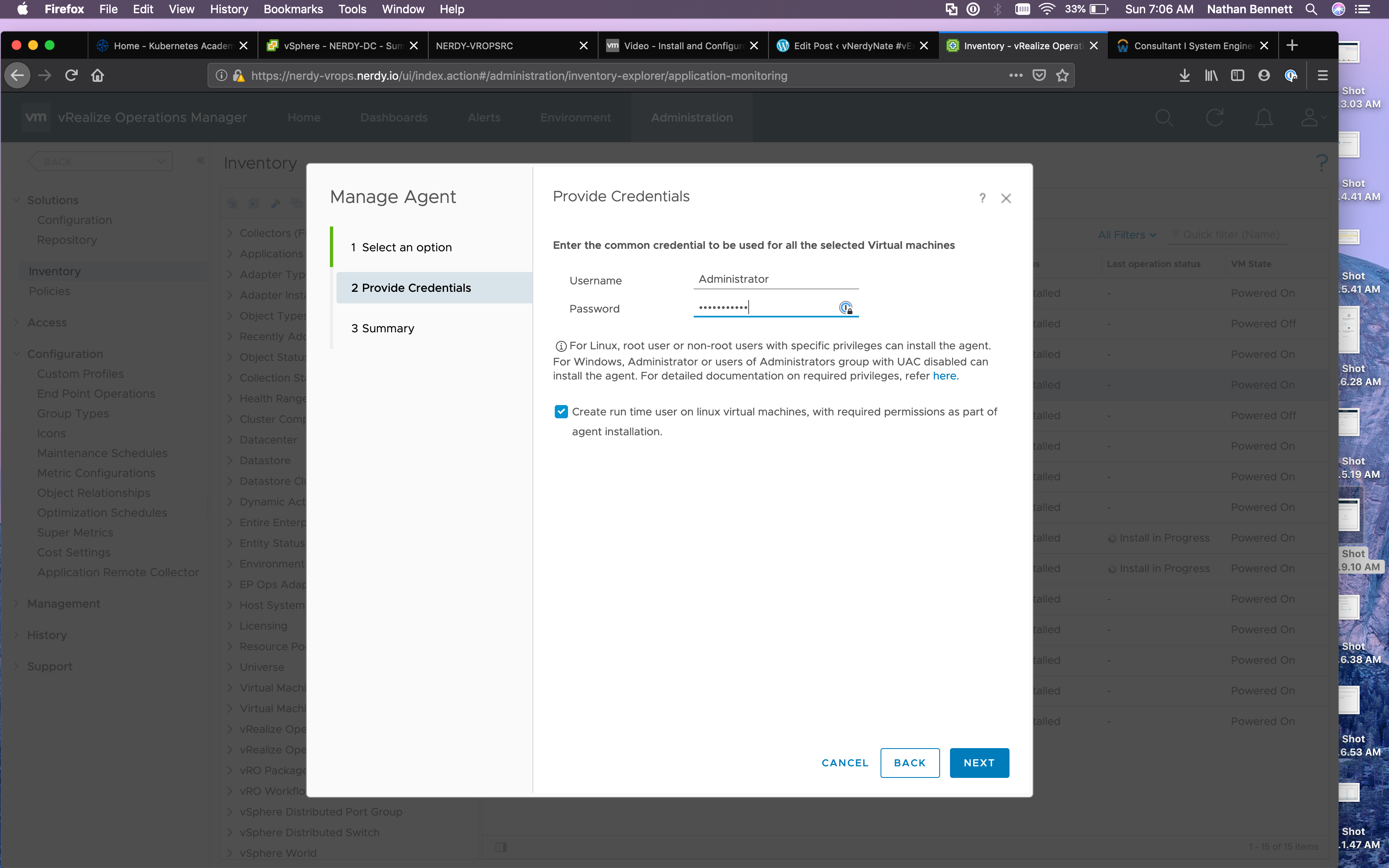
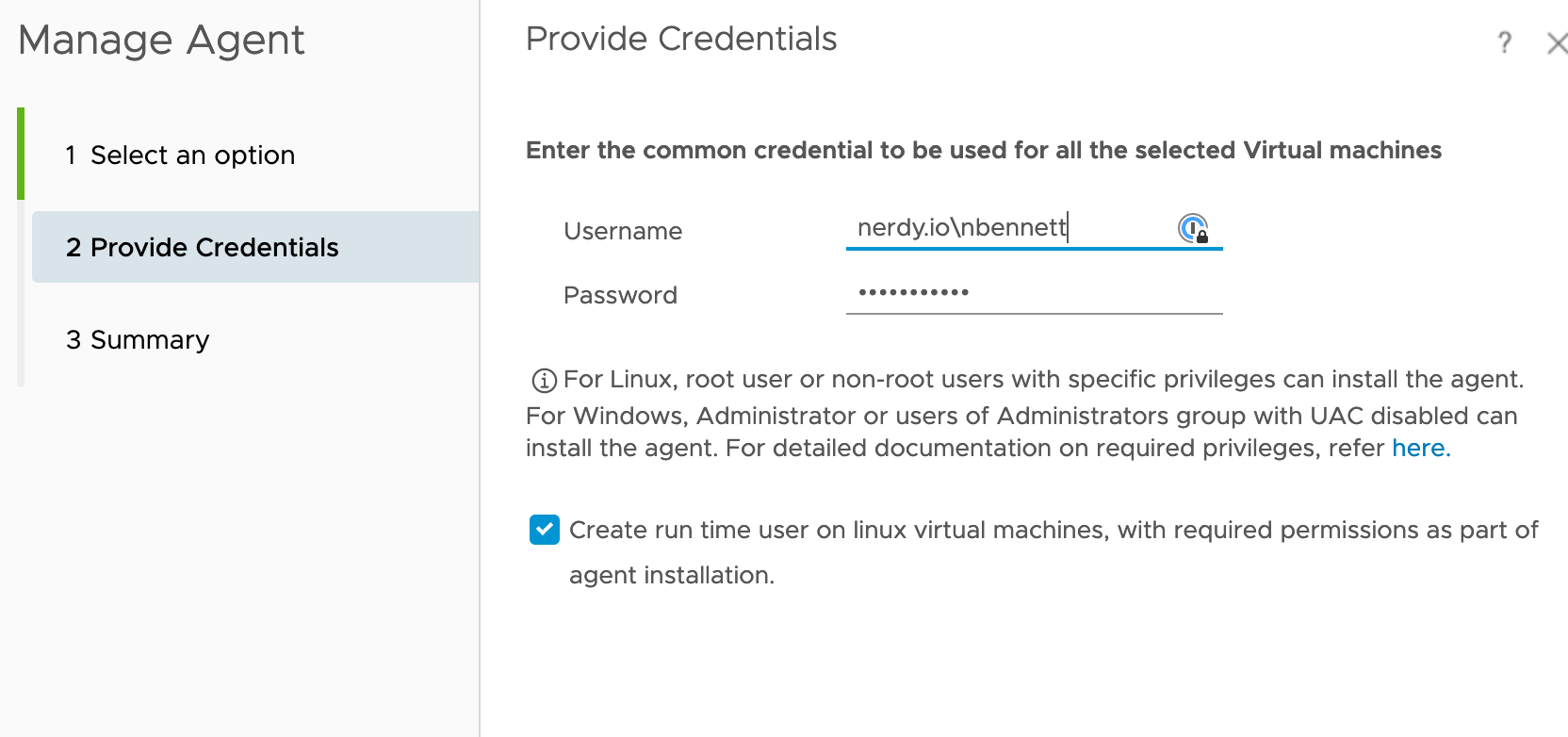
  21. I use a “Common Password” and a service account for my agent deployments.Screen Shot 2019-09-08 at 7.06.29 AMScreen Shot 2019-09-08 at 7.06.47 AM
  22. It’s not very intuitive, but once the agent has finished connecting and has some built in service, you can create a custom built monitoring solution off the “Manage Service” button. It has some built in ports etc. Screen Shot 2019-09-08 at 7.14.03 AM
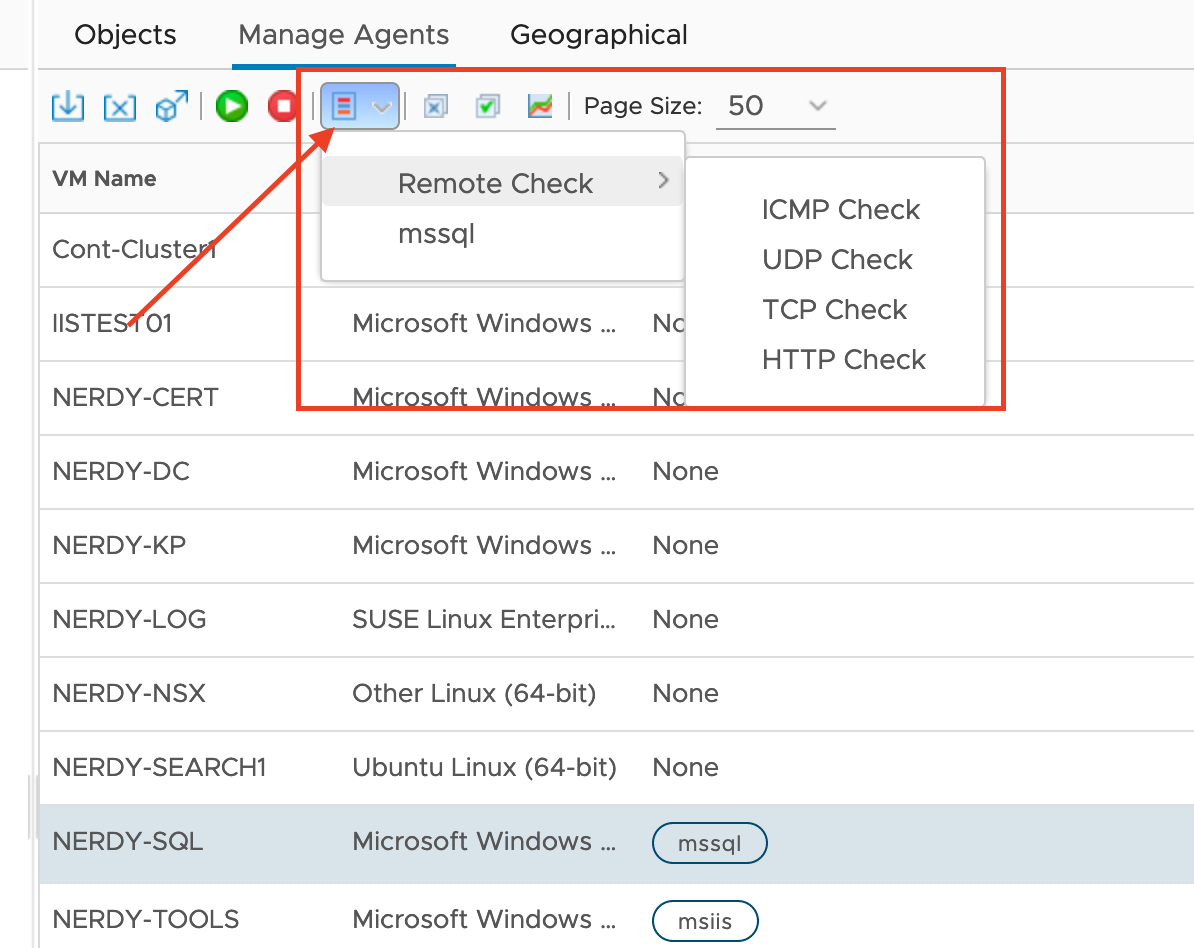
  23. Now you can setup some other monitoring, For instance some port probes, HTTP probes, or a simple ICMP check to verify the machine is up. These all have some different configurations settings, but you can explore from here.

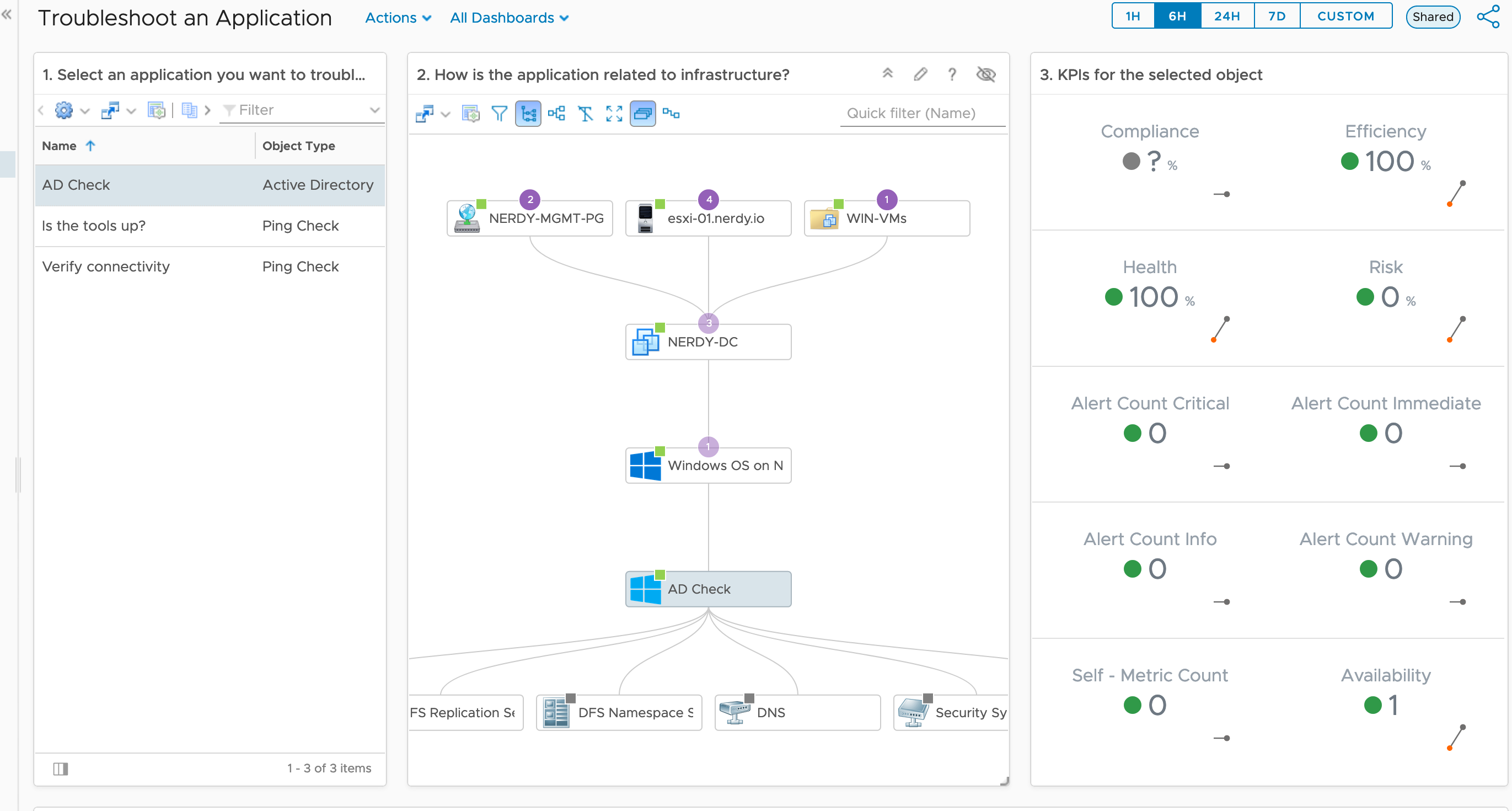
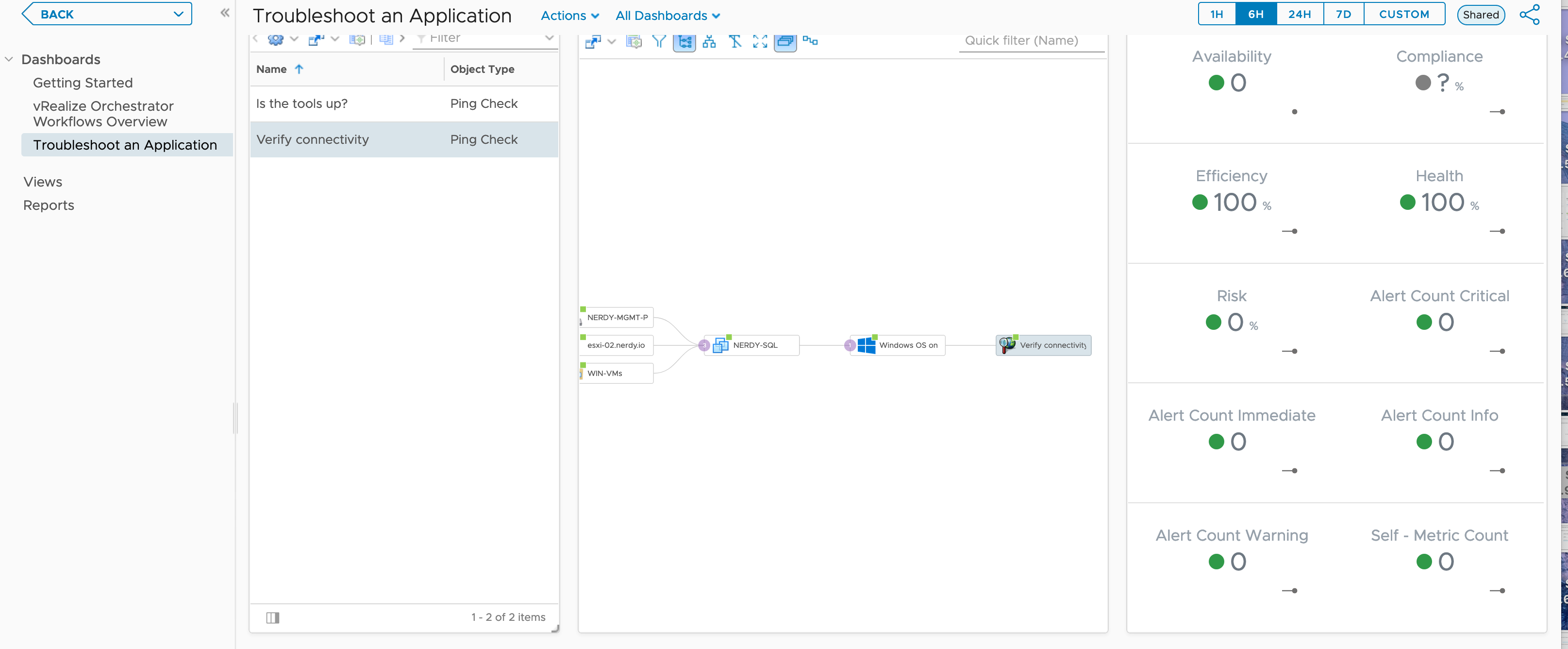
Now that you have configured an application collector and agents have been deployed, you can go to the “Troubleshoot Application” dashboard and take a look! Here is an example of an ICMP checker when the server is down. Notice availability?Screen Shot 2019-09-08 at 7.30.39 AM On the other ICMP check the availability shows 100 percent. Now you have a metric to track, as well as a map to see all the connections.
For the built in services, be sure to add a display name on it to track the service on the VM in “Troubleshooting an Application” in “Dashboards”. Here is an example of the domain controller. Screen Shot 2019-09-08 at 7.43.26 AM

The Ad check is still collecting, at this point, but it shows the extensibility of the built in Monitoring Service.

I hope this helps get you started, I didn’t go very much over more than the video, but thats kinda the point. I really want to fill in spots that I had issues on, in case others have the same issues. Instead of calls over 3 days, I hope this is a good one stop config for the Applications collector on vRealize Operations 7.5

Thursday @VMworld

VMWorld Certification Experience

So I woke up at 6AM this morning, I had a lot of anxiety about the test so definitely wasn’t ready or well-rested for it. However, I was determined to get a good start into the foray of certifications after I talked with the education people yesterday. Its definitely intimidating to walk up and check-in for something that your hoping to turn out well.

Taking the test was very akin to my other certifications but the main difference that I absolutely loved was my immediate comfort with the test. I know this stuff. Maybe I don’t know it very well, but I do daily tasks within this product. I think  there will be many people out there that will find this same experience. I’d suggest, if possible, investing in a lab, or public cloud test, whatever, before you study for a certification. Don’t let the certification be your first foray into a field. That was my problem when IT became my 2nd career. I decided to just get some certifications, and maybe I could get somewhere. It was the hardest thing I did. Then when I started my first big boy IT job, they didn’t care that I had them. In fact, no one cared about what certifications I got. Let me put it this way.. Certifications is a checkbox for upper level positions, Not a checkbox for entry-level positions. At least this has been my experience.
I missed by 3 questions with 0 studying. That just tells me some studying and I’ll get her done. Regardless a very encouraging time for me, and well worth the money for my own personal growth.

Ask the Experts your Toughest Kubernetes Questions[MTE6161U]

So the Expert didn’t show up to our meet the expert discussion. So I decided to talk to the two guys that showed up and ask them what their exposure was with Kubernetes. My own knowledge is very limited, however, as engaged as I have been through VMworld and all the sessions I attended, I asked if it would help them if I shared what I had discussed with others, and my own experience.

I believe a lot in paying it forward when possible, but its not a great to try to take over something when your not an “expert” in it. However, I wanted to help as much as I could. I just went over some of the Kubernetes discussion I’ve had as well as some training I’ve done with AKS and Kubernetes.

It really helped me realize that maybe I should start doing some talks and start going through the white pages and create presentations. This was a good realization, that there are those out there that can benefit from the things I have learned, even though i’m not an expert.

Machine Learning in Less Than 1 Hour with Python [CODE3331U]

Dan Illson @danillson @cloudjourney Cloudjourney.io

VMworld Video

  • What is Machine Learning??
    • A subset of “Artificial intelligence”
    • “Learning based on experience”
    • a process of identifying patterns in data
    • building models which explain a set of data
    • prediction without explicit pre-programmed rules/models
    • closely related to computational statistics
    • NOT MAGIC
  • Breaking down machine learning
    • supervised learning
      • Classification and Regression
        • regression I have a theory and i’m trying to test to progress to the smallest integer
      • using existing data to help interpret new data
      • algorithms include:
        • decision trees
        • support-vector machine
        • native bayes classifier
        • k-nearest neighbors
        • linear regression
    •  unsupervised learning:
      • only received data is considered
      • Algorithm families:
        • clustering
        • association
  • Python why?
    • Python and R are what are normally used for Data Science
      • Its easy to start with
        • the syntax is easily human readable
        • available for many systems
        • its popular and easy to get help
      • all functions are presented
      • fast
      • has a comfortable interface
        • including the command line interpreter
      •  many standard libraries for it
  • Lets try some supervised learning
    • We’ll use the “iris” data set that comes packaged with the sklearn library
    • python via the command line interface
    • we’ll use the k-nearest neighbors algorithm:
      • a positive integer k is specified, along with a new sample
      • we select the k entries in our database which are closest to the new sample
      • we find the most common classification of these entries
      • this is the classification twe give to the new sample
  • DEMO!
    • scipy.org
    • numpy.org
    • matplotlib
    • pandas.pydata.org
    • scikit-learn.org
  • Mean accuracy model – how close it can be accurate with the model.
  • Code for today will be posted on codejourney.io within the next weeks time.

Other things to see is NL VMUG video by Jad Al-Zein on the topic, as well as machine learning on python, in Coursera

Machinelearningmastery.com great resource.

Using NSX-T to Modernize Your IT Infrastructure by IBM [CNET3380BU]

VMworld Video

  • Your either disruptive on the network or your disrupting.
  • Utilizing NSX-T allows less disruption
  • With the challenges of new business models, hybrid, multi-cloud reality presents new opportunities, as well as new challenges…
  • New tech and Containers are helping to support and address concrete business needs
  • Introducing new tech and clouds introduces challenges on integrating with existing technology
  • So how can IBM help?
  • IBM and VMware have been partners since 2014 in enabling NSX for vSphere.
  • NSX-T does not need VCenter

Ending VMworld

Well that’s another VMworld in the books. Man I’m tired. What a wonderful time with wonderful people. Its really weird on Thursday that you start feeling like this place is home. The repetition of going from one session to another. The constant insanity of walk/run/sit/type/type more/run/eat/run/sit/type, becomes just 2nd nature. You start seeing things around you as constant, but its not. Its just part of your life, that has now ended, and like a child who’s been told to stop playing at a friends house, its time to go home.

I’ve got some great Ideas for blogs, and I hope to go through those soon! Till then dear readers!

Wednesday @VMworld

VMworld Tips(AGAIN)

First remember that you are on your feet for almost the entire time you’re NOT in a session and in some cases a bit when you’re in there. The continual mantra that comfortable shoes need to be your first item to pack is totally true.

HOWEVER:

There are definitely other tips to give which I’ll endeavor to share here:

  • Continually verify your session list(Its subject to change)
  • Verify you are in the right place and where you’re going next. This is important when rooms are assigned to the schedule. Its a good idea to grab the sessions you want, but when the rooms are assigned, make sure you don’t have to run across campus to get into a session. Aka, Dont’ be like me
  • Talk to people! I’m going to bring this up almost every day that I can. Its important to recognize that you, YES YOU, are a part of this community. If you’re at VMworld you’re a part of US, and we’re glad to have you! So say hi!
  • Baggage! A lot of people have mental baggage but I’m talking actual luggage here. Check-in/Check-out at your hotel can be a pain. Utilize the bell-hop, or concierge, or whatever they call it at the hotel to hold your bags if the room isn’t ready, or hold them if you checkout on the last day of VMworld, and your flight is later that night.
  • Another word about Sessions. If you see a session you would rather be in, than the one you’re walking to. Go do it! Sure, you’re signed up for another session, but that doesn’t mean you’ll be shot for not showing up. One thing though, if you do this, remove the session from your schedule, as you will still get a survey to fill out. One way or the other, seats are released 10 minutes prior.
  • TWITTER! This little app has changed my life. Take pictures, Use Hashtags, follow people. This is a great resource for everyday growth, and importantly for the community. As I said previously, you’re already part of the community, so say Hi!

Ok imma hop off the soapbox.. Back to sessions…

Zero to App: Building Your First Application in Kubernetes [CODE1804U]

Bill Shetti @shetti @cloudjournei.io http://www.cloudjourney.io

VMworld Video

  • In 30 min we will…
  • VMware Tanzu… the “Obvious answer”
  • Building a cluster in PKS(Usable for the next couple months)
  • The app… Node.js app
  • App deployment is already built
    • Has index.jas
    • Has a dockerfile to show the build of the dockerfile
    • docker buld -t simpleapp was the command he ran and “-t” names the app
    • Tag the app using “docker tag simpleapp: *TAGINfo*)
    • Pushing it to google cloud register with “gcloud push”
    • Now we build the docker image, and pushed it to a container registry
    • Log into the kubernetes cluster
    • verify by using “kubectl –version” or “kubectl get pods”
    • If the pods aren’t coming up, you can always “kubectl describe *PODNAME*”
    • “vke  cluster show bob” shows the information of the kubernetes cluster in vke(pks)
    • PKS brings up a load balancer for you, so in Kubernetes you don’t have to run the node:LoadBalancer but you would run it as NodePort

Why should I use Virtual Volumes? A technical review. [HBI3416BUS]

Cody Hosterman @codyhosterman

VMworld Video

  • vVols are how pure storage was designed, and others.
  • with VMFS you are not protecting applications, you are protecting data stores
  • how VMDL restores VMs
  • as vms SCALE, Challenges arise.
  • what are vVols? Granular storage for VMs.
  • vVols – Every virtual machine has individual volumes on the array
    • every VM gets a config vVol – 4GB – holds the configuration information of the VM
    • Data vVol – for every virtual disk added to the virtual machine there is a new data vVol
    • Swap vVol – is for the vm swap file. sized according to the VM memory
    • memory vVol – if the snapshot is taken with the “snapshot memory” option.
  • What is a Data vVol?
    • A data vVol is essentially a RDM. Just a block volume with whatever file system your guest puts on it. There is no VMFS on them, there is no VMDK encapsulating them. A direct volume. A well-orchestrated one!
    • VMFS Virtual disks are not first class citizens, vVols make virtual Disks first class Citizens. It increases control of your storage.
  •  on the array AND in VMware
  • What about physical to virtual?
  • Move data to Cloud Native
  • The Data Plane
    • how does the host see a vVol? vVols are not connected to a host in the traditional way(Not enough SCSI slots)
    • Protocol Endpoint
  • The Management Plane
  • Provisioning
  • Storage capabilities
  • VMware-Created Snapshots
    • Traditionally, when you took a VMware snapshot of a VM a delta file was created, this hurt performance
    • Now when you take a VMware snapshot the array does the copy. no performance penalty with FlashArray volume copy!
  • vVols is Space Efficient, they are direct RDMs so you can get a lot of space back by going to vVols.
  • Virtual Machine Restore
    • when a VM is deleted or a virtual disk how do you recover? Recovery includes loss of RTO and RPO
    • With vVols you have 24 hours to instantly recover and deleted disk or VM data on the Array itself.
  • VM Cloning – 100% Offloaded
    • when cloning a VM, or deploying from a template –the process is a full volume copy!
    • One API call to the FlashArray = Instant Cloning
    • 50GB virtual Machine? Clone time is 5 seconds!
  • More Insight and More knowledge
    • Ransomware encrypts the data on a VM, With vVols if you see the data reduction go to 5>1 or 1>1 someone encrypted the data, you can respond quickly
  • Encryption and Reduction
    • Pure now encrypts the OS with a special key.
  • Replication
    • vVols and replication
    • there is a concept of a source replication group and a target group. VMs are put into a source and fail over is run against the target.
    • PowerCLI Cmdlets
  • Getting there…
    • Flash-array vSphere client plugin!
      • {Powershell}
      • Migration to vVols – Storage vMotion – Online Migration!
      • More info!

I blinked and was 3 slides behind. Cody goes fast and brings so many great points that I just cant keep up. Watch the video. Man this guy is good.

Is IT Ready to Enable Success in Your Multi-Cloud Environment? [MCO1687BU]

Jad El-Zein @virtualjad Keven Lees

VMworld Video

  • IT Mindset shift IS REQUIRED
  • Clouds are the new silos
  • The goal is blended teams, looking at Service Oriented approach
  • Processes? The good and the bad..
    • Governance or lack thereof is one of the biggest things with Shadow IT, and its needed to maintain the workloads and stay within policies.
    • Provisioning
    • Security and governance
  • Multi-cloud consumption
    • Aligning with Enterprise need
    • VMware Cloud Assembly – Build, Deploy, and iterate on applications
      • Setup your cloud accounts, and zones
      • configure your projects(business groups in vRA)
      • design your blueprints(IaC in CAS)
      • Cloud Assembly – Declarative provisioning and life cycle
      • IaC choice of UI or Yaml Editor
      • VMware Service Broker
      • Infra and App Pipelines
      • Content Marketplace
      • Multi-Cloud Extensibility
        • ABX on-prem with Powershell Support
    • Multi-cloud Operations
      • Self-Driving Operations
      • Intelligent Monitoring and root Cause Analysis(VROPS 8.0)
      • Apps-ops and wavefront are free trials, and cloud health is a trial or POC for testing

Kubernetes and Cloud Automation Services: A Primer [HBO2769BU]

CODE DE ARKLAND AND CHRIS McCLANAHAN The OG

VMworld video

  • vRealize Automation Cloud
  • Kubernetes in PKS
  • Kubernetes Profiles
    • Tag the profiles needed within a blueprint as a constraint for kubernetes within PKS
    • Use tags within the whole platform to define how things provision, Size, region, etc. the tags are everywhere.
  • PKS on the Design Canvas
    • Define the whole kubernetes cluster with an easy drag-drop blueprint
  • On-boarding Existing and External Clusters
    • If Kubernetes is already built you can bring that in so that you can manage kubernetes cluster within the application
    • Master would need to be exposed publicly to be able to manage an already built Kubernetes cluster.
  • Kubernetes in the Marketplace
    • Currently you can do a vsphere cloud.init template that has Kubernetes on ubuntu 16.
    • Don’t need PKS to do Kubernetes things
    • Cloud proxy to deploy on-prem for CAS(Maybe vRA 8 Cloud?)
    • Kubernetes Zones, allow you to bring into your PKS endpoint for Kubernetes
    • You can t-shirt size your deployments
    • You can setup the deployments and allow “Projects” to deploy the needed deployments
    • You can Gui’fy namespaces within Kubernetes, this allows you to hide namespaces from other users.
  • You deploy apps in this under Code Stream.
    • Setting up the pipeline in Code Stream is paramount as anything as Code is needed for specific run times. This includes the app, load balancer, and everything that needs to run for the app.
    • Code Stream works with Gitlab, hub, etc. and when you push a commit to your repo, Code Stream will see it and push that through Code Stream to perform the build and run.

How to not go broke with CI/CD deployments [CODE3452U]

Tim Davis @vTimd

VMworld video

I got to his talk late(*bladder, and sessions were too stacked .. See pointers above*), but wanted to share his talk as its been shared on podcasts and other places.

Deep Dive – Kubernetes Resource Management for vSphere Admins [KUB1208BU]

Michael Gasch and Pranshu Jain

VMworld video

  • Putting Kubernetes on vSphere.
    • Not covering Tanzu or project pacific basically just vSphere
    • Its a good idea to put the kubernetes nodes in Ha as they are not Ha setup.
  • Kubernetes 101
  • Pod is the atomic element of Kubernetes
  • Resource management is the allocation of resources from resource provider to resource consumers
  • https://k8s.af – to help with postmortems and outages, 9 out of 10 related to resource management.
  • But why should I care?(other than most outages are from resources)
    • Best Practices doesn’t always transfer to best practices from a higher level
  • Specifying the pod specialization and resources
  • Resource management in the life of a POD
    • Important to utilize namespaces and then refer to those tenants with what resources are available to the tenant
    • By setting the validation in the Yaml with the namespaces it allows us to know the quota of the VMs and we don’t over commit or under commit our nodes.
  • Best Practice for Kubernetes #1
    • vSphere HA is good for Kubernetes clusters.
    • Define an admission policy for HA that will help understand the normal group and the critical(high cpu etc) group
    • Finally DRS using anti-affinity VM monitoring and host issues
  • Placement with Kube-Scheduler
  • Assisting kube-scheduler how???
  • Enforcement
    • Setting resource limits on the linux kernel VMs is critical to maintaining the cluster. So each deployment in yaml as declarative or an imperative command should have the cpu/ram statements in order to change that information

Very dense talk but well worth it. Basically run on VMs, Enable HA, Use resource limitation switches, and watch your clusters.

Prove Your Skills and Validate Your Value with VMware Certification [EDU3684U]

I know this is a more personal session, but its worth mentioning that we all need to “prove our worth” too many times. Its worth having a sign or symbol to raise when someone challenges you and wont listen. We all have those people who will argue and argue. Also as we move into higher and higher positions, this is a needed step in our growth.

Karl Childs @karlchilds

  • There are quantifiable results that show that individuals get benefits other than employer benefits
  • VCDX – FREE POLO
  • VMware Certification Tracks
  • Good analogy is boulders across a river and you’re trying to get across the river by those boulders
  • What if you miss the exam? or how do you prevent that?
  • Run a Skills Gap-Analysis
  • Download an exam-prep-guide

Things I learned about the Certificate process:

  1. Foundations exam is taken online, and is open book. Still have to pay for it.
  2. The class can be any class. Whether it be for vRA, NSX etc. But it is a REQUIREMENT for the VCP. You can pass all the exams but you will get nothing till you do the class training.
  3. There are lower cost options for the class part. You don’t have to do a 4500$ spend just to get your cert. This is part of the whole #vCommunity mill, but there are those that have done this part much cheaper. Not saying the actual courses aren’t worth it, they definitely are. There are just other options. If you’re a part of VMUG ask your Leader, I’m sure they know.
  4. I’m going to take my vRA VCP tomorrow and take advantage of the 50% off. However, with VMworld fest happening tonight and all the other things, I wont study at all before its there. But it’ll be good to know whats out there, and what the last couple years have taught me.

VMFest

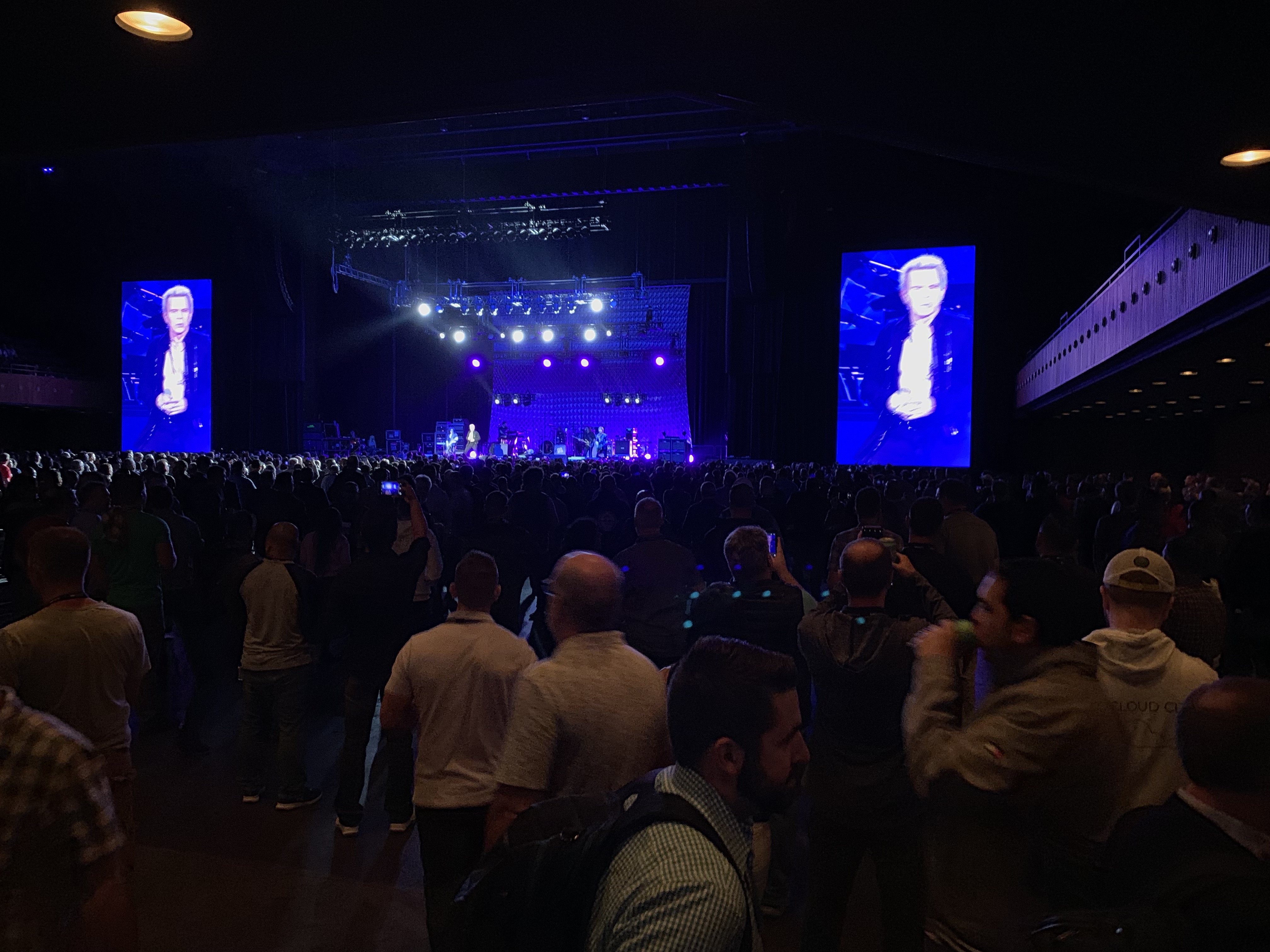
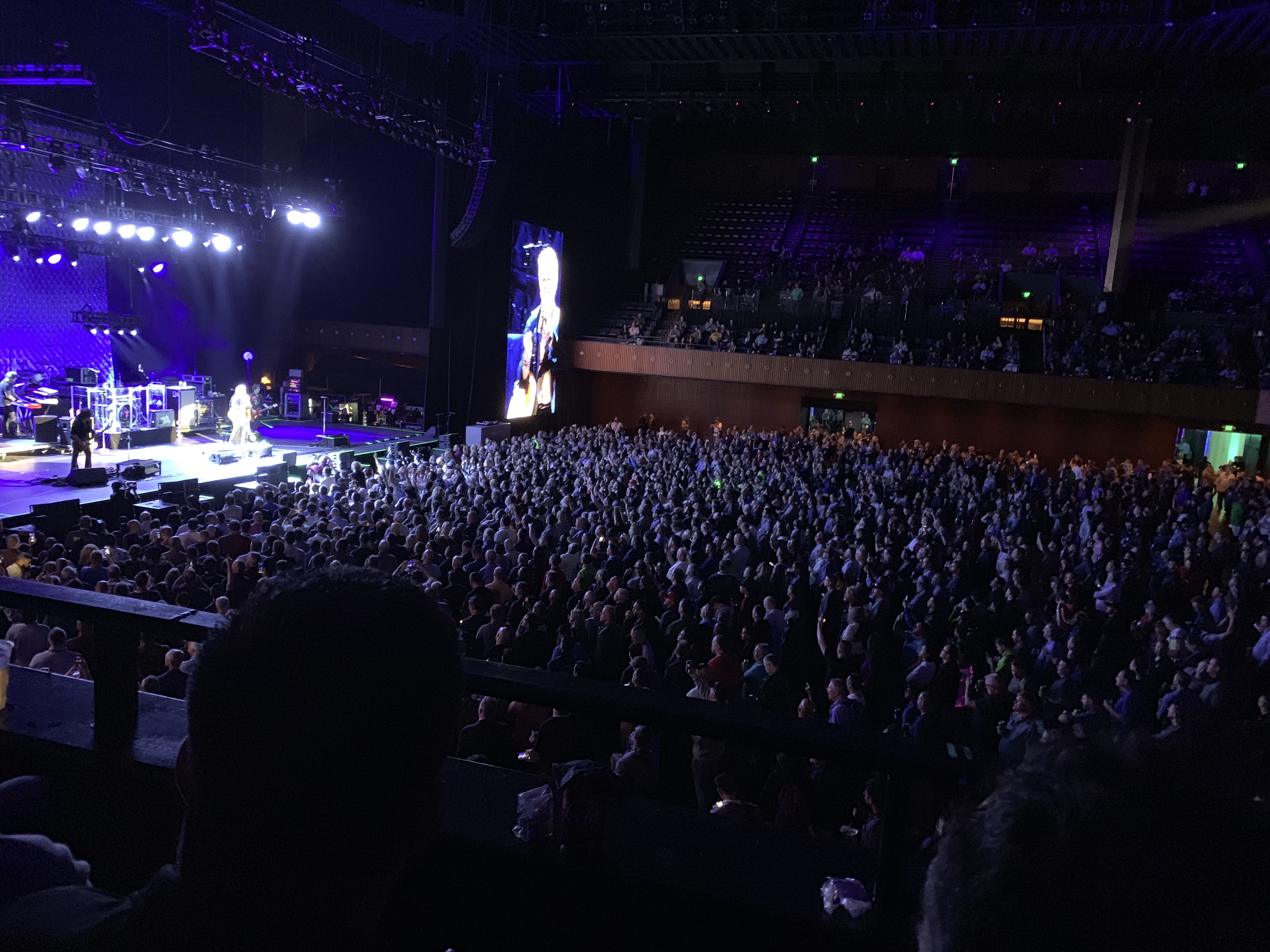
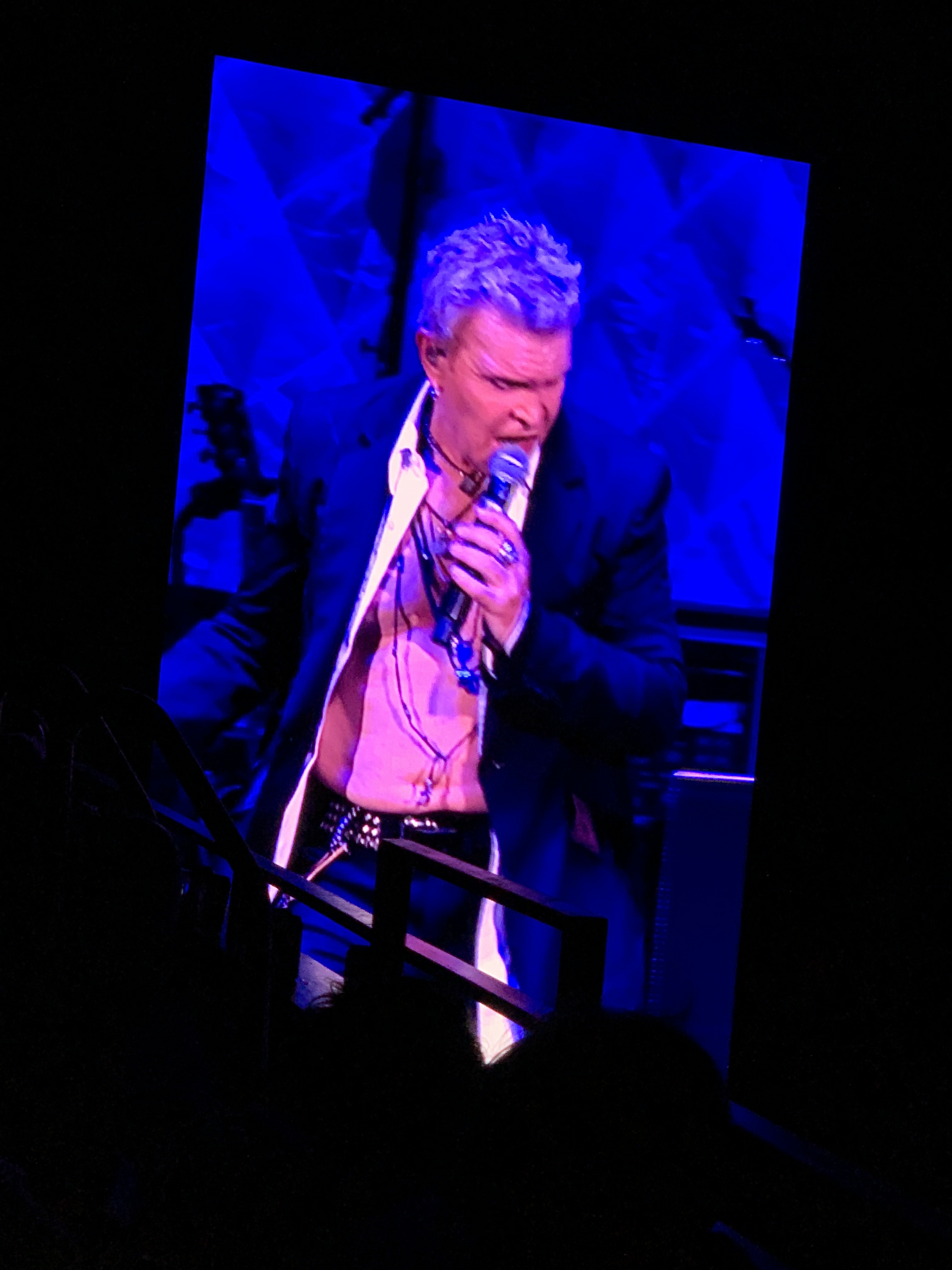
Taking a huge line of buses to the party was insane. I definitely didn’t want to roll with that. Thankfully a friend shelled out on an uber and we got there while Billy Idol was rockin’. Yes Billy F’ng Idol…zot876z5QyiNSnCqzNyWSg

L25A%m0HQoOySFg+Q2iDmw58874062288__619FCAE6-E031-403D-AE6C-F194369B3435

I have to admit he had to rely on the audience for some parts, but the dude is still killin’ it at 60 #LifeGoals. He’s still the drunk rocker persona on the stage, and he’s still crass, and swearing… but we love him anyway cause its rock n’ roll baby.

Next on stage was One Direction…… I mean, One Republic… Man I’m old.. #InsideJoke

The first song I heard of One Republic was “Secrets” which was the end credits song after “The Magicians Apprentice” movie with Nick Cage… Yup, That movie. Regardless that song holds a specific feeling in my life and whenever I hear it I’m transported to that place. However, my highlight of the night was when we got to hear “Halo” which was written by One Republic front man Ryan Tedder, and Beyonce performed and made popular. Hearing it from a male voice like his was incredibly impressive.

Twitter Life!

I met William Lam! This guy has been a huge part of the community and has always been a force for good to the groups. Thanks man for all you do!

Also PEDRO ARROW, also known as Pete Fletcha, of Virtually Speaking Podcast!

FINALLY met an amazing tech guru, and another leader in the community wether he likes it or not the one and only Jad Al-Zein. His blogs and videos on vRA 7.x saved my hide multiple times. Great guy to talk to, and hes SO EASY to talk to as well!!

Now for bed, lets hope the test tomorrow will come out better than I expect, would be nice to pass, but I’m going to try not to hope for it a ton… even though I know it’ll be hard to sleep knowing I’ll be doing that in the morning.