
So what does vRealize really utilize for automation. Well in 7.4(I believe) things got a lot easier with their guest agent. Utilizing the agent page from the appliance will now show an actual PowerShell or bash command for installing the agent(pretty awesome).
Here is the thing. Though the automated installer will remove the already installed guest agent, it doesn’t do it very cleanly. So some old commands are still very useful.
Goal of this blog:
Template management is key for success. Especially when running multiple vRA instances across the US and abroad. Making sure the template is pointed to the proper appliance(or VIP for HA), and IAAS Manager(Or VIP for HA) is CRUCIAL. Without the proper setup you will probably run into timeouts or issues with your deployments and the “customization”. If you’ve worked with vRealize you know how annoying the “Error during customization” message can be.
Solution
(Solution for removal pulled from Jim Griffiths @ http://itsgettingcloudy.blogspot.com/ Hes a great blogger with some good stuff, so check him out! )
Here are the steps to uninstall it;
From a command prompt on the machine which has the agent installed, type;
net stop vcacguestagentservice
then
sc delete vcacguestagentservice
If you do not want to install the vRAS\vCAD agent after this, then you can use the below command to remove the folder;
rmdir c:\vrmguestagent /s /q
I suggest running all three commands before installing the agent again.
Steps to run the installation of the gugent agent
- Download the gugent agent off your primary vRA appliance(if HA this can be any appliance).

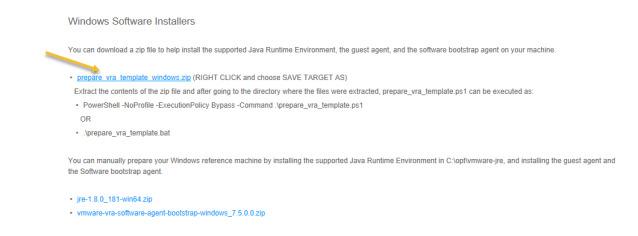
- Move the .zip to the Machine that will be templatized.
- Extract the folder. There will be a folder within the extracted folder. I hate that so i just move the final folder to a c:\temp directory normally.
- Now open an command prompt runas admin and run PowerShell -NoProfile -ExecutionPolicy Bypass -Command C:\temp\**FOLDERNAME**\prepare_vra_template.ps1(if your like me and put it in c:\temp. **FOLDERNAME** is what vRA names the folder or if you rename it(default is currently prepare_vra_template_windows)*NOTE* To me this is the cleanest install, but for those that prefer .bat files…
- You can also run this by simply opening the prepare_vra_template_windows folder and running prepare_vra_template.bat as Administrator.
- Both of these solutions will get you a prompt asking for additional information
- First it will ask for you FQDN/Ip for the vRA Appliance(VIP if HA). *I find that if your using multiple domains the IP is better than the FQDN so DNS doesn’t bite you in the butt. However, If you didn’t put the IP in the appliance certificate(and shame on you if you did). This will not function properly.*
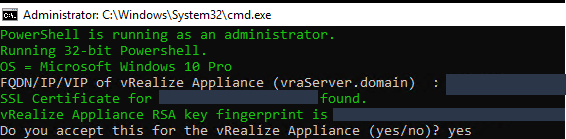
- It should find the appliance if the template can hit it and pull the certificate. Type “Yes” if the SHA1 matches(and if you really want to check that)
- Next is the manager. So type in the FQDN/Ip for the vRA IAAS Manager(VIP if HA)*I find that if your using multiple domains the IP is better than the FQDN so DNS doesn’t bite you in the butt. However, If you didn’t put the IP in the appliance certificate(and shame on you if you did). This will not work.*

- The rest is dependant on how your setting up the agent and where the template is (EC2, vsphere, etc) and the account you want to use on the machine for administration(local, or domain).

- After all information is completed the install will run and when complete, you should see a message that states “INSTALL COMPLETE Ready for shutdown”(or something like that…). Dont shut it down yet..
- Here is when your run your sdelete, or whatever cleanup solution you have(dont forget to delete the agent install!! )
- Now shut it down…
The GuestAgent log should now show proper calls, and responses including the full payload when the template is deployed. Pretty cool stuff…
Now never touch the template again…


 vNerdyNate #vExpert