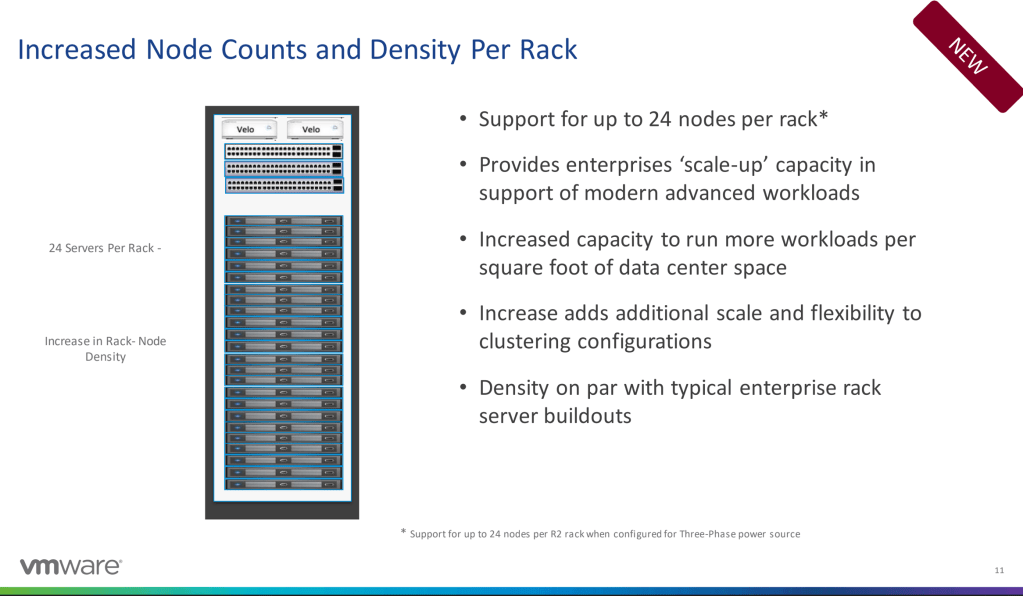
VMware and Cloud do not normally seem synonymous or, in fact, near each other. VMware is still viewed as the on-premises solution that is used for hypervisors, and then the cloud is viewed as a regional solution in multiple locations. VMC on AWS has changed that landscape, and the landscape continues to be changed. Dell came into the market with its “Dell Cloud”, and VMware’s parent company continues to improve its offering. You are still purchasing a rack of Dell hardware but now that rack has been optimized with the SDDC to allow more nodes and better utilization.
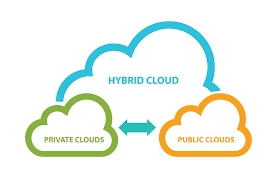
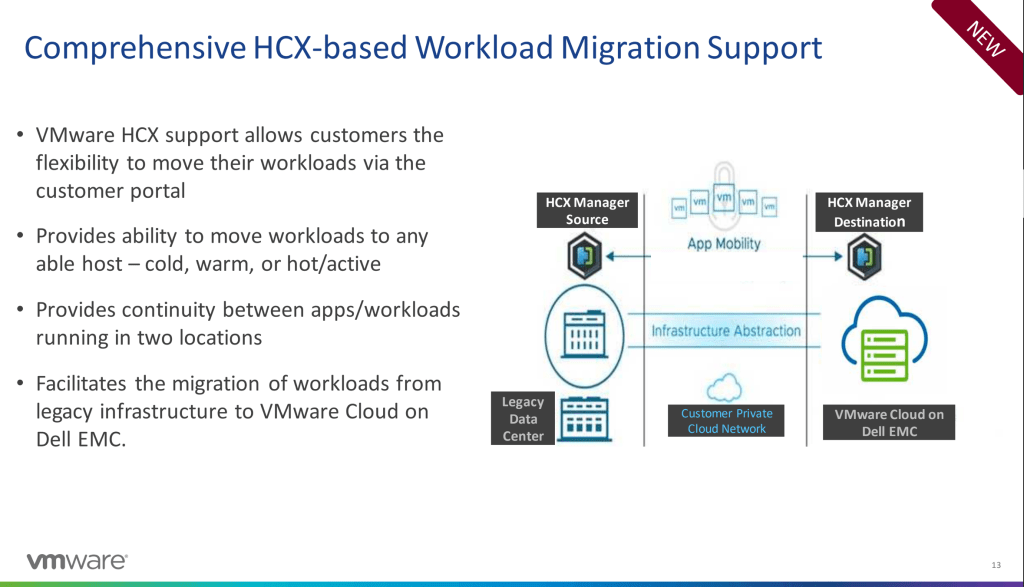
This all comes into effect making the Dell cloud a better solution for companies looking for a co-location data center or a hybrid solution for cloud. With the addition of more optimization you can also deploy multiple clusters on the same rack of resources. Up to 8 clusters on one rack will let you manage your clusters within a single-pane of glass, and yet segment the clusters. These are all amazing updates to Dells Cloud, but then one function needed is HCX into Dell, which is announced today. Allowing HCX to migrate your workloads from your legacy infrastructure to your Dell cluster lets customers do a cold, hot, or warm migration from on-premises to your Dell cloud and provides continuity for an application in 2 location. More to come on this.
VMC on AWS
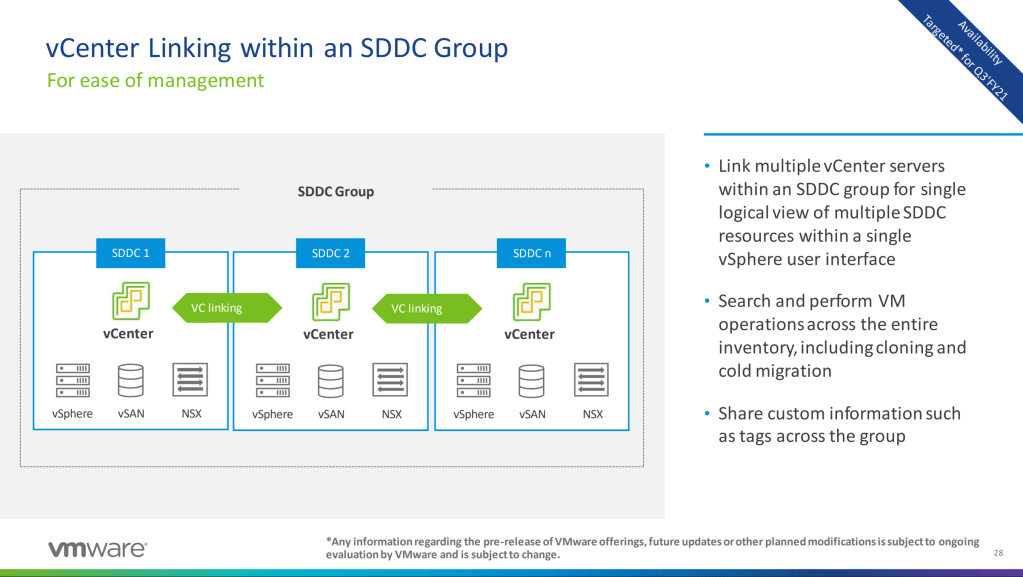
With the optimization coming to the original hybrid cloud there are some great updates. First starting with allowing vCenter linking to work between vCenter to vCenter.
This creates a better view of the environment from a single pane of glass at a vCenter level. Next there are additional migration and replication using HCX. The ability to create groups of workloads to migrate from one location to the other really helps create borders around the applications to ensure the full workload and dependencies are migrated together.
The real interesting story here is seeing everything at a vCenter level, as well as being able to migrate your workloads from on-premises to off. Now with all this addition to migrations and management of your full environment, what would be next?
DRaaS – Disaster Recovery as a Service
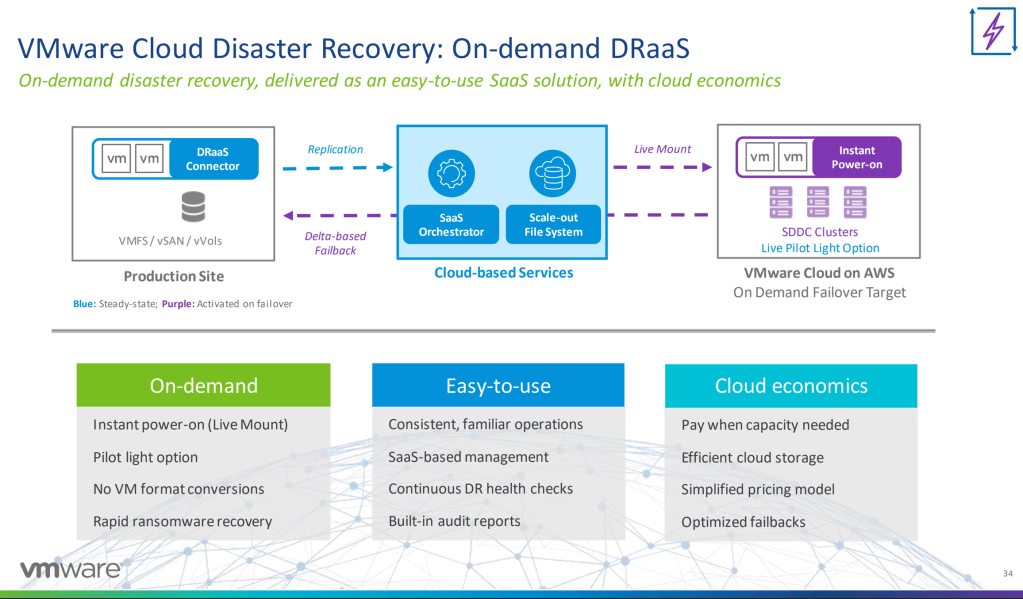
So you may have heard that VMware purchased Datrium a while ago, the question is, what would they use Datrium for? Perhaps the best thing Datrium was used for before they were with VMware, but with VMC on AWS. That’s what we’re seeing today. Disaster recovery as a service allows you to backup your solution and manage it depending on the type of backup you want to use. If your looking at a hot backup, your change rate is kept pretty close to live, so that you can immediately bring up your infrastructure in another location. This is where the migration to and management of VMC’s comes into play, now with the updates in both hybrid cloud solutions. Here is a shot of the solution:
This will leverage Datrium’s solution into a very useful DR solution that already was a stellar selling point for VMC on AWS, now with Dell cloud as well.
With these new solutions coming to customers, moving to a hybrid cloud is getting easier. With the addition of optimization for Dell cloud the cost of the rack is more justified. Finally with the Datrium acquisition, creating a DR/BCP looks far simpler to create, and execute.
With the continual mantra of “Do more with less” from management, we are continually challenged to increase velocity to production while maintaining or improving accuracy of the deployed application. Automation, Operations, and the Cloud are a mesh of solutions that need to work together. The announcements today are amazing steps for the vRealize suite to improve the cloud and automation footprint.
vRealize Cloud Universal
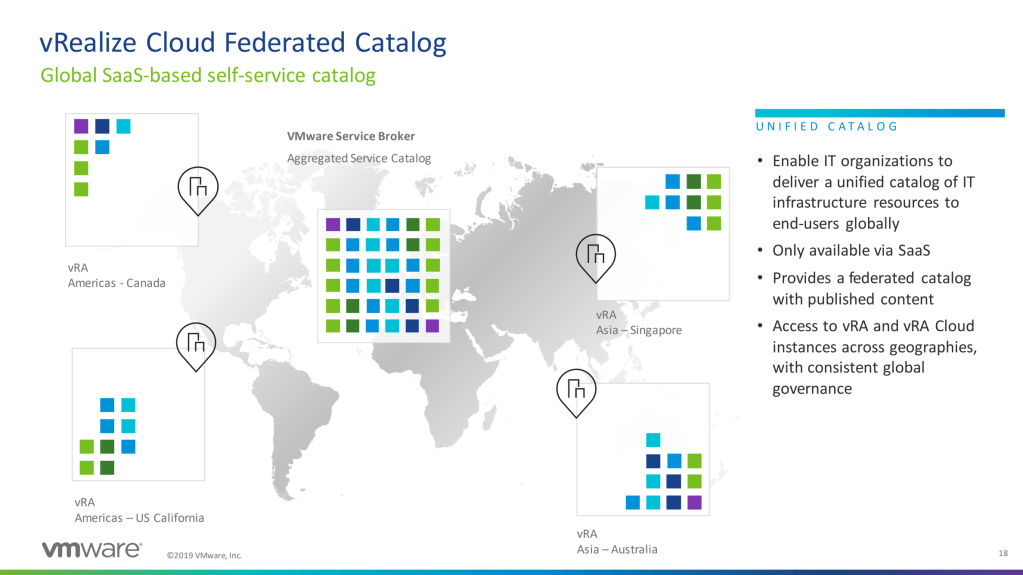
Let’s start with the announcement of a global catalog, which will allow you to take all of your on-premises catalogs into a centralized location. As a automation architect, this got my attention more than the other announcements. I’ve had the challenge of looking into managing multiple automation solutions in multiple regions. To be honest, there really isn’t a great solution when your looking on-premises, in multiple regions.. This takes your already existing on-premises catalog and then allows it to be centralized in the cloud. An amazing solution for a multi-region company
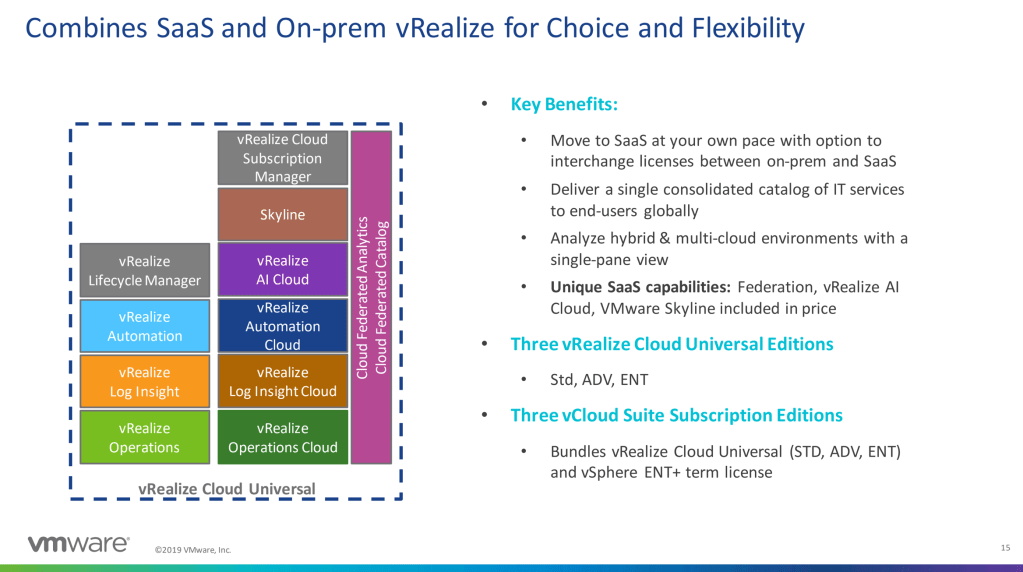
Of course, this solution would require a special licensing model, which is why they are looking into combining on-premises and cloud licenses together to allow you this solution. Time will tell what the licensing model will really look like, and how successful it will be. In my mind allowing the licensing to be one model would be best instead of moving into another “hybrid” model.
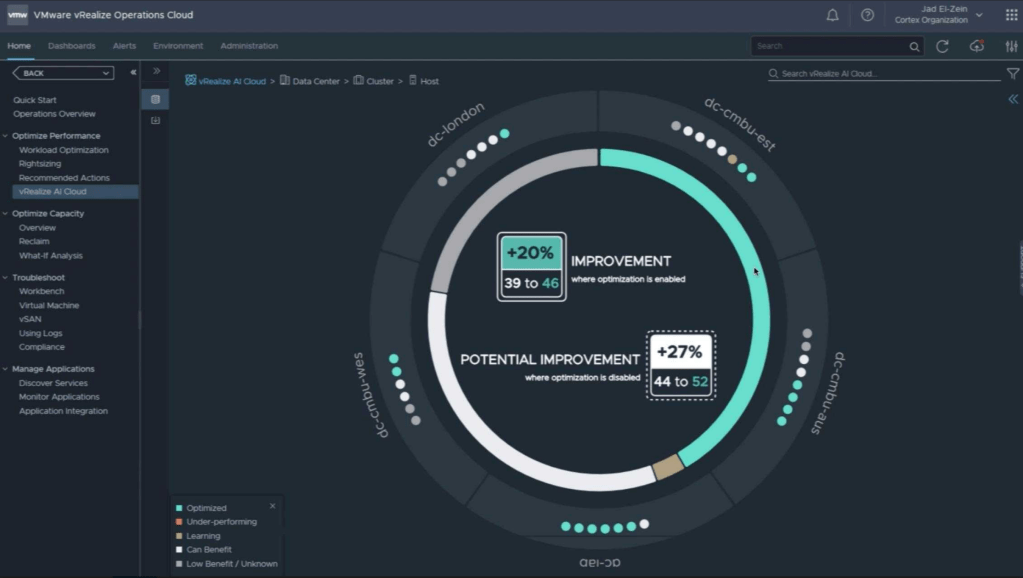
What would go great with that automation solution? Understanding how to make that model work better, faster, and cheaper? This is where project Magma and vRealize Cloud AI comes in. With the power of AI they can peer into your environment and allow you to enable optimization. This will gauge your environment and, using the power of AI, state what changes would make it run better. The first solution they will be focusing on for this solution will be vSan but others are coming.
vRealize Operations – (vROPS)
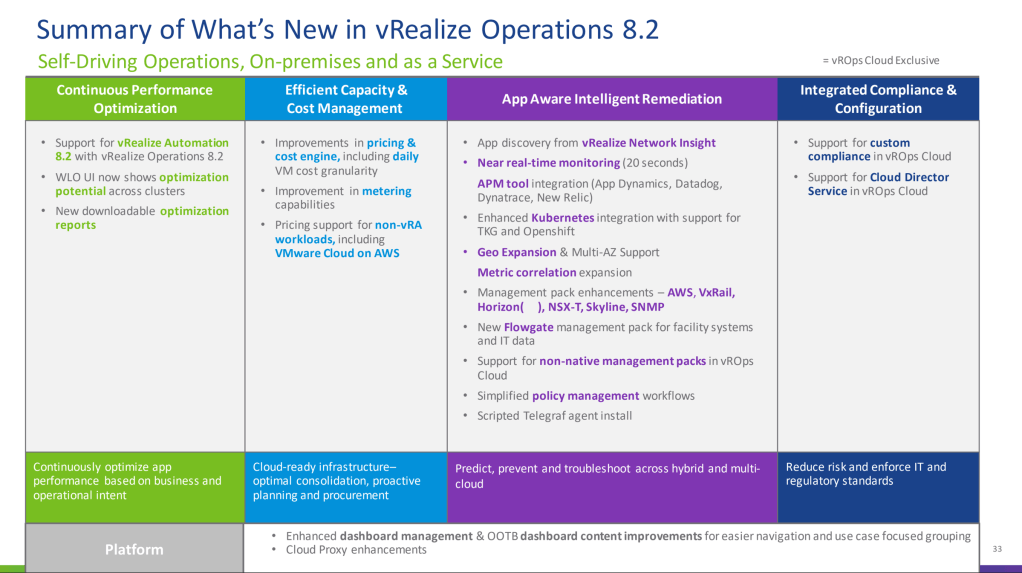
With SaaS becoming a stronger option for your vRealize operations management, additional tools and improvements were needed. First, as Tanzu has changed the landscape to vSphere so we need vROPS to be able to monitor and optimize as needed. The next step after Tanzu is to get into the applications running in those environments and map them using vRealize Network Insight and then see how to remediate issues and optimize. vRealize Operations has always been a powerhouse to help teams understand what is happening in your clusters, and how to troubleshoot issues that are being reported. Now with this insight brought into the application space and into Tanzu itself we have a much better perspective into the applications itself. With the new addition of the application monitoring and optimization, what would make it better? Well for one moving to real-time polling, with basically push-button functionality. That’s right, with one click of the mouse you have the ability to change the polling of vROPS from 5 minutes to 20 seconds. These are great solutions from the vRealize Operations team. New additions also come in pricing model, allowing pricing to be done on non-vRealize automation tool sets, and enhancing the amount of pricing that can be exposed.
These are all great additions to an already great solution, but VMware has never been about keeping something great in what it does without ever enhancing. VMware has always had a goal of moving the ball forward. That means Kubernetes, that means cloud, and that means applications being treated as 1st class citizens instead of passengers.
vRealize Automation
Most of the announcements about vRealize Universal covers the bigger announcements for vRealize Automation, but one thing I have to mention, is the ability to use HashiCorp Terraform as a 1st class citizen in Cloud Assembly. This allows vRA to manage your state information while the rest of the codebase is kept in your repository. You can bring your Terraform variables into Code Assembly and create them also in the blueprint, which will then map them as environment variables into the Terraform deployment.
One other addition already announced with vRealize Automation 8.2 is the creation of supervisor namespaces in Tanzu. This is a pretty significant feature for vRealize Automation. For those that have not played with Tanzu, the supervisor namespaces is one of the few things that the operations team needs to create. Once the namespace is created, then RBAC can be assigned as well as storage for the cluster/pods. Basically once this is passed onto the Developers they can create clusters, change context to those Tanzu clusters and deploy their workloads. By automating this solution, vRA administators will add another self-service solution to remove visibility of infrastructure/operations from developers.
The world is looking far more self-service, with a side of clouds. These solutions really do increase velocity to market, while maintaining or improving accuracy. The additions of fuctionality on all solutions presented create a great tool-set for customers looking to help bring their applications to scale.
This is a really weird blog for me to write. I am not great at this test. I really don’t think that I’m the best person to write this information. Let me be straight, I took this test 3 times. That’s 750$. If you just passed the CKA and you think you can do this test with no studying. You’re wrong.
The CKA is a “How-To” test only focused on kubernetes specific solutions. You dont have to know Helm, Valero, Sonorboy, Prometheus, etc. for the CKA. This test(Cloud Native), on the other hand, was written by the heptio team. These folks have been in kubernetes since day 1. They have been there with developers working through issues. They were there setting up logging, and policies to segment things. If the CKA is a “How-To” test that only cares about if you can perform actions, this test is about if you know how to operationalize it. The exam is 67 questions, and you need a score of 300 to pass the test.
How did you setup prometheus in your kubernetes cluster? How did you segment a development cluster from a production cluster? You need to know best practices about these things in order to pass the test. This is also where the test becomes extremely hard. Have you ever deployed kubernetes into AWS? Have you used Flannel? Do you know when to use Flannel and when to use a different CNI? Do you know the major differences between the CNI’s? Have you deployed Helm? Have you packaged things with Helm? Knowing these products, best practices, and how to implement them is good for the exam.
Yes I passed, but I’m still not sure what questions I answered were actually correct. This is the 2nd hurdle.
The Questions.
OK, I have not taken a ton of professional, or master certifications. This is my first. The questions are written to mess with your brain. They throw in a bunch of random information to take away from the tech of the question. Most of the time melt down the question to what I understand and answer the questions the way I know. Expose an app with replicas publicly? Service with type LoadBalancer. Want to ensure pods are on a specific node? NodeSelector. These are how I answered my questions, but were they correct?
The problem for me is every question reads as if a the test makers actually dealt with that situation. Now if you haven’t been there then you wont feel like you know the answer. That’s the challenge.
If I would point to things more specifically to understand. Here is what I would say. (TLDR Start here)
Resources
So the resources are a bit out of date because the CKA was re-done since they created this test, so some things are lost in translation. Here is what I would do:
Know how to enable and use Prometheus and Fluentd. Know when to use Service meshs. Know when to use cluster-role, or role, and correct binding. What deployment type would you want to deploy in different situation? When to use pod-affinity?
Helm, Prometheus, fluentd/fluentbit. I suggest you get hands on experience. Know how to deploy these solutions, and know the “best practices” of each. Especially helm.
Seg-Men-Tation. How do you make sure to secure pods to escalate rights(PSP) how do you make sure pods arn’t running as root?(PSP) how do you make sure to segment one cluster from the other?(Network policy). A hard and fast rule: PSP’s are for the initiation of the pod. NetworkPolicies make sure that they don’t talk to each other. Keep that in mind.
When do you use a configmap, and a secret?
When do you use a readiness probe? Liveness probe?
https://12factor.net – I have seen many different questions on this. On my pass there was only 1 question, but that was on that test. I’ve seen as many as 4 on a test.
Know Heptio’s products – Sonobuoy, Valero, and Contour. Know their function, especially ingress, and when to use it and why. Know when to use Valero, and why. Know what the function of Sonobuoy is, and why you would use it in different environments.
Know OIDC and Dex.
Outdated stuff to keep in mind: How to secure Tiller with Helm. – Helm 2.0 is still out there so not really outdated, but Helm 3.0 got rid of tiller so interesting question.
Again, know the differences between CNI’s especially flannel.
I know this is a different blog, cause most of my other “How-to-pass” blogs were focused on the content of others, where this is focused on source material. The reason is because no one has created the training material for this. Maybe its because its a “master” level badge? Regardless, this isn’t an easy test. If you are attempting this test, I would suggest preparing to take the test at least 2 times. If needed, feel absolutely free to contact me on twitter. I’d be happy to help you prepare for this test.
NOTICE: This information will be out of date in 9/2020 when the test is updated. Most of the information i put it here should be in-step with the new test but since the test isn’t out yet, I cant say for sure.
I decided a while ago that I wanted to go for the Certified Kubernetes Administrator certification. Little did I know the amount of work and struggles I’d deal with through the process, though I think that’s normal for most of us. We see a new solution set taking hold, and we play around with it, get some experience, then we decided to take it to the next level. It’s kinda like dating, but really, not like it at all. If you’re reading this because you’re thinking of going for the exam yourself, here are some things right off the bat.
Certified Kubernetes Admin Test Tips
The CKA is a practical exam. There is no multiple choice questions on this test. Its all you figuring out what’s broken, deciding how to fix it, and then fixing it. The end result is what counts more than how you perform a task. So if you have a broken cluster, as long as you get it fixed and back into a “ready” state, you’re good. The CKA can give partial credit. So even if you know half of the answer, do half of the question. This can be critical between a pass and fail.
The CKA is open book. You can use kubernetes.io/docs, and kubernetes github page. I’m not a fan of open book tests, because it means that the biggest factor against you is time. You’re given 3 hours to perform the 24 tasks on the exam, and since its open book. being stuck on one question will lead to a failure on others. For myself, I was searching everywhere for a CNI link that I lost track of time, and didn’t perform 3 other tasks. So there were 4 questions that didn’t even have answers. No bueno.
JsonPath will be crucial in the CKA. I had a lot of questions requiring you to pull data and spit it out in a different form. This was basically performed with custom-columns, or –sort-by functions within Kubernetes. Its good to be aware of how to use both. Though these questions aren’t normally weighed as heavily, they can be the difference between a pass and a fail. Almost every test has you use ETCDctl, and KubeADM, but be aware of these solutions, and how to utilize them in an administrator role. I myself was expecting some documentation to be available when using KubeADM to create a cluster, that was not. This was the biggest factor in failing my first test. When I had to install a CNI for the cluster to become “Ready” and the documentation didn’t have a CNI link to use, it became a really bad situation because of time.
The CKA is based in Linux. This should be no surprise to anyone, but I’ll state the obvious for those in the back. Learn to troubleshoot basic Linux issues. This means learning how to copy, checking service logs, and using an editor like VIM, VI, etc. These are all crucial as you can download the solution you may want, but again, that takes time, and can lead to a bad situation. I suggest learning how to navigate VI, as “Kubectl edit” opens a very similar environment to VI to edit a service/deployment/pod.
Commands to remember: simply typing “kubelet” will bring up the kubelet logs, I stumbled upon this while I took the exam, not sure if this is a product in the exam, but its good to know when troubleshooting node failures. “Journalctl -u kubelet” will continue to hold you up if kubelet doesn’t get the job done, and you can grep the error code. These were key for failed nodes/master nodes.
Alright, enough of my gabbing, about what I learned. What course work should you follow? Well here is my take on the course-work.
Absolute Beginner: Start with Nigel Poulton’s Pluralsight courses, then move from there to the Pluralsight CKA track. These give you great perspective to what K8s is and what they can do.
Test-Prep and Skill Development: This course literally made the lightbulb shine in my head about what what the CKA was about. I cannot recommend this course enough. I got it on sale, and only got it for 13$, so this does go on sale and can make your life WAY easier. This uses kodekloud as the lab tests and the tests are extremely good for prepping for the test. https://www.udemy.com/course/certified-kubernetes-administrator-with-practice-tests/
The Test
One thing to keep in mind is there are like 7 contexts during the test. Some questions require you to change your context, and some questions you will SSH directly into a specific node. If you need to change your context, there will be a reddish pink box in the upper left. Make sure to copy and paste that into the terminal before you do anything. This is critical, as you could do a question correctly in the wrong context and not get credit.
If you spend 5 minutes on a question and have not gained ground on your answer, move on. This is critical, as my first test resulted in a fail because I spent far too much time on a question instead of working on other questions. This means to jump past the questions you aren’t moving forward on, or the one you are spending too much time in kubernetes.io and check out the next one. The test will let you mark these questions to review later, so it will allow you to go back.
If you SSH into a node, and then run “sudo -i” in order to elevate rights, be wary how many times you exit. This can kick you out of the terminal completely. If that happens the proctor may tell you to “refresh the console”. Now, it may have been a glitch for me, but when I refreshed the console I lost all the flags I set on my unanswered questions. I remembered most of the numbers, but I figured it’s something to keep in mind.
These are all just my thoughts in what aided me to get a pass, and I hope aids you. In the end, I hope you become a helmsman and a happy CKA.
So the first part of this blog topic was about the people that made me love the things I love, and be who I am in my career. I’m going to extend this half of the topic to the people that keep me in touch and help me grow. This list will be focused on the blogs that help me maintain my focus, are a consistent help when I need information, and probably, I know them on twitter so I can bug them.
No surprise here. The guy is still killing it. Eric continues to expand my automation insights, and now he’s got a great series on vSphere 7 with kubernetes and Tanzu Suite that really help those interested in getting started. The guy has a way of writing that helps one conceive of what is being done instead of why. I get that understanding “why” is important but the “what” helps us actually get the “why’ to work, so that helps. He also has some great “How-To’s” to give development to those interested, and also some help for those troubleshooting issues. Great blog 100% certified fresh.
Paul Bryant has been a great friend to me. I’m not saying that because he’s helped me several times with NSX issues, or because his blog has really pinpointed some major issues within our lifestyle. He writes what he thinks. It’s awesome that so much traffic is going to his blog, and I still can’t believe when he first started he actually asked for my opinion… MINE? This guy knows how to push your career, and push you out of your comfort zone and into a better position to help you succeed.
I’d be amiss if I didn’t mention William Lam’s blog. The dude pumps out content like a -t ping. He’s always tinkering with something and posting about physical hardware as well as the software behind it. He’s also a great automation insight, as he writes script to do what some would think is impossible. I think his k8s on vSphere 7 says enough about his chops. If not, how about his developing a Folding at Home image for vCommunity to use during covid crisis?
This blog has been helping me keep up with a lot of things that I never play with, Ansible being one of them. This past week I looked into how to connect with Ansible in vRA, and they not only had information on how to do it, but they had some great solutions to build your control machine, add it into vRA then add additional stuff to it. Pretty slick stuff. They have been around for a while and have really helped me keep tabs on the new solutions I can utilize.
**Outside of these blogs, I tend to be very “Hot Topic” focused. New products that hit the market tend to be my “insta-press” when I see documents on how someone used it. I use Twitter a lot to keep tabs on the information coming out of the community and consuming blogs. I’ve found some great resources there that have really helped me keep up to date on other things, such as Kubernetes, Infrastructure as Code, and other automation solutions.** – I think you need a better closing sentance
In this blog, I want to take the time to help anyone interested in getting the Terraform Associate Certification from Hashicorp. The test runs abbout 60 mins, has 57/58 questions, and although there is no definite answer to what a passing grade is, I’m betting it is around 70%. The certification itself is pretty young at only about 3 weeks (maybe 4) at the time of writing, so there isn’t a ton of information out there to help you get through the demo. Also, there are a couple pitfalls to keep in mind when you take it. I’m hoping to cover some of these in this blog.
My History
So let’s set one thing straight. I’ve used Terraform for the past year. So right off the bat, understand that I have some concept on how Terraform works. The providers I have focused on are for Azure, vSphere, and AWS. That being said, the exam goes over far more than just open source Terraform; Terraform Enterprise and Cloud are both covered in the exam. I’m hoping that if you’re reading this, you’re not like me and have not used up your 30 day trial. I also went into this exam thinking it would be easy, and 30 questions into the exam I knew I failed, then the next 20 questions I knew cold. So there are different levels to the questions.
Try Everything
Ever store state in another location? You should do that. Ever import brownfield resources into a terraform file? You should do that. Doing the basic fleet deployment and management is great for getting your hands dirty, but you need to go even deeper than that. One thing to keep in mind as with every certification out there, it’s not about what you have done in a starter area, but about knowing further what you can do with the product. For instance, I worked with Azure, AWS, and vSphere. Guess how many questions I got about Google Cloud? A LOT. All that to say, if you haven’t tried something with Terraform, TRY THAT. Knowing your plan/apply/destroy is great, but it’s time to take the kid gloves off and dive deep.
Resources
Here is a path that may help you go from zero to certified. I learn best by doing the actions, not just the book, so that is the perspective through this blog. If you learn differently, then follow yourself. This will still help, but I put a lot of weight on the “doing”.
Ok, let’s talk about the resources I used, as well as what I believe would be a “guide” to help you pass.
Starting out
The guide at Terraform website is broad reaching on the subject to make sure you know the different concepts. Go to terraform.io and do the beginning courses. It will help you get from not having Terraform installed, to plan/apply/destroy resources with any provider. Get a developer account for every cloud that you can, and do the initial steps for the providers. Azure provider takes a lot more resources to deploy a machine than AWS, and vSphere is much different than all public cloud. Get used to those differences, because a question regarding a different provider may mess you up. Now I’ll admit, I’m get caught on the minutia of the questions far too easily. The “Gotcha” questions are my downfall. So that’s why I’m saying to not just book learn it, but do it.
Intermediate
I used Pluralsight for a good amount of my next training. Ned Bellavance @Ned1313 has a great starter course there that really helps you learn how delve a bit deeper from the terraform beginner courses. Ned will start moving you from the basic plan/apply/destroy steps into a deeper level consuming multiple resources, and starting to discuss adjusting and managing state. These are all VERY key for the test, so, the best thing you can do here is to perform the steps that he does. Learn what fails, how to troubleshoot and adjust as necessary. Also, Ned has a guide for the certification here which may help you as well.
Advanced – Deep Dive
I’m not sure if there needs to be additional steps in order to pass. If you want to make sure that you will pass, I highly suggest you take a look at Neds Terraform Deep Dive in Pluralsight. This will take things even one step further and start adjusting additional resources, bringing in brownfield resources, and using the import command. The course is about 3 hours, but it will help you grow and you can perform the steps that he does (Ned has a Git repo with the needed config files to help you do just that). At this point, you can start taking some practice tests. Udemy has some practice questions by Bryan Krausen (@btkrausen) that will give you a better understanding on the type of questions you may deal with. Keep in mind that the types of questions on the test include multiple choice, multiple answer, and short answer (type in the proper code), so know that these just help you gauge where you are and what you should review. It is NOT a goalpost to say you are ready to take the test if you pass the practice tests. As Bryan states in the course, “It’s to help you gauge where you are. If you know the concepts behind the questions you’re good for the course.” Basically, if you answer the question wrong about Terraform “state” then you should go back, and play around with state some more. Knowing how to answer the question in the practice test WILL NOT help you pass. It will only notify you that you should put in more time reviewing on that topic.
Take the test
At this point I would say you could take the test. Of course take a peek over Terraforms Guides on the certification and make sure you know each thing. On the day of the test, make sure to sign in 15 minutes before your scheduled test, because you may have some issues getting a proctor, or have some browser issues. I normally use Firefox and ran into a nightmare. My test was scheduled for 5, and I logged in at 4:45, but I ended up taking the test around 5:50. So, I would say to make sure your requirements are met before, and also, don’t use Firefox. Chrome, seemed to work best.
I’m going to divide this topic into two parts. The first will list blogs that changed my career and by extension into my personal life. The next will be info on blogs I currently visit to keep up to date. A lot of bloggers out there think they send their words out into the void, and then nothing really happens. We sometimes forget to make call outs to great content/contributors for the help they give. So I truly want to call out some amazing blogs that may not get enough interest.
Eric Shanks literally saved my career 4 years ago, and I really can’t say enough about him. I was a guy who had used vRealize Automation, created blueprints/workflows, and was placed in an administrator role. From getting the solution up and running to tips and tweaks to get the solutions solid (as well as some fixes when its broken) this helped me learn to be an administrator. He is now working in the Modern Apps BU at VMware, so he’s “kubee-cuddling” (haha yes, I know, kube-SEE-TEE-ELLL) all day and putting out some great content still in that area.
The same could be said about Virtual Hobbit’s Mark Brookfield. This guy taught me a ton of vRealize Orchestrator and workflows. He also helped me grow my vRealize Automation into vRealize Orchestration, especially for passing variables. Once inside Orchestrator, the world became my oyster. He’s still very active in blogging and doing some truly awesome stuff with vRealize solutions, as well as some Hashicorp, and a sprinkling of others. This guy is a guru to a ton of people that I look up to. So my neck hurts when I look at the guy.
This seems like a easy one as well. When I started using a lab for my automation solution, I came from a purely windows based understanding. Cody changed my views on using Macs, and now I use almost everything he stipulated in his blogs for terminal use, as well as other fun apps. Cody is known for the automation skills he possesses as well as the people skills he holds. He also dropped information in his blogs, podcasts, etc. that has helped me past the technical, and into my family life. He’s over at Hashicorp these days spreading the good news on service meshes with Consul, which is still hard for me to grasp on my good days.
When I met Jon and told him how much his blog helped me, he looked at me as if to say, “People read that?” It’s true he doesn’t post a lot, but Jon is a great guy to know. He’s another guy that moved from VMware to Hashicorp, and his demos are great for learning how to take a preliminary understanding into a production solution. Back when I was working on 7.2 vRA and 7.3, his blogs really helped me understand vRA IDM, APIs and other solutions. Some really good gems that are still viable in vRealize Orchestrator and vRealize 7.x. So it may be dated, but still some great stuff. Also if you love Terraform, Jon’s ya boy.
Another Dated blog source, but if you met Jad, you know this guy is on a different level. He works in the office of the CTO at VMWare now playing around with AI and ML. If you’re setting up vRA 7.x this guy is where it’s at. ESPECIALLY if you need to troubleshoot a failed deployment, this blog could save your time and effort. He also has some place-holders for blueprints to help you grow if you’re looking for a starting point. Jad also has call outs in other blogs that I’ve listed where he has had an influence on those guys as well.
These are just the guys that defined my career from the past 5 years that I’ve worked with vRealize Automation. I work with it a lot everyday, and it’s really challenging some days, and very good others. There are many other great blogs out there and I’ll get to those in part 2. Part 2 will be the blogs that I frequent that have consistently helped me grow. What are some blogs that changed/helped your career?
Today VMware announced a vSphere with built in Kubernetes solution. This allows their hypervisor access to Kubernetes clusters with built in operations to run and manage those solutions. They are making this change for a good reason. Businesses want their applications to run better, and the term “cloud-native” is right in the center of it.
Last year was the first time that IT saw businesses spend more money on a line of business solutions than on IT operations or Infrastructure. What this seems to imply, is that the budget of IT is moving from the machines running in data-centers, to development of applications that are making the company money. This means that there is a shift in thinking for companies around the nation. They are realizing their monolithic and slow applications need to run faster, with a lighter load, and with better availability. Pat Gelsinger CEO of VMware even posted in a tweet last week, that the idea of “Slow and steady wins the race” that has been prevalent in business, is almost non-existent now. Speed is key. The well known quote from Mark Zuckerberg of, “Go fast and break things” has changed the face of development lifecycle.
There is also another side, application developers often are in an environment that is not friendly to them and requests for resources or access take far too long. This can lead to fruitless arguments that can go so many different ways. The Ops guy can say, “If the app ran better I wouldn’t be spending all my time and budget on better hardware.” The Dev guy can say, “If the Ops guy would just give me what I want I can tweak things so they run better, and take that back to my code-base.” and the story goes on and on.
Cloud-Native
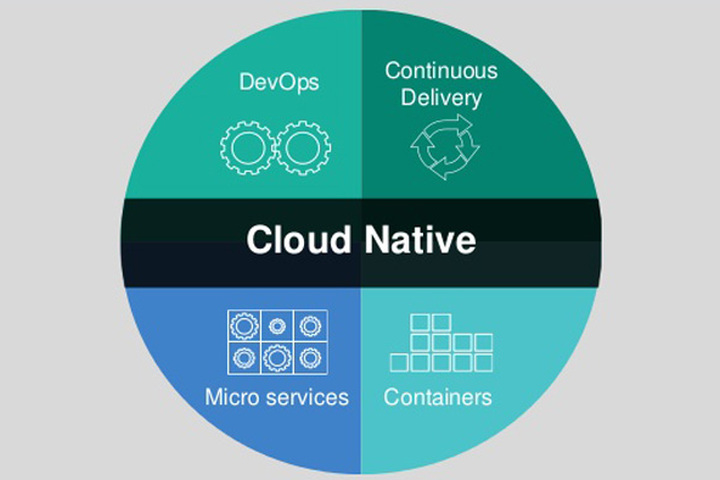
So what does Cloud-Native actually mean? It is the solution for an application to run utilizing something called microservices to remove the operating system from the equation, and can be run in many different environments. Microservice is breaking down your application to smaller bits. This allows you to not have to build the whole app as a web-front end database solution with api hooks in multiple locations, but to break down each segment like a websitefront end solution, the database behind it, and the different service solutions to “hook” into other services.
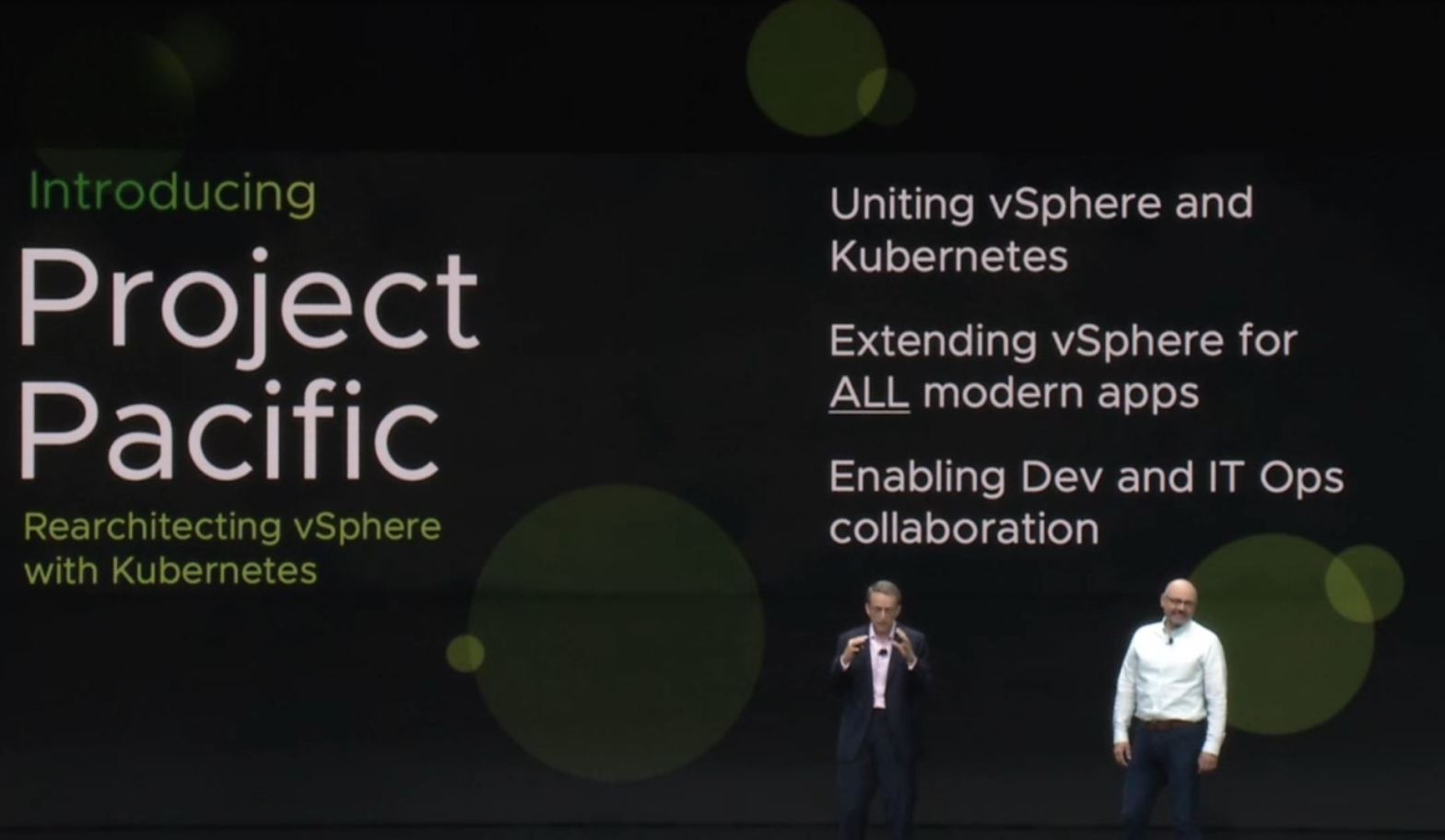
This is where Kubernetes comes in as the buzz-word of the past year or two as well as VMware’s solution known as Project Pacific.
Project Pacific – vSphere 7 and Kubernetes
Project pacific (Now called vSphere on Kuberenetes) leverages built in services in vSphere 7.0 to allow you to run kubernetes on your hypervisor. This alone is very underwhelming, but just like a modern cloud-native application, it’s not the home that’s important, but the group of solutions that comes with it. For instance, Pacific utilizes NSX to allow load balancing for your pods (group of microservices). This allows highly available applications, all of which are within your private cloud environment, and you do not have to look into moving to a public cloud. For me this was a big point. The idea of running a cluster in the public cloud is great and fun, but at the end of the day its connected to a billing cycle, so it brings the developers to the solution, but then when someone hears of it, then the higher ups get them out of it. This many times will result to a developer trying to run Kubernetes locally on his machine with Minikube or Docker desktop, which are great solutions to attempt, but they don’t really reflect an enterprise environment.
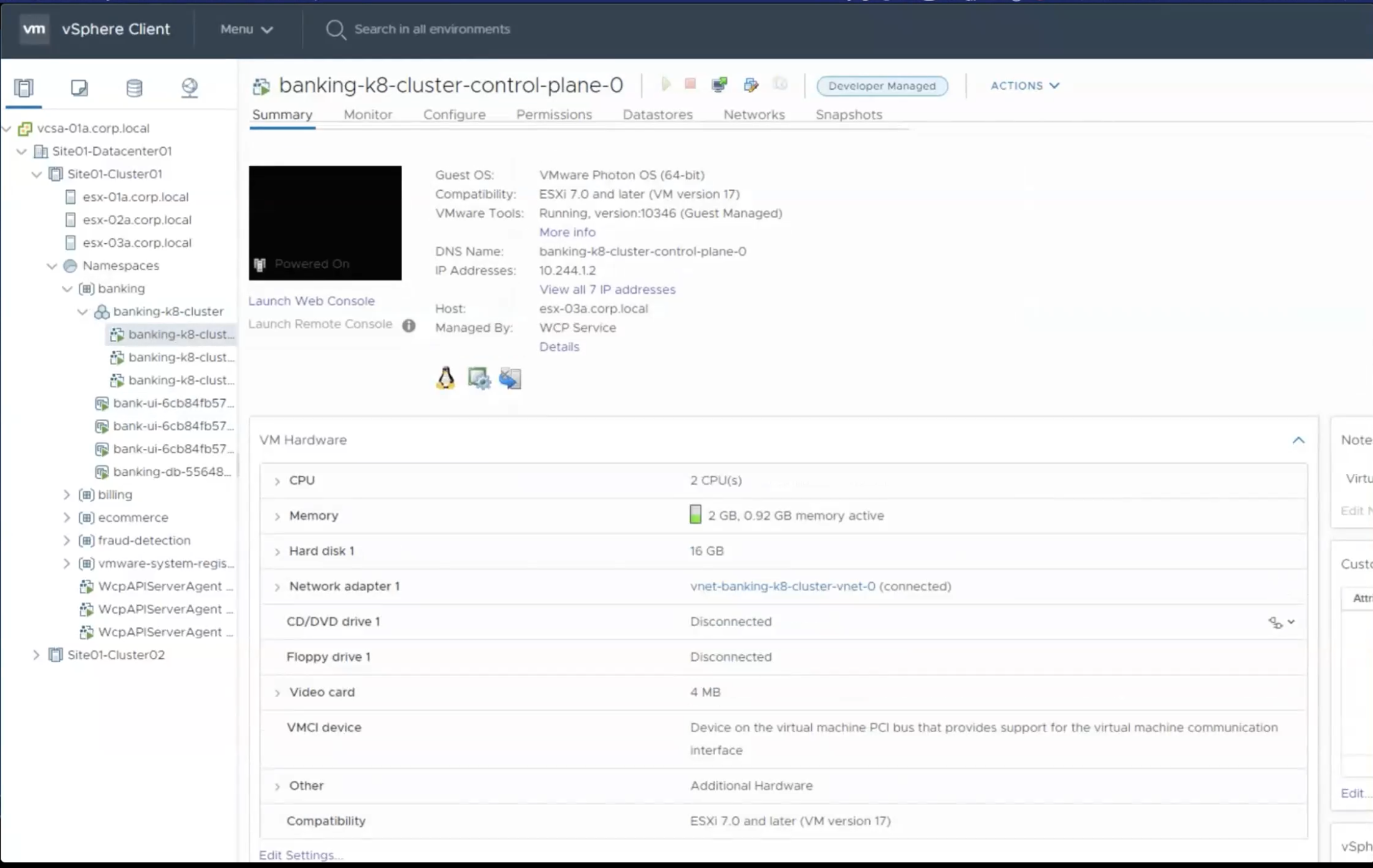
Pacific’s goal is to allow an Operations user to create a cluster for Kubernetes (set of servers), so the developer can access, utilize, and run their microservices. The operator will first deploy the solution with VCF on their vSphere hosts, then run another automation piece that sets up the needed NSX settings, and finally run the configuration to built the workload cluster that controls the deploying of their clusters. Once this is done the Operator will build clusters in specific namespaces and grant access to that namespace so that developers can login to clusters and build/manage/run their pods. This isn’t just ops being a deploy button to spit out clusters (Although I’m sure some devs would be very happy for that), but the operations user has the ability to view the clusters, as well as the pods.
This graphic shows 4 or 5 different parts. The vCenter, the Hosts, the VMs, the clusters, and the pods. This is a great example of how the developer can be free in the cluster, but the operator still has that hierarchical viewpoint to be able to help the developer when things break and put up the barriers if the pods start going past their needed solution.
Operational Updates
Along with this huge update and feature set being released to the consumer base, VMware is also updating a number of features in its infrastructure to help Operations setup this solution, and VMware Cloud Foundations will be utilized to deploy this solution.
VMware Cloud Foundations has been a great solution to deploy management and workload clusters on the hypervisor to allow operations to easily utilize, update, and manage their environment on premises.With this new update VMware Cloud Foundations will deploy the needed software defined networking through NSX-T and also their software defined storage through vSAN. As I mentioned above, NSX-T will be the necessary for the routing and networking utilized by your Kubernetes clusters, and pods. vSAN is a software defined storage solution that will be utilized for Kubernetes persistent volumes, allowing the pods to connect directly to a storage policy and consume storage directly instead of a virtual machine playing the middle-man. vSAN also gets some friendly updates for Operators including NFS connection. This will let you connect to the vSAN solution and utilize it for file storage. This new feature for vSAN 7.0 is releasing at the same time as Kubernetes on vSphere.
Additionally, vSAN comes with a host of other solutions in vSphere that I’ve placed in another blog. Every addition is set to take time off the task for operators when trying to perform tasks. In the vRealize Suite of products there are major updates that will be discussed on another post in the future on the updates to create your operation automation more extensive from Operations to Developers, and your optimization, billing, and monitoring through vRealize Operations.
Conclusion
With the speed of business priority rising above the charge of operational and capacity costs, we now have to adjust our implemented products to fit that challenge. VMware’s group of announcements today is poised to set in motion speed of development and operations for its customers. From the adjustment of applications to a “Cloud-Native” architecture, to simplifying the day to day actions of operators and engineers utilizing automation, monitoring, and reporting, these products will fit right into the “Speed is Key” mantra we see today. The change in direction has been in the works for businesses for the past couple years, and some are ahead of the game. For those that have not found a solution to create this speed, VMware has stepped up to bring the solution to their customers. If you are interested in learning more, take a look at the announcements coming out today and see what is a good fit for your environment. I strongly suggest to look at the vRealize Suite of solutions for your existing environment, and if you’re building a new datacenter out, building a new disaster recovery site, or are just getting started setting up your private cloud, VMware Cloud Foundations is a solid choice. Time will tell the success of these products, but the adoption of speed will fill this need for businesses for years to come.
For the automation operator that utilizes vRealize Automation, 8.0 was a huge update. Moving away from those dreaded IAAS components built on Windows made everyone cheer. Unfortunately, what we found on the other side of 7.6 was an empty house that once held many functions we had all grown to love. The lack of multi-tenancy, software components, no migration path, no approval policies, and more, ended up leaving many vRealize Automation administrators leaving sad, and they opted not to upgrade, waiting for the next major release. I, myself, have worked in 8.0 for the past couple months. Even though I’ve found the structure faster, easier to work with, more stable, and was very happy with the state where it is, even I can tell you the missing solutions from 7.6 needed to be in the next release.
vRealize Automation 8.1 – VMware Listened
Like an Apple consumer continually wondering why the keyboard in the 2019 Macbook had lower travel and felt bad, was screaming to Apple, “Bring back My Keyboard!!”, vRealize Automation admins have wanted the solutions that exist in 7.6 to be brought into 8.0. VMware listened, and starting March 10th, vRealize Automation 8.1 has announced that they will include Approval Policies in Service Broker and Organizations above projects for multi-tenancy. This is a great step to bring us back to that ease we had in the previous major version. They also brought back resource allocation management for projects to let us keep limits on the resources we allow users to consume. These are huge updates within themselves. Having approval policies brings 8.1 in line with 7.6 in my opinion. This grants the adjustment on resources and approvals for builds that was in 7.6 and it greatly improves the governance for vRealize Automation. Now, if they could bring vROPS and Cloud health together for pricing and allow limitation to a monthly payment that would be pretty awesome.
Other updates to vRealize Automation include Custom Resources which can slightly fit the bill for software components. Just as Custom Resources in previous versions of vRealize Automation, this lets you create automation sets for specific objects and sets action workflows for those resources. A good example is setting a custom resource for an User in Active Directory, and then creating actions for Enable, Disable, Reset, Unlock, etc. This can show how powerful these resources can be, and, although it is all custom code that you have to write, it is still re-enabling solutions we want back.
Another solution coming is the creation of Security Groups in NSX-t. This will allow you place your solutions from vRA into the needed Security Groups to allow the distributed firewall to route traffic properly to and from the machine. I, myself, find the 8.0 setting for this to be tiresome and very cumbersome. Setting the security group in 8.0 currently will only allow you to pull already created groups into a network profile and not outside of it. So if I use a network profile for a web app, I’d have to use a completely different one for SQL and these can’t overlap. This is a big mess in 8.0 and it will be very nice to have that tool set in 8.1.
Other features will add value to the solution, including AD integration for adding computer objects in Active directory for your Windows environment, a read-only (or view) member in project instead of just member or administrator, a new IPAM SDK to allow multiple IPAM solutions into vRA instead of just Infoblox. Additionally it will include vRealize Operations integration to allow your already build machines to show usage and issues directly on vRealize Automation Deployment screen. PowerShell will be an ABX solution which allows serverless functioning of PowerShell for your day-2 actions and solutions.
One more thing being added to vRealize Automation is the ability to put your Code Steam(CI/CD product) pipeline within Service Brokers front end catalog. This way you can self-service release and have an approval policy to follow the code if your missing the tool set to follow a Pull-Request ticket solution.
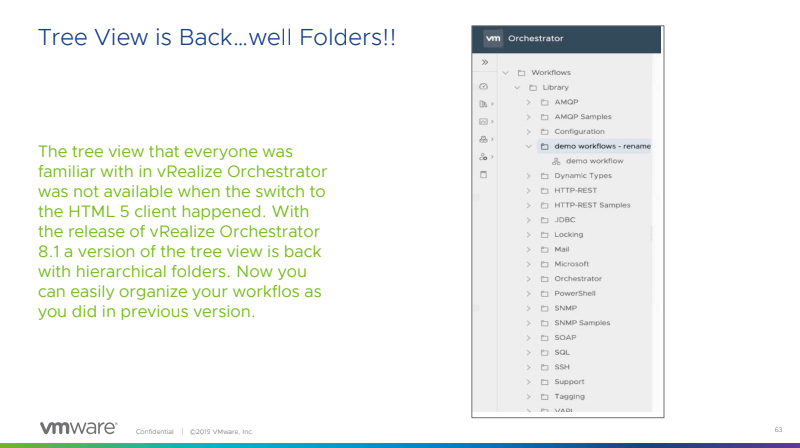
Did I forget to say that Tree view is back in vRealize Orchestrator….
This view was available in 7.6 of vRealize Orchestrator and we could create folders for individuals as well as set policies and backups on our production workflows. Now you can see these folders and manage your workflows by folders, instead of tags. There is much rejoicing to be had….or at least I thought until they announced something mind blowing.
vRealize Orchestrator is no longer only a Javascript solution. You can write your workflows in node.JS, Python, PowerCLI, or PowerShell. Yes, no longer do we have to wrap our workflow code language in Javascript so that it can be deployed to our endpoint. Even better, we don’t even need an endpoint! For those using PowerShell in a Windows environment, you can write your PowerShell code directly in your workflow and send it to your server or solution to run on that host. This is a game changer. I had to create multiple hosts with multiple pipelines in order for this to be utilized in my previous environment at scale. This is a welcome change to make our life much easier.
For More information about vRA 8.1 and vRO 8.1 you can find the VMware blog posts here!
The first big announcement for vRealize Operations was that it is following the model of all other vRealize products and going SaaS. With vRealize Operations you have solution parity with on-prem vRealize Operations but within the cloud, with full API sets, and solutions to connect to existing VMware solutions, and public cloud.
VMware is also strengthening their migration assessments to the public cloud, making pricing models a bit better (and including GCP) along with better understanding of cost migrations. There will also be, better management and alerting for your VMC on AWS solution. Increasing the tool set of the VI admin to be able to look into this hybrid cloud and pull issues, adjustments and create solutions. A big part of this, is billing. With vRealize Operations 8.1 and Cloud you can now see what is being billed and what you can do to bring that bill lower. More importantly catch those high dollar “Gotchas” and shut them down quickly.
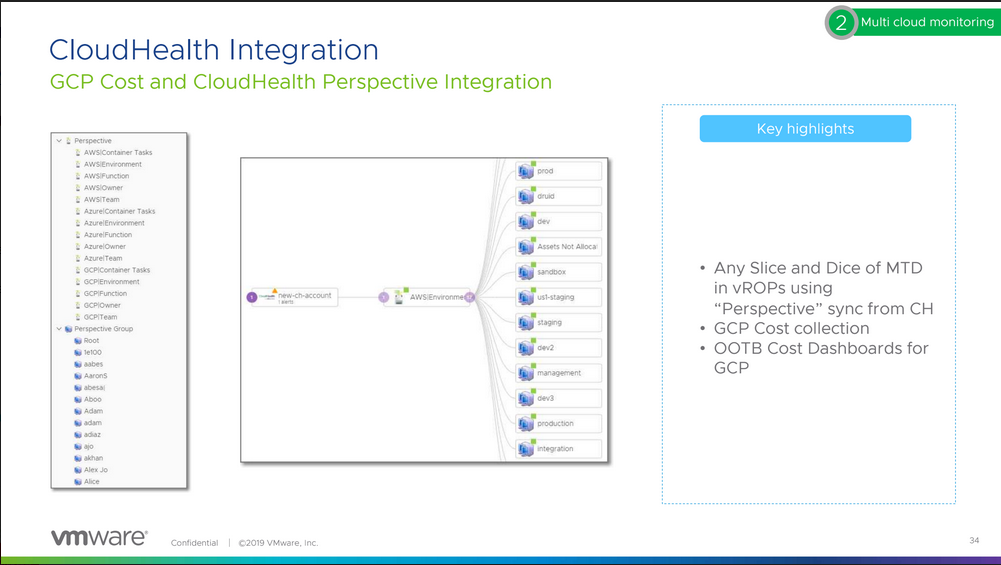
A major factor allowing this is vRealize Operations new integration with Cloud Health. This integrations with vRealize Operations to see all your cloud cost and how you can adjust or prepare for future growth or reduction.
Since vRealize Operations 8.1 is releasing the same day as Kubernetes on vSphere, vRealize Operations is ready to deliver container monitoring for your Kubernetes clusters on day one. If you’re looking at Kubernetes on vSphere, be ready for your monitoring solution to be taxed. Because of that issue, if it were me, I’d have vRealize Operations 8.1 in my back pocket. Monitoring and alerting isn’t flashy, but it will definitely save your company time, and money.
For More information about vROPS 8.1 and cloud, you can find the VMware blog posts here!
VMware is listening to its userbase. The needed features in vRealize Automation is there, and we’re getting more and more features as they work on them. Though it still lacks an automated migration I know the solution can be manually migrated to in a short amount of time. Considering the slow ramp up to setting up the solution, I would definitely look into it.
vRealize Operations is still a powerhouse for your vSphere environment allowing your self-driving datacenter to learn, grow, and save you money and time in the process. With the integration of Cloud Health, vRealize Operation is poised to take you beyond the private environment and into the public cloud. With both vRealize Automation and Operations, you are well on your way to embracing a multi-cloud strategy of both the public and private cloud, and can sleep at night with the knowledge that you’re making the best decisions for your environment.
The announcement of Project Pacific last year at VMworld came to the surprise of engineers around the world. Project Pacific, in a nutshell, is the deployment of Kubernetes within vSphere and the solution to deploy Kubernetes clusters on vSphere hypervisor. From the customer perspective, there were so many unanswered questions. I was allowed to take part in an early access on both beta and a blogger access webinar on vSphere 7 and other releases. We tried to ask as many questions as we could, but so many more remained. With the new cloud solutions all around us, the different cloud spaces, and modern K8 clusters, and from the infrastructure that is built, to the applications running on that infrastructure, the direction of business has changed. Obviously, in our ever changing and fast-pace business space this makes sense, as ‘the application’ is what makes the money. For a long time, vSphere has been focusing on the operations and enterprise architect engineers, which has allowed us to use our beloved solution to bring applications and VMs to manage resources. With the release of vSphere 7, our beloved hypervisor is getting not into the OS kernel deployment solution, but into pure application management, operation, and deployment. For today, lets just look at the vSphere 7 updates and look at how they bolster vSphere for both the engineer, and operator.
vCenter Server Profiles
vCenter Server Profiles is a desired state file that holds the configuration for your hosts. This includes authentication, management network, etc. that can be exported and then imported to servers and then set universally. This can also be done to multiple vCenters, allowing the same settings across DR zones or different co-locations. A surprise of this solution is that it’s API based, so, you are pulling the configuration of the host and then importing it through the API. Now, some may rejoice at this solution, but others, may hold back their rejoicing as APIs can be difficult to navigate, but fear not! The big V has added an API explorer to help you navigate around and configure your GET, SET, POST, PUT etc. The Server Profile will allow you to set your network solution, but be advised that NIC1 will always be utilized as vCenter HA.
vCenter Upgrades
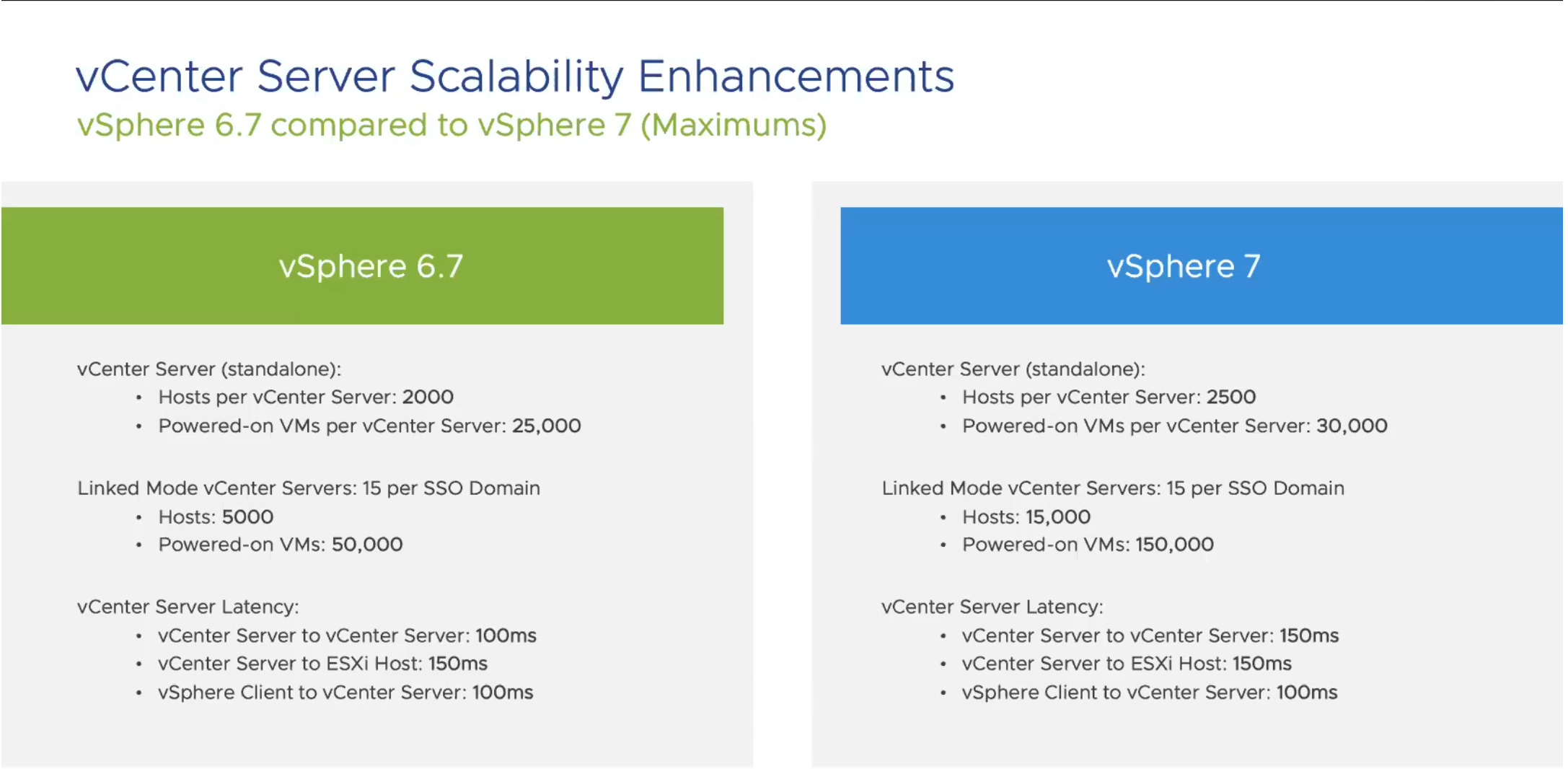
For vCenter, they also ‘beefed up’ the allowed resources you can connect to your solution, allowing your environment to grow even larger. Here is a quick snip of the increases.
Content Library
As a vRealize guy, templates have been critical to my whole life. Being able to deploy golden versions of templates is a huge part of the solution. Content library, to me, has always been a frustrating solution, because it has never really been useful to me. However, Content Library has some amazing new features including versioning. The Content Library will allow a check-in and check-out solutions to pull those templates out and update, or adjust them. After adjustment, if it fails and you have crashed your template, you can revert it! If you are like me, and know the pain of having to create a new template every time a patch screws up sysprep, or, if you have ever had to make an adjustment and needed to revert and the snap isn’t there, this safety net is a really nice feature.
Updating
With the new release of vSphere 7, updating is getting easier and more automatic. While we all love VMware Update Manager, and the solutions that it brings, I’m sure we can all agree it would be better if it removed the process of creating baselines, but still gave us the ability to manage what patches are deployed. These are the issues they seem to be working on, and we’re getting a better patching solution, for both vCenter and ESXI.
The vCenter Upgrade Manager will address the patches that are available for upgrading vCenter as well as the environment. This includes the solutions that are installed including the vRealize Suite, and the compatible versions for those solutions. This allows engineers to see the gotchas that they may experience after the upgrade, before clicking the button. The manager also allows modifying the solutions that are deployed, which lets engineers add solutions if they are not automatically seen, and setting the versions so they can be run against the vCenter upgrade delta.
For ESXI, VUM is no longer, and has been replaced with Lifecycle Manager. We all love the solution of VMware Upgrade Manager allowing us to add devices and drivers, but the goal of Lifecycle Manager is to bring that solution automatically, This allows those users who use partner products, currently HPE and DELL, to be able to view ESXI patches, as well as drivers and firmware for the hardware. Once again, the goal here is “Desired State” keeping all hosts in the same settings across your environment. Lifecycle Manager allows the driver and firmware updates set in the recommended settings to verify that they are safe to run before installation. Once again, this solution is available via both API and a GUI allowing those API engineers the solution of pulling and pushing code to set the variables, and push the solution.
Workload Utilization – DRS
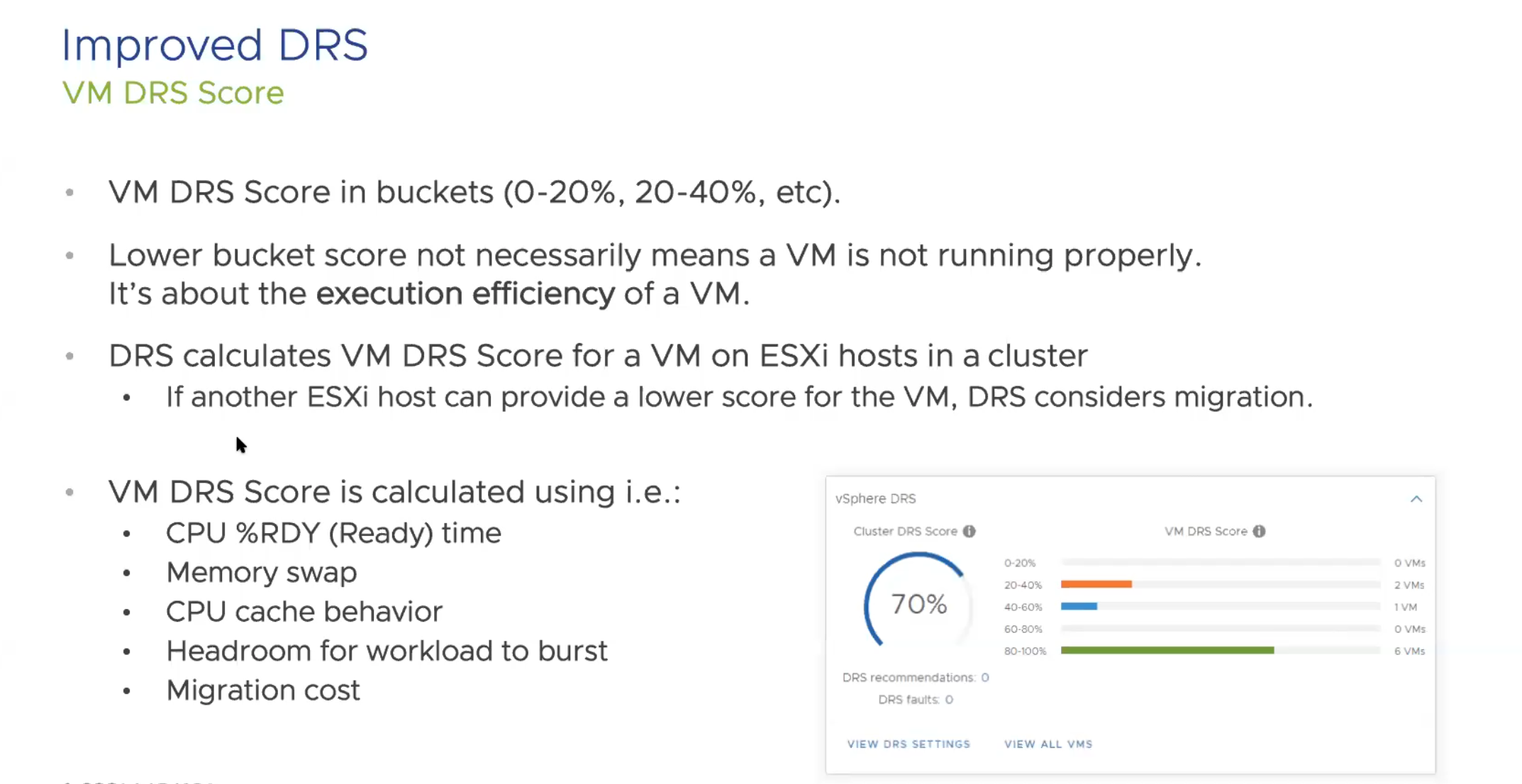
Previously, DRS had been focused on a cluster based metric, verifying the solution across each ESXI host. Now, DRS is focused around the workloads running on the cluster. This gives an increased polling rate at 5 minutes to check the solution and populate a DRS Score. This score will run on each host, and if a better score is on a different host, the solution will consider migration, and if it is better to keep the workload on the host that it is currently on, DRS will decided to keep it there. The DRS Score score brings in CPU-ready time, Memory swap, Cache behavior, etc., meaning this takes into account both compute and storage.
DRS also will take into account specific hardware accelerator solutions such as vGPU solution on the VMs that are running.
In the DRS improvements, VMware also took a look at VMotion and have made adjustments to help VMotion work on large or monster size VMs. For these large machines (like SAP HANA, or Oracle) VMotion will now lower the stun time and migration. They worked really hard to create or refactor a solution to help with these larger VMs and have found a process that works better. Along with this refactor comes better memory migration for VMotions, and the stun time reduction will help all VMotions, but the most noticeable change is on the bigger VMs. Additionally, with these configs, EVC now has new versions of CPU to set on your EVC settings.
For the ESXI hardware component, they include a watchdog timer to catch OS failures, and reboot upon failure, also, a Precision Time Protocol or PTP to help financial apps or features, which keeps that time setting down to milliseconds. This is only available in hardware components within 7.0 but great features to help those that 3 A.M. calls about machines that failed on patch update reboots, or time being outside the needed parameters for sales, financials, etc.
Security
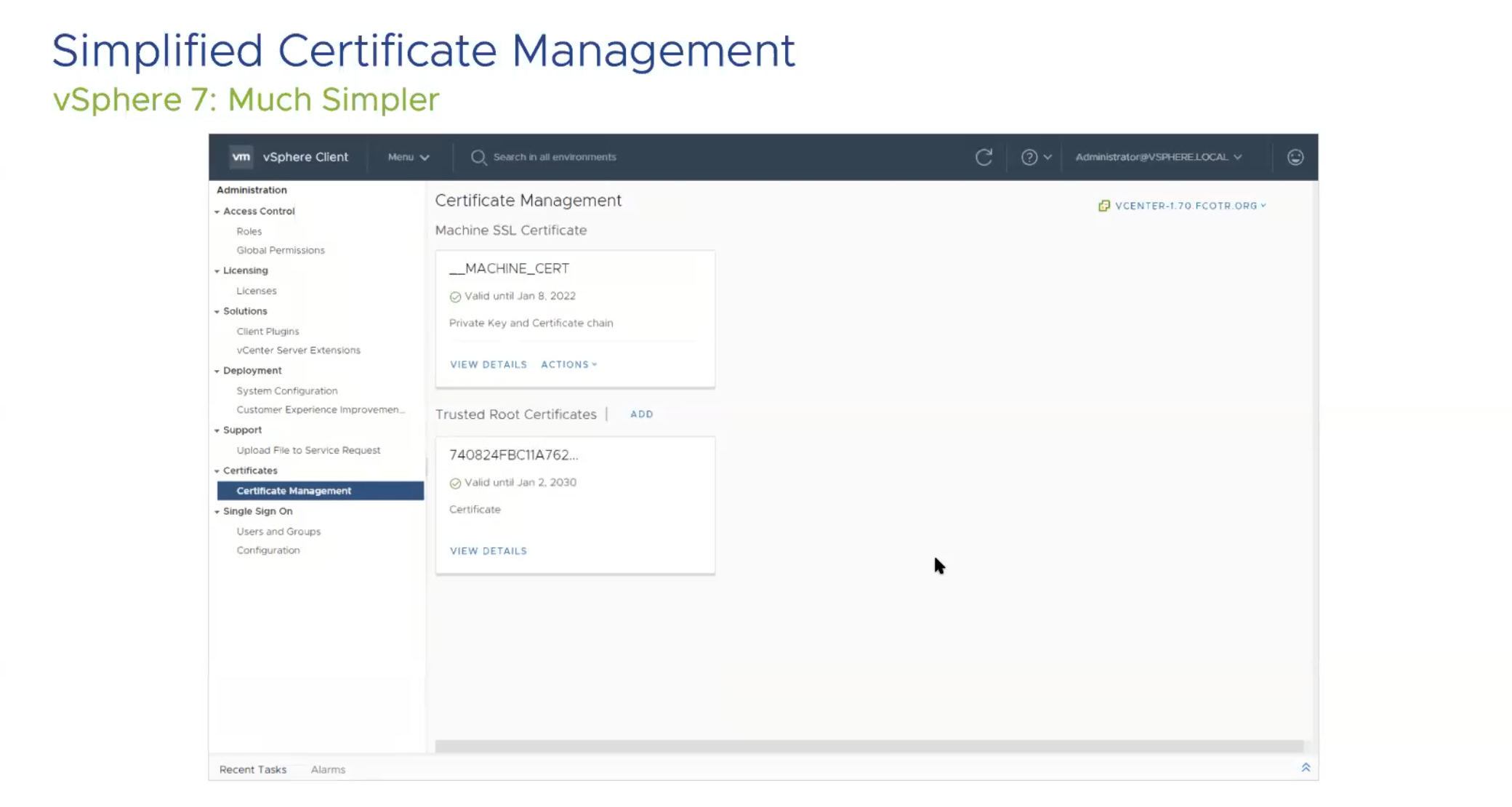
Now, let’s look at changes in Certificate management. If anyone has replaced certificates in the PSC, you know that replacing multiple certificates and having the number of certs is kinda crazy in vCenter.
This picture was very much a relief to me personally, as there were about 6 (8 total) more certificates in 6.7 and in 7.0 there are only 2.
vSphere Trust Authority is being introduced as a new feature for vSphere. It introduces attestation for key management if needed. It also makes it easy to implement the principle of least privileged, allowing users only the needed access instead of more. vSphere Trust Authority also requires a vCenter cluster of 3 hosts outside of the “Workload” vCenter to maintain this, and it can also encrypt Workload vCenter Server instances.
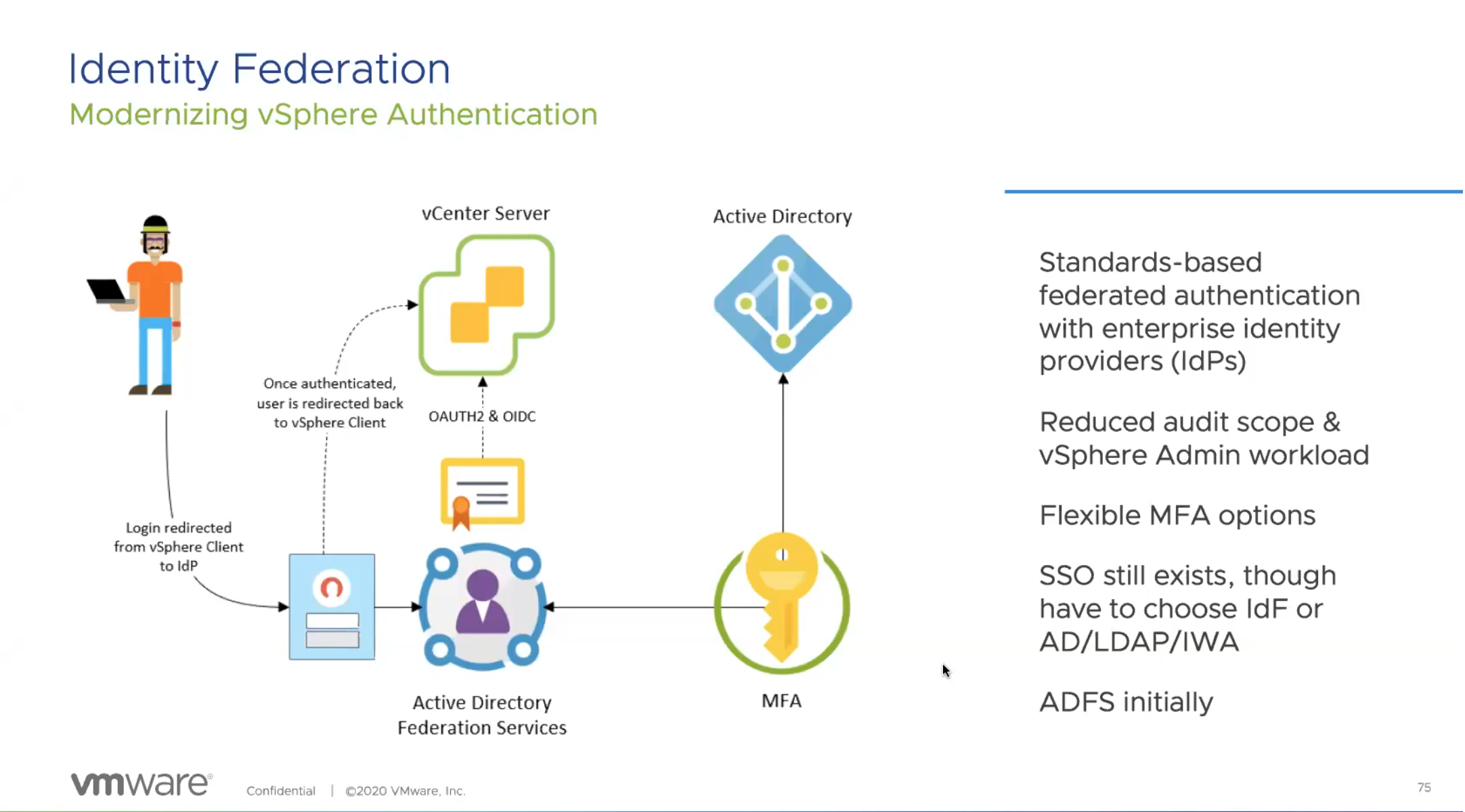
Identity federation in 7.0 will let single federation of ADFS allow authentication into your environment. This also has Multi-factor Authentication available, allowing a huge feature to be available to those wanting to bring in a more trusted and secure authentication process to log into your environment.
This is available only for vCenter, but eventually they will bring in other solutions into the federated solutions. This does bring federation into Kubernetes namespaces as they are built into vCenter.
Conclusion
vSphere 7.0 is not just an iterative upgrade for VMware. This is a full solution upgrade for engineers that brings in many solutions that we were looking at third parties to provide. Now, we have the ability to find these solutions directly in vSphere. Your homelab will run easier with these solutions, and your enterprise 20,000 VM solution will run better. I’ve been in the vSphere Beta for the past 2 months, and I’ve loved the solutions this has brought. I’ve only scratch the surface in my homelab (and in this blog), but there are hundreds more updates that are in vSphere that will make being a VI admins job easier. I hope this helps fill in the gaps in where vSphere is headed on March 10th. I look forward, as I’m sure you all do, to utilizing these functions and working with the new solutions.














 vNerdyNate #vExpert